Git Worktree: One Repository, Many Working Trees

You are four hundred lines into a refactor. The working tree is a mess of new files, moved files, and a half-deleted module. Then a production bug lands, and it needs a fix on main right now.
The usual escape hatches all cost something. git stash asks you to trust that a pile of unrelated changes survives the round trip cleanly. A WIP commit puts noise into the history you will clean up later. Cloning the repository a second time gives real isolation, but now you maintain two object stores, two sets of refs, and two remotes that drift the moment you forget to fetch one of them.
Git has shipped a fourth answer since 2.5 (2015): git worktree. One repository, several working directories. Each tree is a full checkout you can build and test in, but they all share a single object store and a single set of refs. Creating one copies no history.
This is not an article about branching models, merge queues, or squash-versus-merge — those are separate topics, and this blog already covers the runtime side of reliability elsewhere. It stays on the working copy: what a worktree shares, what it isolates, and the exact place the manual itself tells you it stops being reliable. The manual still calls multiple checkout "experimental" and submodule support "incomplete", and I show where that bites.
What a worktree actually is
A repository has one main worktree — the directory you cloned into — and zero or more linked worktrees. The git worktree add command creates a new working directory and registers the metadata for it inside the repository.
$ git worktree add -b feature ../feature
$ git worktree add -b hotfix ../hotfix
$ git worktree list
/home/you/work/project  7f3a1c2 [main]
/home/you/work/feature  7f3a1c2 [feature]
/home/you/work/hotfix   7f3a1c2 [hotfix]
Two details in that output are worth naming. The main worktree is listed first; the linked trees follow. And all three trees sit on the same commit 7f3a1c2, because that is where HEAD pointed when I created them — a new worktree branches from the current commit unless you pass a <commit-ish>.
If you omit both -b and the revision, the new branch takes its name from the last path component: git worktree add ../topic creates a branch called topic. And git worktree add -d <path> (or --detach) produces a throwaway tree with a detached HEAD — the shape you want for a one-off build or a CI job.
The mental model is one object store with several front doors:
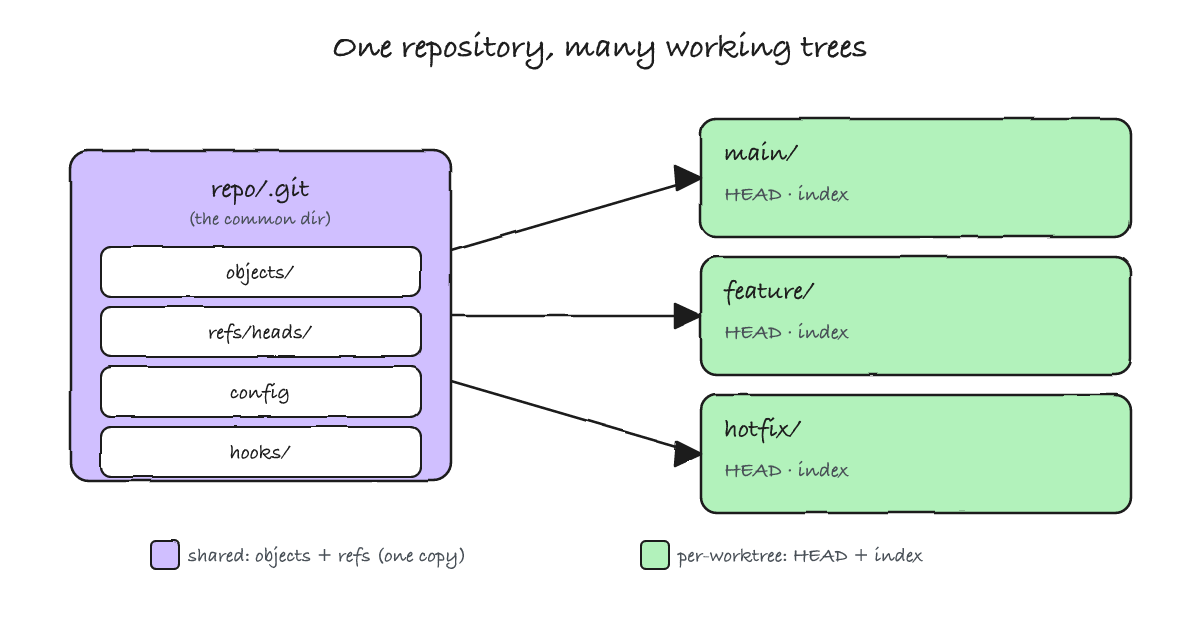
Everything in the purple box exists once. Everything in the green boxes exists per tree.
Anatomy: the .git file and the pointer pair
Inside a linked worktree, .git is not a directory — it is a small file:
$ cat ../feature/.git
gitdir: /home/you/work/project/.git/worktrees/feature
That admin directory holds the per-worktree state, and two one-line files form the linkage back:
$ ls /home/you/work/project/.git/worktrees/feature
commondir  gitdir  HEAD  index  logs  ORIG_HEAD  refs

$ cat /home/you/work/project/.git/worktrees/feature/commondir
../..
The worktree's .git file stores a gitdir: pointer into the repository. The admin directory stores a gitdir file pointing back, and a commondir file saying where the shared .git lives — ../.. from that admin directory.
Do not reach into $GIT_DIR by hand to find any of this. The manual is direct about it: use git rev-parse --git-path, because whether a given path belongs to the worktree or to the common directory is exactly the thing you are likely to get wrong.
$ cd /home/you/work/feature
$ git rev-parse --git-dir
/home/you/work/project/.git/worktrees/feature
$ git rev-parse --git-common-dir
/home/you/work/project/.git
$ git rev-parse --git-path HEAD
/home/you/work/project/.git/worktrees/feature/HEAD
$ git rev-parse --git-path refs/heads/main
/home/you/work/project/.git/refs/heads/main
Read those last two lines together. HEAD resolves inside the per-worktree admin directory; refs/heads/main resolves inside the shared one. That single distinction — per-worktree HEAD and index, shared refs — explains almost every behaviour for the rest of this article.
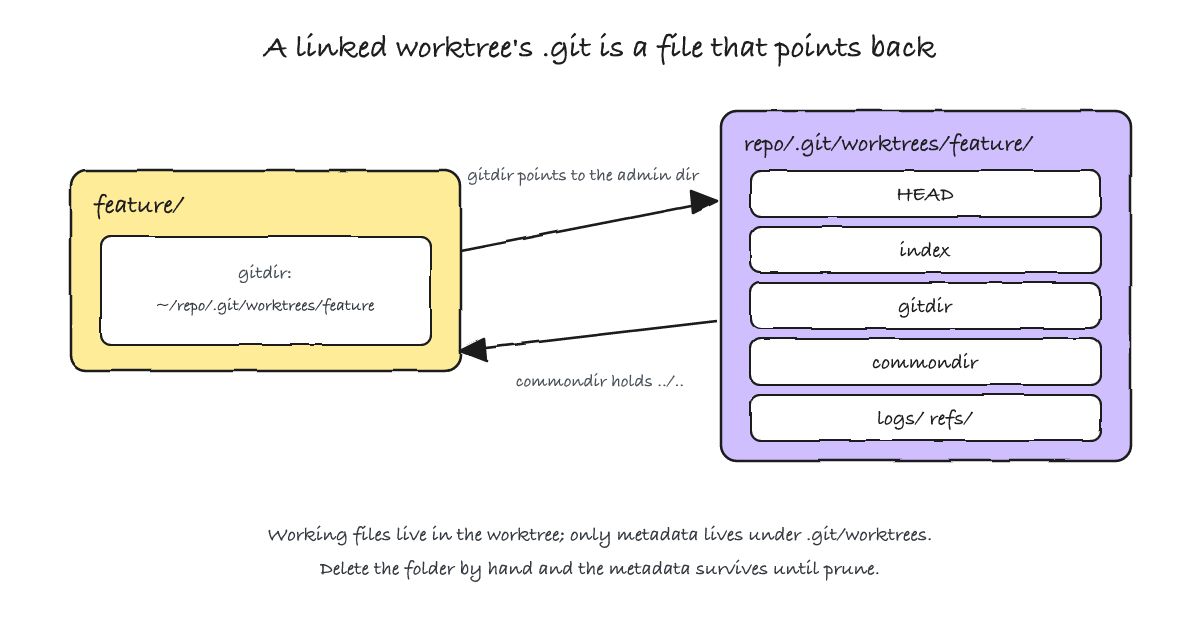
.git file points into the admin directory, and commondir points back to the shared store.What is shared and what is not
Shared across every worktree: the object store; everything under refs/ (branches, tags, notes); the stash; the remotes; the configuration file; and the hooks.
Per worktree: HEAD, the index, ORIG_HEAD, the reflog for HEAD, and — as documented exceptions to the refs rule — refs/bisect, refs/worktree, and refs/rewritten. Untracked and ignored files are also per tree, because they are simply files on disk.
The stash is the surprise. It lives at refs/stash, and refs are shared:
$ git stash push -m "wip-from-main"
$ cd ../feature && git stash list
stash@{0}: On main: wip-from-main
I created that stash in the main worktree and listed it from the feature worktree. The stash is one global stack for the whole repository, not one per tree. A git stash pop in the wrong working directory will apply someone else's work — including your own, from a context you have already forgotten. If the two states must stay separated, stash is the wrong tool.
The shared hooks directory has the same flavour of consequence:
$ cd ../feature && git rev-parse --git-path hooks
/home/you/work/project/.git/hooks
Hooks are shared. A post-checkout or post-merge hook that assumes it runs at a fixed path will misbehave in a second tree. If you need worktree-aware behaviour, branch on git rev-parse --show-toplevel inside the hook, or move the logic into a script the hook calls.
Untracked files being per tree is the price of isolation: every worktree needs its own node_modules, its own .env, its own build cache. On a repository with a heavy dependency tree that is real disk and real setup time — the one place where a worktree and a second clone cost the same.
The branch mutex and the detached escape hatch
A branch can be checked out in exactly one worktree at a time:
$ git worktree add ../feature-2 feature
Preparing worktree (checking out 'feature')
fatal: 'feature' is already used by worktree at '/home/you/work/feature'
This is not a convention you are asked to respect. A line in a contributing guide that says "do not check out the same branch twice" is an assertion; this is the enforcement behind it. The reason is structural: HEAD is per worktree, but refs/heads/feature is shared, so two HEADs advancing the same branch would corrupt each other's history. Git refuses the checkout instead.
The same shape — two writers, one shared resource, one rule that decides the outcome — appears at the runtime layer as the HTTP ETag: a validator on reads and a compare-and-set guard on writes, with the lost update as the failure it prevents. That story is the ETag post; here the mechanism is a hard mutex rather than an optimistic retry.
When you genuinely need two trees on the same commit — a CI worker, an agent sandbox, a one-off build — do not fight the mutex. Opt out of the branch name with --detach:
$ git worktree add --detach ../ci 7f3a1c2
$ cd ../ci && git status -sb | head -1
## HEAD (no branch)
A detached worktree holds a commit, not a branch. That is exactly right for CI and sandboxes: each wants a disposable tree at a specific commit, not ownership of a branch. It is also why two parallel jobs can share one repository without racing for a branch ref — as long as neither of them claims one.
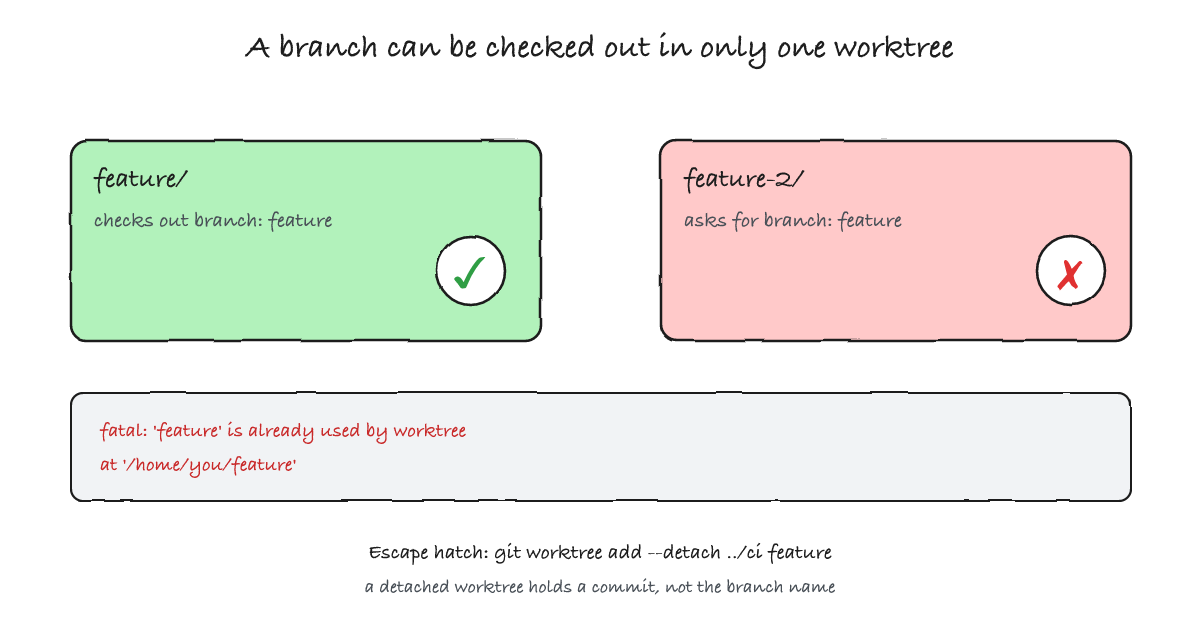
--detach gives a tree at a commit without claiming the branch.Lifecycle: remove, prune, lock, repair, move
git worktree remove refuses to delete a tree that has uncommitted or untracked files:
$ git worktree remove ../feature
fatal: '../feature' contains modified or untracked files, use --force to delete it
Add --force for a dirty tree, and for a tree that contains an initialised submodule. Deleting the directory with rm -rf instead leaves the metadata behind, and Git notices:
$ rm -rf ../hotfix
$ git worktree list --verbose
/home/you/work/project  7f3a1c2 [main]
/home/you/work/feature  7f3a1c2 [feature]
/home/you/work/hotfix   7f3a1c2 [hotfix]
	prunable: gitdir file points to non-existent location

$ git worktree prune -v
Removing worktrees/hotfix: gitdir file points to non-existent location
Manual git worktree prune removes the entry immediately. Automatic pruning, which runs as part of git gc, waits for gc.worktreePruneExpire — three months by default. A worktree you deleted by hand can therefore linger in the list for a long time if you rely on gc rather than pruning it yourself.
On a removable or network drive, lock the entry so a machine that cannot see the path does not treat it as stale:
$ git worktree add -b usb ../usb
$ git worktree lock ../usb --reason "on the external drive"
$ git worktree list --verbose
/home/you/work/project  7f3a1c2 [main]
/home/you/work/feature  7f3a1c2 [feature]
/home/you/work/usb      7f3a1c2 [usb]
	locked: on the external drive
If you move a worktree with your file manager instead of git worktree move, the links break in both directions. git worktree repair re-establishes them:
$ mv ../feature ../feature-renamed
$ git worktree list --verbose
/home/you/work/project  7f3a1c2 [main]
/home/you/work/feature  7f3a1c2 [feature]
	prunable: gitdir file points to non-existent location
/home/you/work/usb      7f3a1c2 [usb]
	locked: on the external drive
$ cd ../feature-renamed && git worktree repair
repair: gitdir incorrect: /home/you/work/project/.git/worktrees/feature/gitdir
$ git worktree list
/home/you/work/project          7f3a1c2 [main]
/home/you/work/feature-renamed  7f3a1c2 [feature]
/home/you/work/usb              7f3a1c2 [usb] locked
git worktree move does the same job without breaking the links — except for a linked worktree that contains a submodule, where it refuses outright. That limit is the subject of the next section.
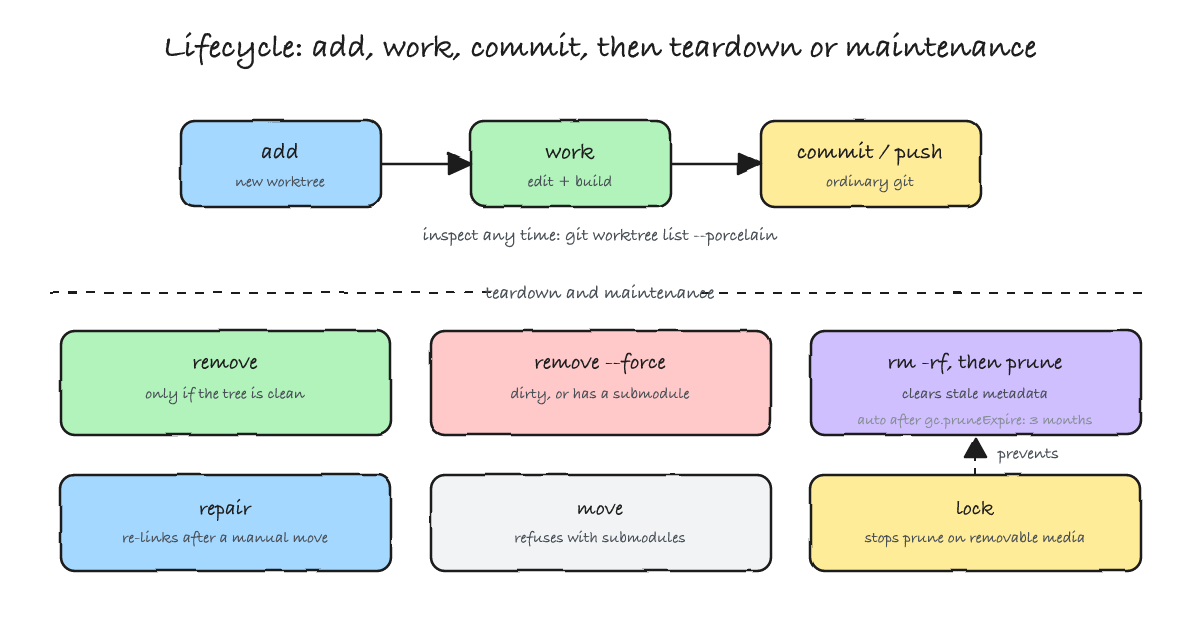
Relocatable worktrees: relative paths (Git 2.48)
By default the pointer in the .git file is absolute, which makes a worktree directory position-dependent: move the repository or the tree and the link dangles until you repair it. Git 2.48 added relative pointers:
$ git worktree add -b relbranch --relative-paths ../relwt
$ cat ../relwt/.git
gitdir: ../project/.git/worktrees/relwt
$ git worktree move ../relwt ../relwt-moved
$ cat ../relwt-moved/.git
gitdir: /home/you/work/project/.git/worktrees/relwt
You can make that the default with worktree.useRelativePaths=true. Turning it on writes a repository extension, extensions.relativeWorktrees, and that is the catch: a repository carrying the extension is invisible to Git older than 2.48 and to tooling built on a libgit2 that predates it. Such tools do not degrade gracefully — they fail with an unknown-extension error. If your team or your IDE fleet is not uniformly recent, keep the default.
That last line is the detail worth knowing if you move one: move without a flag rewrote the pointer back to absolute. Relative pointers are opt-in per operation — pass --relative-paths to move as well, or set worktree.useRelativePaths=true so that every worktree and every move writes them. When the two styles do get mixed, the manual notes that repair updates the linking files on an absolute/relative mismatch, even when the links themselves are valid — so reach for it rather than editing the pointer by hand.
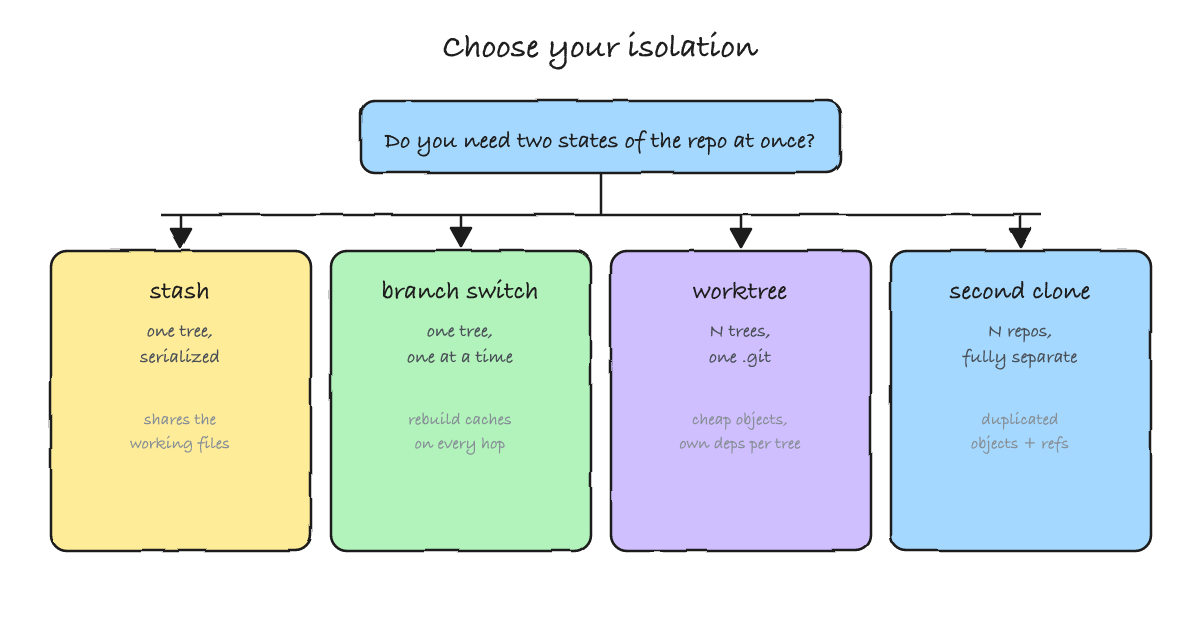
Choosing: worktree, stash, branch switch, or a second clone
A worktree is one answer to "I need two states at once", not the only one. The honest selection is by cost, not by preference:
- stash — one tree, serialized. The cheapest thing to reach for, but it shares the working files, so it cannot hold two states at the same time, and it is a single global stack.
- branch switch — one tree, one branch at a time. Perfectly fine when the two states never need to coexist, at the price of rebuilding caches on every hop.
- worktree — several trees, one object store. Real isolation of dirty state for the cost of per-tree ignores (dependencies, environment); it cannot hold one branch twice, and submodules are the sharp edge.
- second clone — fully separate repositories. The strongest isolation, duplicated objects and refs, and no mutex — the only option when the same branch must exist at two different commits at once.
Reach for a worktree when the work is genuinely concurrent: a hotfix beside a refactor, a review checkout beside your green build, a long test run beside ongoing edits. Reach for a clone when the isolation must be total, or when you need one branch at two commits.
Where it breaks
The manual is explicit, and the sentence deserves to be read twice:
"Multiple checkout in general is still experimental, and the support for submodules is incomplete. It is NOT recommended to make multiple checkouts of a superproject."
Submodules are the concrete case. They are not shared — a new worktree starts with empty submodule directories, and you initialise them per tree:
$ git worktree add -b wt-sub ../wt-sub
$ ls -A ../wt-sub/vendor/sub          # no output: the directory is empty
$ git -C ../wt-sub submodule status
-67f18af22d60cd1d865d9eecbe87b8790b5b7676 vendor/sub
The leading - in submodule status means the submodule is not initialised in that tree. After a per-worktree git submodule update --init it behaves normally — but now the tree "contains a submodule", and that changes what you can do with it:
$ git worktree move ../wt-sub ../wt-sub-moved
fatal: working trees containing submodules cannot be moved or removed
$ git worktree move --force --force ../wt-sub ../wt-sub-moved
fatal: working trees containing submodules cannot be moved or removed
$ git worktree remove ../wt-sub
fatal: working trees containing submodules cannot be moved or removed
$ git worktree remove --force ../wt-sub
Both commands refuse for the same reason, and they do not respond to it the same way. move never yields — not even with --force twice. remove refuses until you add --force, which then succeeds silently. The manual states that a linked worktree containing submodules cannot be moved by git worktree move at all. If you must relocate it, move the directory yourself and let repair re-link it. This is the gap the BUGS note is pointing at, and it is why a worktree is a poor fit for a superproject with a deep submodule tree.
The worst case is moving such a tree by hand. Take a worktree that already contains an initialised submodule — call it wt-move — and move it without git worktree move. repair reconnects the worktree itself, and the submodule still looks healthy, but it keeps its own pointer to the old location and nothing rewrites it:
$ mv ../wt-move ../wt-move-moved
$ cd ../wt-move-moved && git worktree repair
repair: gitdir incorrect: /home/you/work/project/.git/worktrees/wt-move/gitdir
$ git submodule status
 ae229129a775b4ccffb928fd9716361f6f8b528b vendor/sub
$ git status
fatal: cannot chdir to '../../../../../../../wt-move/vendor/sub': No such file or directory
fatal: 'git status --porcelain=2' failed in submodule vendor/sub
Read the last two commands together: git submodule status exits 0 and reports the submodule as present, while git status dies with 128. The stale pointer lives in the submodule's own config — worktree = ../../../../../../../wt-move/vendor/sub, relative to the shared admin directory and still naming the directory you moved away from (the exact number of ../ segments depends on where the repository sits on disk). Because a submodule's git directory is per worktree, each tree also carries its own copy of the submodule's object store under .git/worktrees/<id>/modules/ rather than the shared .git/modules/. Both facts are the "incomplete submodule support" the BUGS note describes, and both are silent until something actually reads the tree.
A few more places it does not fit:
- Disk-bound machines with heavy dependencies. Every tree pays for its own
node_modulesorvendor. If that is the dominant cost, a worktree saves you nothing. - A single state of mind. If you never need two branches at once, worktrees add a directory convention and a pruning chore for no benefit; plain branch switching is simpler.
- CI that already starts from a clean clone. A fresh checkout per job is already isolated; adding a worktree introduces a mutex you must respect rather than a win you can bank.
- Two jobs, one worktree. The branch mutex turns concurrent jobs into flaky failures. Give each job its own detached tree, or keep the clone-per-job model.
- Worktrees on network shares. Without
lock, a machine that loses the mount treats the tree as stale and prunes its metadata.
And the honest note on where I changed my mind: I expected worktrees to replace clones. They do not. They replace stashing and branch-switching under concurrency. For disposable, unrelated, or same-branch-at-two-commits work, a clone is still the better tool.
A defaults cheat sheet
The layout I have settled on after enough context-switching: one bare repository as the hub, one worktree per active branch beside it, and the store hidden so it never competes with a checkout.
~/work/project/
├── .bare/      # the bare repository: objects and refs, no files to edit
├── main/       # worktree for main
└── feature/    # worktree for feature
Two things make that small ceremony worth it. A bare repository has no working tree, so the directory you hand to your editor is always a checkout — and since most editors open one directory as one workspace, each worktree becomes its own window instead of a branch you switch inside a single one. And naming the worktree directories after their branches keeps git worktree list, your shell prompt, and your editor's window titles reading the same.
$ git clone --bare git@github.com:you/project.git ~/work/project/.bare
$ cd ~/work/project/.bare
$ git worktree add ../main main
$ git worktree add ../feature feature
$ git worktree list
/home/you/work/project/.bare    (bare)
/home/you/work/project/feature  7f3a1c2 [feature]
/home/you/work/project/main     7f3a1c2 [main]
With a bare hub there is no main worktree at all: the bare repository is listed first and marked (bare), and every checkout is a linked worktree. Scripts should read git worktree list --porcelain rather than parsing the human output.
git worktree add -b topic ../topic        # new branch off HEAD
git worktree add ../review origin/pr/42   # existing ref, new tree
git worktree add --detach ../ci 7f3a1c2   # throwaway tree, no branch
git worktree list --porcelain             # machine-readable inventory
git worktree remove ../topic              # delete a clean tree
git worktree remove --force ../topic      # dirty, or has a submodule
git worktree prune -v                     # clear stale metadata now
git worktree lock ../usb --reason "ext"   # protect a tree on removable media
git worktree repair                       # re-link after a manual move
Summary
A worktree is one object store behind several working directories, each with its own HEAD and index. Use it to hold two states of a repository at once — a hotfix beside a refactor, a review tree beside your build — without duplicating history or disturbing uncommitted work. Keep the three surprises in mind: the stash and the hooks are shared, a branch lives in only one tree, and submodules are per-tree and remain the sharp edge the manual still warns about. When you need the same branch at two commits, or the isolation must be total, a clone is the better tool.