PIE Replaces PECL: Installing PHP Extensions in Docker, Measured

PIE, the PHP Installer for Extensions, is the tool PHP now recommends for installing extensions such as redis, xdebug or grpc. It replaces PECL, the pecl install you have in old Dockerfiles. In September 2025 an RFC made PECL "formally deprecated as the recommended installation method" by 36 votes to none. PECL still works, and the RFC sets no date for removing it. PIE is a Composer-based PHAR from The PHP Foundation that finds extensions on Packagist, builds them from source or downloads a prebuilt binary, and enables them in your php.ini.
Last week, for durable AI agents on Temporal in Laravel, a pecl install grpc in my Docker build was still compiling after three hours, on a laptop busy with other containers. That sent me to PIE, and I measured what changes when a Dockerfile moves over. I installed redis and grpc in the official PHP 8.5 images every way PIE offers, killed nothing on purpose this time, and still lost a build to the kernel's out-of-memory killer. As far as I can tell, the three hours were the busy laptop: on an idle machine pecl builds grpc in 33 minutes.
Three results are worth knowing before you switch. PIE builds in parallel by default, which made redis almost twice as fast but ran grpc out of memory on a machine with 8 CPUs and 7.6 GiB of memory, where four jobs finished in about ten minutes. Prebuilt binaries install grpc in 5 seconds, but for grpc only unofficial mirrors publish them, and PIE itself prints that HTTPS is the only integrity check. And when an extension it installed fails to load, PIE says so in a warning and exits with 0, so your image builds green with a broken extension in it.
Everything is in the companion repository: PIE 1.5.5 and 1.6.0-rc.1, PHP 8.5.12 on Debian bookworm and Alpine, every image the checks run pinned by digest. Every Dockerfile and script below is a real file there, every output is what PIE or the compiler printed in these runs, and ./run.sh checks 69 claims this article makes, the puzzle included. The grpc timings have their own script, because they take over an hour. Where I rely on documentation or on reading PIE's source, the text says so.
PECL, PEAR and PIE
The three names get mixed up because they grew out of each other. PEAR was PHP's first package repository, for libraries written in PHP, and Composer replaced it more than a decade ago. PECL is the sister repository for extensions written in C, and the pecl command is built on the PEAR installer, which is why pecl output still mentions /tmp/pear. PIE replaces PECL, not PEAR: it installs C extensions, and it finds them on Packagist, next to the PHP libraries Composer installs.
| Term | What it is |
|---|---|
| PEAR | The old repository and installer for PHP libraries. Replaced by Composer. |
| PECL | The repository of C extensions at pecl.php.net, and the pecl command that downloads, compiles and installs them. Deprecated as the recommended way since the 2025 RFC, still working. |
| PIE | The PHP Installer for Extensions. Installs extensions published on Packagist as Composer packages of type php-ext or php-ext-zend. |
| Package name and extension name | You install a package, such as phpredis/phpredis, which provides an extension, such as redis. Several packages can provide the same extension. |
download-url-method | What the package tells PIE to download: the source (composer-default, pre-packaged-source) or a compiled binary from the GitHub release (pre-packaged-binary). |
pie.json, pie.lock | PIE's record of what you installed for one PHP installation, like Composer's composer.json and composer.lock, kept in PIE's own directory rather than in your project. |
docker-php-ext-enable | The official image's script that writes extension=... into conf.d. PIE calls it when it finds it. |
In a Dockerfile, the change looks like a rename. pecl install redis-6.3.0 && docker-php-ext-enable redis becomes pie install phpredis/phpredis:6.3.0. What happens underneath is less alike, and the rest of this article is about the differences.
The Dockerfile
This is where I ended up. The rest of the article explains each line.
# examples/Dockerfile
FROM php:8.5.12-cli-bookworm@sha256:050713ce008e2360ea9dc96e1f9a075690132388d917fc3552806f7a7be6f2a0

# PIE is mounted only for this step, so it never becomes part of the image. unzip is the one tool the official
# image lacks; it is removed again in the same layer.
RUN --mount=type=bind,from=ghcr.io/php/pie:1.5.5-bin@sha256:3fca03c16df842d02b654dc382db3756058d9c128064f57cace14f8728779ce9,source=/pie,target=/usr/local/bin/pie \
    set -eux; \
    apt-get update; \
    apt-get install -y --no-install-recommends unzip; \
    pie install --no-cache phpredis/phpredis:6.3.0; \
    pie install --no-cache pecl/pcov:1.0.12; \
    apt-get purge -y --auto-remove unzip; \
    rm -rf /var/lib/apt/lists/* /root/.pie; \
    # PIE exits with 0 even when an extension it installed does not load. Check last, after the purge,
    # so a library the purge took away fails the build too.
    php --ri redis > /dev/null; \
    php --ri pcov > /dev/null
Three things would surprise someone coming from PECL, and one is easy to miss.
PIE is mounted, not installed. PIE publishes a binary-only image, ghcr.io/php/pie, that holds nothing but the PHAR, and a bind mount from it puts PIE on the path for one RUN step. It never becomes part of your image, and pinning its digest pins the PIE version the way a Composer lock pins a library. The PIE image does not contain PHP: PIE runs on the PHP of the image you are building, which is also the PHP it installs the extension for.
PIE asks for two tools and needs one. The official image ships with gcc, make, autoconf and phpize, which is why pecl install works in it, but not unzip, which PIE uses to unpack the source it downloads from GitHub, and not libtoolize. Without them, PIE names both and prints the exact apt-get install line, carries on, fails when it tries to unpack the source, and exits with 1:
The following build tools are missing: libtoolize/glibtoolize, unzip
You are not running in interactive mode, and you did not provide the --auto-install-build-tools flag.
You may need to run: apt-get install -y --no-install-recommends --no-install-suggests libtool unzip
That is a good failure: loud, early and with the fix in it. The fix is half right, though. With unzip installed and no libtool, PIE still warns that libtoolize is missing, then builds, installs and loads redis, pcov and grpc without it, because phpize generates its own libtool script. PIE's documentation installs only unzip in its Docker example, and that is enough. --auto-install-build-tools would install whatever PIE asks for, but then the packages in your image depend on what PIE decides at build time, so I would rather name unzip in the Dockerfile and remove it in the same layer.
php --ri after every install. PIE can exit with 0 while the extension it just installed does not load. That has its own section below. php --ri redis prints the extension's information and exits with 1 when the extension is not loaded, so with set -e it turns that case into a failed build.
--no-cache on every install. PIE downloads through Composer, and Composer keeps a cache of what it downloaded in /root/.composer. Without the flag, this image kept the source archives of redis and pcov in that directory, which is harmless for two small extensions but means a copy of the whole grpc source archive in every image that installs grpc. PIE's own Docker example passes the flag too.
There is no -j on those lines, and for redis and pcov there should not be. For grpc there should, which is the next section.
Parallel builds: faster until memory runs out
The difference you notice first is speed. pecl runs plain make, so the extension compiles one file at a time. PIE counts the CPUs it may use and runs make -j with that number: -j8 on my 8 CPUs. -j is the number of jobs make runs at once, and each job here is a separate compiler process working on its own file. PIE gets the count right inside containers: with docker run --cpus=2 or --cpuset-cpus=0-1 it ran make -j2, although nproc in the --cpus=2 container still answered 8.
For a small extension that is a free win. In three runs of each, taken in turns, PIE installed redis 6.3.0 in 6 to 7 seconds. Two pecl runs took 11 and 12 seconds, and the third took 46, of which about 34 went on downloading the source from pecl.php.net, so that one measured the network, not the build.
grpc is not small. The extension compiles 1,467 C and C++ files, much of it generated code, and at its peak the build needed more than a gigabyte of memory per job. Every job is its own compiler with its own memory, so memory grows with -j while the time does not shrink in proportion. I built grpc 1.85.1 for PHP 8.5.12 on Debian bookworm, one build at a time on an otherwise idle Docker with 8 CPUs and 7.6 GiB of memory, and sampled the memory of the build's processes every second:
| How | Wall time | Peak process memory | Result |
|---|---|---|---|
pecl install grpc-1.85.0 (one job) | 33 min 7 s | 1,747 MiB | installed (PECL had 1.85.0, not 1.85.1) |
pie install -j2 | 17 min 52 s | 2,870 MiB | installed |
pie install -j4 | 10 min 15 s | 4,645 MiB | installed |
pie install (default, -j8 here) | failed after 5 min 44 s | 7,212 MiB | compiler killed by the kernel |
pie install extport/grpc (prebuilt binary) | 5 s | 39 MiB | installed |
apt-get install php8.5-grpc (deb.sury.org) | 4 s | 56 MiB | installed (1.83.1) |
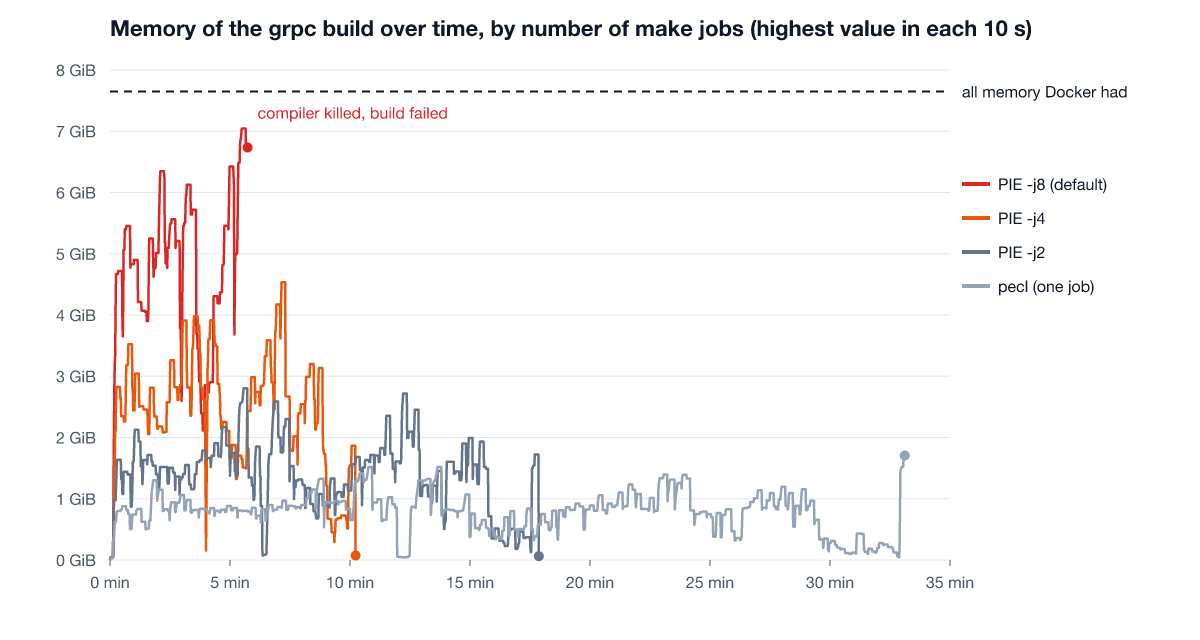
Even pecl, compiling one file at a time, peaked at 1.7 GiB, so the heaviest file in grpc needs about that much on its own. Going from two jobs to four cut the time by 43% and raised the memory by 62%. At eight, the build's processes reached 7.0 GiB of the 7.6 GiB the machine had, the kernel's out-of-memory killer ended one compiler, and PIE failed with the output of make:
g++: fatal error: Killed signal terminated program cc1plus
make: *** [Makefile:2542: src/core/resolver/xds/xds_resolver.lo] Error 1
That run failed cleanly, which is the lucky case. The out-of-memory killer picks the process it thinks frees the most memory, not necessarily the build. On my first attempts, with another project's containers running next to the build, the machine spent long stretches doing little but swap, and the kernel log showed it had killed PHP processes of that project as well as compilers. A build that finishes in ten minutes at -j4 can stall for over an hour at the default.
PIE's default is the right one for extensions the size of redis and pcov, where the compilers fit in memory many times over. PIE sizes the build by CPUs and does not look at memory, and it cannot know how much the compiler will need for a given extension. So for the heavy ones, grpc above all, set -j yourself from memory rather than from cores: free memory divided by what one job needs, which for grpc on this machine was well over a gigabyte at the peak. On a CI runner, look up its memory before trusting the default: a runner with many cores and little memory per core is the case that fails.
Prebuilt binaries: five seconds, and whose binary
The last row of that table is the other way out. A package can tell PIE, through download-url-method in its composer.json, to look for a compiled binary among the assets of its GitHub release, named by extension version, PHP version, architecture, operating system and C library. When one matches, PIE downloads it and skips the build. grpc installed that way in 5 seconds.
The catch is who publishes them. On 8 November 2026, of the 22 packages PIE's own list names as the standard package for an extension, one asks PIE for prebuilt binaries, and it is an alpha release of rdkafka. grpc's official package, grpc/grpc-php-ext, builds from source. The binary I installed came from extport/grpc, whose README calls it an "Unofficial PIE-compatible mirror of grpc/grpc": it repackages the upstream source and builds binaries in its own GitHub Actions. Search Packagist for packages that provide the grpc extension and you find the official one, two mirrors with binaries (extport/grpc and pie-extensions/grpc), and bsn4/grpc, which is a different implementation written in Rust that presents itself as a drop-in replacement. All four provide an extension named grpc.
PIE is candid about what it checks. Every prebuilt install prints:
Note: dist-sha integrity check is not available for prebuilt-binary URLs; HTTPS to the release-asset origin is the only integrity guarantee.So the binary is whatever that GitHub release holds when your build runs. PIE verifies its own PHAR with GitHub artifact attestations (pie self-verify), but in the source of 1.5.5 and 1.6.0-rc.1 that verification is only for PIE itself, not for the extensions it downloads. The mirror's binaries had no attestation for me to check by hand either: gh attestation verify found none. pie.lock does not close the gap. For the prebuilt redis I installed from a mirror, the lock recorded the source zipball of the release commit with an empty shasum, not the binary that was installed.
That does not make the mirrors malicious. Their build workflows are public, and someone did the work the official projects have not. It makes them a dependency with the same standing as any other binary you download from a stranger's release page: you are trusting the account, every person who can publish to it, and every future release, each time the image is built.
One more surprise sits in the same mechanism. Pass a configure option to a package that ships binaries and PIE builds from source instead, because a binary cannot honour the option. pie install pie-extensions/redis:6.3.0 used the binary, and the same command with --disable-redis-session compiled. That is documented, and reasonable, but for grpc it is the difference between 5 seconds and the builds in the table above, caused by one added flag.
If a 10-minute compile is the problem, there are ways to keep trust where it was. Build the extension once, in your own base image or CI job with an explicit -j, and copy the .so from there into images built from the same base. Extensions are built for one PHP minor version, one C library and one thread-safety mode: the redis.so from 8.5.12 loaded in 8.5.11 on the same Debian, as designed, and the next section shows what php --ri cannot tell you about crossing to another C library. Or install a signed package from a repository you already trust for PHP itself: on Debian bookworm, the php8.5-grpc package from deb.sury.org installed in 4 seconds, although Sury's newest grpc that day was 1.83.1, two minor versions behind. That repository is run by Ondřej Surý, not by Debian, so it is a trust decision too, but usually one you made when you chose where your PHP comes from. Or ask the extension's maintainers to publish binaries, which is the outcome PIE is designed for.
Building once also takes GitHub out of your build. Every PIE install in this article downloads from GitHub at build time: the source through GitHub's API, the binaries from release assets. While I was writing, GitHub's status page reported partially degraded service, its API answered the download of the redis source with HTTP 504 five times in a row, and 19 of the claims my checks test came out wrong. Every one of those failures came from a command that exited with a non-zero code, which is the right behaviour, but the image did not build until GitHub recovered. pecl has the same weakness with pecl.php.net. An extension you built once and keep in your own registry has neither.
GitHub's incident report said the timeouts hit mostly unauthenticated users, and PIE's downloads are unauthenticated unless you give it a token. PIE downloads through Composer, so it takes Composer's COMPOSER_AUTH, and in a Docker build that belongs in a BuildKit secret, which never lands in a layer:
# examples/token/Dockerfile
# A GitHub token for PIE's downloads, passed as a BuildKit secret so it never lands in a layer:
#   docker build --secret id=composer_auth,env=COMPOSER_AUTH .
# with COMPOSER_AUTH='{"github-oauth": {"github.com": "<token>"}}' in the environment of the build.
FROM php:8.5.12-cli-bookworm@sha256:050713ce008e2360ea9dc96e1f9a075690132388d917fc3552806f7a7be6f2a0
RUN apt-get update && apt-get install -y --no-install-recommends unzip && rm -rf /var/lib/apt/lists/*
RUN --mount=type=bind,from=ghcr.io/php/pie:1.5.5-bin@sha256:3fca03c16df842d02b654dc382db3756058d9c128064f57cace14f8728779ce9,source=/pie,target=/usr/local/bin/pie \
    --mount=type=secret,id=composer_auth,env=COMPOSER_AUTH \
    pie install --no-cache phpredis/phpredis:6.3.0 \
    && php --ri redis > /dev/null
With a deliberately invalid token in that secret, the build failed with Could not authenticate against github.com, so the token does reach PIE. Whether a valid one would have got through the incident I cannot say: by the time I had the test ready, GitHub had recovered. A token also moves you off the much lower rate limit GitHub documents for anonymous API requests, which matters on CI runners that share an address.
A green build with a broken extension
The binaries led to the result I like least. The grpc binary for Alpine is compiled C++ and links against the C++ runtime, libstdc++, which the official Alpine PHP image does not include. The mirror's README says so. I installed it without reading the README, which is how most Dockerfiles get written:
Install complete: /usr/local/lib/php/extensions/no-debug-non-zts-20250925/grpc.so
Something went wrong enabling the grpc extension: Expected extension grpc to be loaded in PHP /usr/local/bin/php, but it was not detected.
⚠️  Extension has NOT been automatically enabled.
You must now add "extension=grpc" to your php.ini
PIE noticed. It tried to load the extension, saw it was not there, and said so. Then it exited with 0, so the RUN step passed and the image built. Two more things make it worse than a warning. The message says the extension has not been enabled, but docker-php-ext-enable had already written docker-php-ext-grpc.ini, and PIE left it in place, so the extension is enabled and broken. And from then on every PHP process in that image, every request in PHP-FPM and every artisan command, starts with:
Warning: PHP Startup: Unable to load dynamic library 'grpc' (... Error loading shared library libstdc++.so.6: No such file or directory ...)PIE 1.6.0-rc.1 behaves the same. Reading the source explains it: when enabling fails, PIE prints the warning and carries on, and the exit code reflects only whether the install step itself failed. That is a reasonable design for a person at a terminal, who reads the warning. A Docker build has nobody reading it.
The fix is the line from the Dockerfile above. php --ri grpc returned 1 in that image and 0 once apk add libstdc++ libgcc came before the install. One line per extension turns the silent case into a failed build. The same check should also catch an extension built against a different PHP, or one whose library a later step in the Dockerfile removed, so I would keep it even if PIE changes its exit code.
It proves less than it seems, though. php --ri says the extension loaded, not that it was built for this image. I copied the redis.so built in the Debian image above into the Alpine image, and it loaded: Alpine's C library, musl, accepts a request for glibc's libc.so.6 as a request for itself. php --ri redis returned 0, and a refused connection, a failed DNS lookup and serialize() all behaved. Nobody supports that combination, and two C libraries that disagree about a structure layout can fail in ways a smoke test does not reach. Check that an extension loads, and also make sure it was built where it runs.
Installing what composer.json requires
Your composer.json probably lists the extensions the code needs already, as "ext-redis": "^6.2". Run pie install with no arguments in the project directory and PIE reads them from composer.lock, checks which are loaded, and offers to install the rest. Without a terminal, the two versions I tested differ.
PIE 1.5.5 refuses to choose. For a project requiring ext-redis and ext-pcov it exited with 1 and listed the packages that provide each extension, asking for one --select per extension. For pcov the candidates were pecl/pcov, the official one, and vitaliyboyko/pcov, a fork with a few hundred downloads. With --select=pcov=pecl/pcov --select=redis=phpredis/phpredis both installed.
PIE 1.6.0-rc.1 chose by itself: pecl/pcov and phpredis/phpredis, both installed, exit code 0. Since 1.6, PIE downloads a short map from its own repository that names the standard package for well-known extensions, which is the same list of 22 I counted binaries in. That is a better default than a menu, and it removes the case where a hurried developer picks the fork. For extensions outside the map, and for anything you want to be explicit about, I would keep --select in the Dockerfile anyway: it puts the package name where a reviewer sees it.
One requirement is easy to trip on: PIE reads the extensions from composer.lock, not composer.json. Without a lock file it stops with No lockfile found.
pie.lock in a Docker build
PIE keeps its own pie.json and pie.lock, like Composer's, recording what you installed and the exact versions. They do not live in your project. They live in a directory under ~/.pie whose name is php, the PHP minor version, and an MD5 hash, so on my images /root/.pie/php8.5_daf413ac…. In a fresh container, with both files copied to that directory, pie install --from-lock installed exactly the locked apcu 5.1.27. With the files anywhere else, it stopped with No lockfile found and exit code 1, which is the right way to fail.
For a Dockerfile I would still pin the version in the pie install line, as above. It is visible in review, it lives in the file that builds the image, and it does what a lock would do for the extension itself. The lock adds less than it does for Composer: the locks in these tests held one package each, with nothing else pulled in, and for prebuilt binaries the lock records the source commit rather than the file you installed.
A puzzle: the lock nobody touched
A team wants reproducible extension builds, so a developer runs pie install once, commits pie.json and pie.lock, and adds to the Dockerfile:
# examples/puzzle/Dockerfile
# The puzzle's Dockerfile. The lock directory is the one pie show -v printed in php:8.5.12 on arm64.
ARG BASE=php:8.5-cli-bookworm
FROM ${BASE}
RUN apt-get update && apt-get install -y --no-install-recommends unzip
COPY pie.json pie.lock /root/.pie/php8.5_daf413ac2c6373732eaa89ffb4a8bf81/
RUN --mount=type=bind,from=ghcr.io/php/pie:1.5.5-bin@sha256:3fca03c16df842d02b654dc382db3756058d9c128064f57cace14f8728779ce9,source=/pie,target=/usr/local/bin/pie \
    pie install --from-lock
The path is the one pie show -v printed on the developer's machine, inside the same image. The build works in CI and on every laptop in the team for weeks. Then CI fails with No lockfile found, on a day when nobody changed the Dockerfile or the lock, while the same commit still builds on every laptop. A week later it fails on a laptop too. What changed?
The answer
The PHP version. The hash in the directory name is the MD5 of the operating system, the path of the PHP binary, the full PHP version, the architecture and the thread safety mode. I read that in PIE's source and then checked the parts that move: the directory PIE looks in differed between php:8.5.11 and php:8.5.12, and between the arm64 and amd64 builds of the same php:8.5.12 image.
php:8.5-cli-bookworm is a moving tag. When it moved to the next patch release, CI, whose runners start each build without a cached image, got the new PHP, and with it a new hash and a directory with no lock in it. The laptops kept building from the image they had pulled weeks before, until someone's Docker pulled the new one. Nothing in the repository changed: the place the lock has to go depends on the exact PHP it is for, so a lock file meant to make builds reproducible broke them. The architecture is the same trap. Had CI built for amd64 while the laptops are Apple silicon, it would have failed from the first day.
Two fixes, both tested. Ask PIE for the directory at build time instead of writing it down, as the checks do:
# docker/pie-dir.sh
# Prints the directory where PIE keeps pie.json and pie.lock for the PHP it runs on.
pie show -v 2>/dev/null | sed -n 's/^Using pie.json: //p' | head -1 | xargs dirname
That found the directory in all three images, and with it --from-lock installed the locked version. Or skip the lock and pin versions on the pie install line, which also survives a PHP patch release. In both cases, pin the base image by digest too, so a patch release reaches you through a pull request rather than through a rebuild.
What to reach for
- New Dockerfiles: PIE, pinned. Mount it from
ghcr.io/php/pieby digest, installunzipyourself and ignore the warning aboutlibtoolize, pin each extension's version on thepie installline, and end the step withphp --rifor every extension. That is the Dockerfile at the top, and it is what PHP now recommends. - Heavy C++ extensions: an explicit
-j. grpc, and anything else that compiles for minutes, gets-jfrom the memory of the machine that builds it, not the default from its CPUs. - Existing
pecl installlines: no hurry, but no new ones. PECL works and the RFC sets no removal date. It is falling behind, though: on the day I measured, PECL's newest grpc was 1.85.0 while Packagist, and so PIE, already had 1.85.1. Move a line to PIE when you touch it. - Many images or many builds: build the extension once. A base image with the extensions compiled, rebuilt when you change a version, pays the compile and the download from GitHub once instead of in every build.
- Prebuilt binaries: from the maintainers, or not at all. When the extension's own project publishes them, they are the same trust as its source. From a mirror, they are a new party in your supply chain that PIE does not verify. Build once in your own base image instead, or use signed packages from the repository your PHP comes from.
install-php-extensionsis still a reasonable choice. The popular script by mlocati knows the system libraries for 164 extensions and installs them for you. Reading its script (2.13.2), it loads each module through a temporary ini file before enabling it and fails if that adds an error, which is the check PIE leaves to you. It compiles with one job per processor as reported bynproc, which in my--cpus=2container still said 8, unless you setIPE_PROCESSOR_COUNT, so the memory advice applies to it even more. I did not measure it here.- Projects: let
composer.jsondrive it, from PIE 1.6.pie installin the project directory installs what the lock file requires, and from 1.6 it picks the standard packages by itself. On 1.5, pass--select.
Scope and how this was checked
./run.sh in the repository runs ten checks against PIE 1.5.5 and, where they differ, 1.6.0-rc.1, in the official php:8.5.12-cli images for Debian bookworm and Alpine, all pinned by digest, and compares 69 results with the claims in expectations.txt. A changed expectation makes it fail, and one check builds a broken copy of the recommended Dockerfile to prove that its php --ri line fails the build. timings/run.sh builds grpc in each way from the table, one build at a time, sampling the anonymous memory of the container's cgroup every second, which counts the compilers' memory and not the file cache. I ran it with no other containers running, on Docker Desktop on an Apple silicon Mac with 8 CPUs and 7.6 GiB of memory given to Docker, and I kept the Mac awake for the whole run, after a first attempt where sleep had made the timings meaningless. During the first minutes of the pecl build, which uses one core, some of the checks ran on the other cores, so its time may be slightly high.
The limits matter. The grpc timings are single runs on one machine and one architecture, arm64. grpc on amd64, on another compiler version, or with other memory would give other numbers, and the point is the shape, memory growing with -j, not the minutes. I tested two extensions in depth and two more in passing. What PIE verifies and how it derives its directory comes from reading its source at the 1.5.5 and 1.6.0-rc.1 tags, and the counts of packages on Packagist are from 8 November 2026 and will change. I did not test Windows, where PIE downloads DLLs published with each release instead of compiling, thread-safe (ZTS) builds of PHP, or GitHub's rate limits: dozens of anonymous installs in an hour from one address went through for me, but I did not push past them.