Git Bisect: The Algorithm Is Trivial, Your Predicate Is Not

Something broke. The last state you trust is four hundred commits behind, and you have no idea which of them did it. git bisect is the tool for exactly this: it keeps an interval between a commit you know is good and one you know is bad, tests the midpoint, and throws away half the range. Four hundred commits become roughly nine questions.
That halving is the whole algorithm, and it is trivial. Everything difficult about bisect is something bisect cannot supply: the predicate — the script, the test, the check that answers "is the bug present in this commit?". I built a repository, a real regression, and a set of predicates to answer that question in different ways. On the same history, against the same failing HEAD, two of those predicates returned two different commits. Both runs printed is the first 'bad' commit. Both exited zero.
This post is about that gap. It stays in one engineer's working copy — the same git bisect you run at your desk — and it does not cover running bisect as a pipeline job; that is a different problem, with a different hard part. It also is not about git worktree, which is the other Git post on this blog and only touches bisect in one place: bisect state is per working tree, which is genuinely useful.
If the theme sounds familiar, it should: it is the same trap as picking a metric for a system and then optimising the metric instead of the system. The oracle decides the answer. In measuring a system's quality that oracle is a judge and a threshold; here it is a shell script and its exit code.
The mechanism, in one screen
You give bisect two anchors and then answer one question per step. I built a ten-commit repository whose calc.sh multiplies by two until commit 6, where a change makes it multiply by three. The predicate reads the behaviour, not the version marker:
#!/bin/sh
# 0 = good, 1 = bad, 125 = cannot be tested
[ -f calc.sh ] || exit 125
out=$(sh calc.sh 5 2>/dev/null)
rc=$?
[ "$rc" -ne 0 ] && exit 125
[ "$out" = "10" ]
Driven by hand, that is three tests instead of ten:
$ git bisect start
status: waiting for both 'good' and 'bad' commits
$ git bisect bad HEAD
status: waiting for 'good' commit(s), 'bad' commit known
$ git bisect good 3892cd6
Bisecting: 4 revisions left to test after this (roughly 2 steps)
[f038ab0] step 5
$ sh ../check.sh; echo "exit=$?"
exit=0
$ git bisect good
Bisecting: 2 revisions left to test after this (roughly 1 step)
[213bcc8] step 7
$ sh ../check.sh; echo "exit=$?"
exit=1
$ git bisect bad
Bisecting: 0 revisions left to test after this (roughly 0 steps)
[ef020c5] step 6
$ sh ../check.sh; echo "exit=$?"
exit=1
$ git bisect bad
ef020c5 is the first 'bad' commit
Notice the shape of the answers: step 5 good, step 7 bad — so the boundary is in between, and one more test lands on step 6. That is the entire algorithm. Now point it at a script and it runs unattended:
$ git bisect start
$ git bisect bad HEAD
$ git bisect good 3892cd6
Bisecting: 15 revisions left to test after this (roughly 4 steps)
[40a8232] step 16
$ git bisect run sh ../check.sh
running 'sh' '../check.sh'
Bisecting: 7 revisions left to test after this (roughly 3 steps)
[068efd6] step 24
running 'sh' '../check.sh'
Bisecting: 3 revisions left to test after this (roughly 2 steps)
[2d698b6] step 20
running 'sh' '../check.sh'
Bisecting: 1 revision left to test after this (roughly 1 step)
[3b33cd5] step 22
running 'sh' '../check.sh'
Bisecting: 0 revisions left to test after this (roughly 0 steps)
[d42e46b] step 21
running 'sh' '../check.sh'
d42e46b is the first 'bad' commit
bisect found first 'bad' commit
Thirty-two candidate commits, five predicate runs, and the correct answer: step 21 is where the multiplier changed. The tool also writes you a replayable transcript, which is worth knowing about before you need it:
$ git bisect log
git bisect start
git bisect bad d46e3a5
git bisect good 3892cd6
# good: [40a8232] step 16
git bisect good 40a8232
# bad: [068efd6] step 24
git bisect bad 068efd6
# good: [2d698b6] step 20
git bisect good 2d698b6
# bad: [3b33cd5] step 22
git bisect bad 3b33cd5
# bad: [d42e46b] step 21
git bisect bad d42e46b
# first 'bad' commit: [d42e46b] step 21
That log is an executable script: git bisect replay that-file restores the whole session, which is how you recover from marking a commit wrong, and how you hand a reproduction to someone else.
What does it cost? I ran the same predicate over ranges from 8 to 255 commits and counted how many times it actually executed:
| Candidate commits | First printed estimate | Actual predicate runs |
|---|---|---|
| 8 | 2 | 3 |
| 16 | 3 | 4 |
| 32 | 4 | 5 |
| 64 | 5 | 6 |
| 128 | 6 | 7 |
| 255 | 7 | 8 |
Every doubling of the range adds exactly one test — that is the logarithm, and it is the reason bisect is worth the setup. But the middle column is not a budget. In each of these six runs the number of predicate executions was exactly one more than the value in the first estimate git printed — and that is the same line you can see in the 32-commit example above, whose first estimate was roughly 4 steps and which then took five runs.
The reason is in the wording. Git prints "roughly N steps" when it hands you a commit — after that commit has been chosen — so the estimate describes what remains beyond the one you are about to test, not the size of your job. The first line is therefore always one short of the total, and the last one is always zero. Budget from the right column.
What your predicate must return
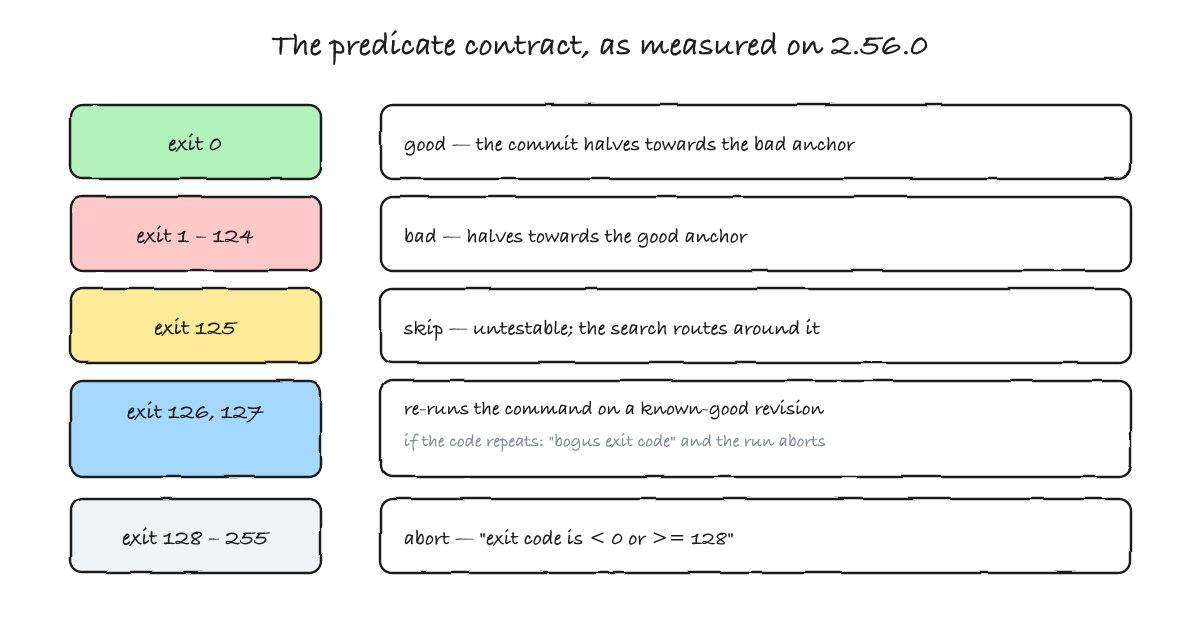
The contract looks like "0 for good, 1 for bad", and that is what most people remember. The real contract has five branches, and I mapped them against git 2.56.0 by running each one:
| Exit code | Verdict | What git actually does |
|---|---|---|
0 | good | Marks the commit good and halves towards the bad anchor. |
1–124 | bad | Marks the commit bad and halves towards the good anchor. |
125 | skip | Records the commit as untestable; the search continues around it. |
126, 127 | "bogus" | Re-runs the same command against a known-good revision. If the code repeats, the run aborts: error: bogus exit code 126 for 'good' revision. |
128–255, negative | abort | Stops immediately: error: bisect run failed: exit code 128 … is < 0 or >= 128. A shell turns exit(-1) into 255. |
The manual describes the middle of that list differently. It says the script "should exit with code 0 if the current source code is good/old, and exit with a code between 1 and 127 (inclusive), except 125, if the current source code is bad/new", and then, of 126 and 127, that "these details do not matter, as they are normal errors in the script, as far as bisect run is concerned".
They do matter. Here is the actual code from builtin/bisect.c, and it is worth reading twice:
/*
 * Exit code 126 and 127 can either come from the shell
 * if it was unable to execute or even find the script,
 * or from the script itself.  Check with a known-good
 * revision to avoid trashing the bisect run due to a
 * missing or non-executable script.
 */
if (is_first_run && (res == 126 || res == 127)) {
        int rc = verify_good(terms, command.buf);
        ...
        if (rc == res) {
                error(_("bogus exit code %d for '%s' revision"),
                      rc, terms->term_good);
                res = BISECT_FAILED;
                break;
        }
}
if (res < 0 || 128 <= res) { ... }
On the first run, if your predicate returns 126 or 127, git does not mark anything as bad. It re-runs the same command against a known-good revision. If the code comes back the same, git concludes the failure belongs to the script and not to the commit — and stops, with bogus exit code. This is a defence aimed precisely at the most common way a bisect run lies: the script that cannot run at all.
I hit it by accident while building these demos, which is the best way to hit it. A predicate path was one directory off:
$ git bisect run sh ../check-b.sh
sh: ../check-b.sh: No such file or directory
[fb1f806] step 1
sh: ../check-b.sh: No such file or directory
error: bogus exit code 127 for 'good' revision
Without that check, a typo would have produced a full, confident, worthless bisect: every commit "bad", the answer being whichever commit sits next to your good anchor. The exit code 127 from a missing file is exactly what the code comment is talking about — and it is worth knowing that the check only applies on the first run. A script that starts failing to execute halfway through a run has no such protection.
Where the exit codes stop, one more obligation begins: the predicate has to leave the tree as it found it. A script that writes temporary files, warms a build cache (target/, node_modules/, __pycache__), appends to a log or checks out a submodule can hand the next step a working tree that is not the commit under test — and bisect will build its conclusion on top of that without noticing. The manual's own example script sidesteps it by rewinding before it reports: it applies a temporary patch, runs the build and the test, then executes git reset --hard and exits with the status of the real test. Make the predicate idempotent, and clean up before you return.
The same history, two answers
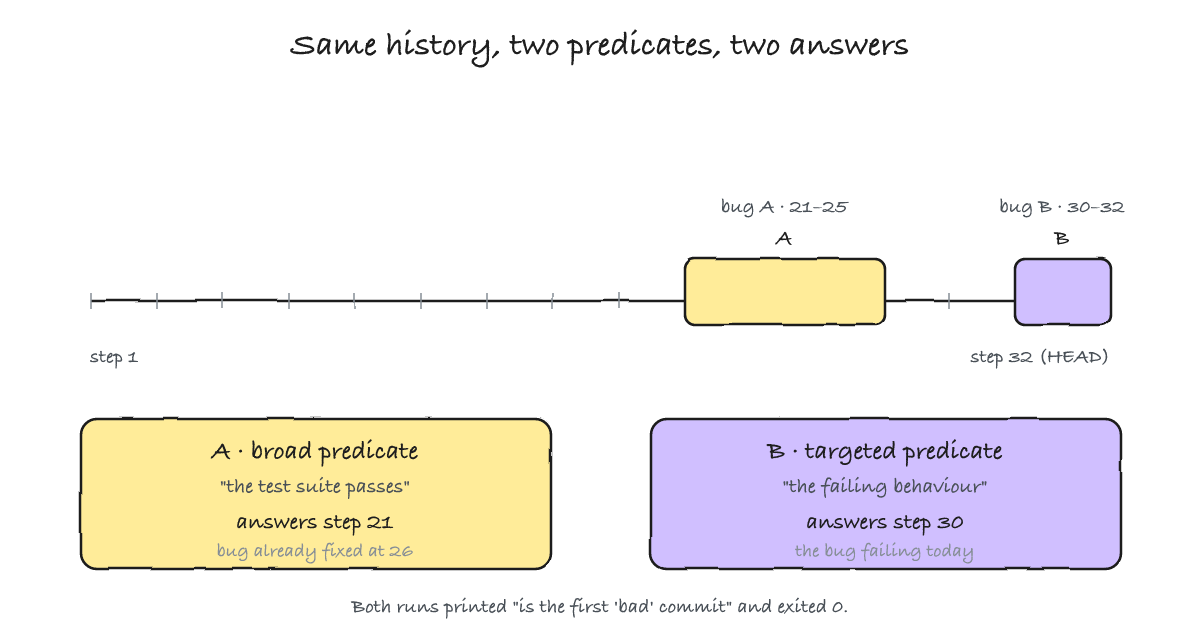
This is the experiment the whole post is about. I built one history containing two independent bugs: double is wrong in commits 21–25 (and fixed at 26), and plus-five is wrong from commit 30 onward. At HEAD, the first is fixed and the second is live:
$ sh calc.sh double 5
10
$ sh calc.sh plus-five 5
11
The bug I am chasing is the one today — the second one. Now I ask bisect twice, changing nothing but the predicate. First, the honest-sounding one: "the test suite passes."
$ git bisect run sh ../../broad.sh
[478cc55] step 24
[ce47a01] step 20
[e4b5ec9] step 22
[14e770b] step 21
14e770b is the first 'bad' commit
bisect found first 'bad' commit
Bisect answers step 21 — the bug that was fixed six commits later. That commit was correctly reported as bad: when it was written, the suite did fail. It just is not the failure in front of me. And bisect never says so; it found a first bad commit, because that is exactly the question the predicate asked.
Now the same session with a predicate that asks only about the failing behaviour:
$ git bisect run sh ../../check-b.sh
[478cc55] step 24
[7b85298] step 28
[86be48e] step 30
[43346b9] step 29
86be48e is the first 'bad' commit
bisect found first 'bad' commit
Step 30. One history, one failing HEAD, two confident answers, both with exit status zero. The difference is the question. A broad predicate answers "when did anything start failing?", and in a repository with more than one lifecycle that is almost never the question you meant. The predicate is not a detail you write after bisect; it is the instrument you are measuring with, and the measurement is only as good as its resolution.
When the predicate is not deterministic
The previous section assumed a predicate that answers the same way every time. Take that away and bisect does not slow down or warn — it produces a different answer. I ran the same session twice against a predicate that is right about 90% of the time when the bug is absent and about 70% of the time when it is present. The true first bad commit is 21. The two runs returned 26 and 25:
$ git bisect run sh ../flaky.sh      # run one
f0f8926 is the first 'bad' commit    # step 26
bisect found first 'bad' commit

$ git bisect run sh ../flaky.sh      # run two, same command
fce830f is the first 'bad' commit    # step 25
bisect found first 'bad' commit
Both runs exited zero. Neither is correct, and nothing in the output distinguishes them from the successful runs above. Bisect has no consistency check: it never re-tests a commit it has already judged, and it has no notion of "this answer contradicts an earlier one".
There is a degenerate version that is worth seeing once, because it kills the intuition that bisect needs to be lied to repeatedly. A predicate that always reports good gives bisect a completely consistent world in which nothing is ever broken — and bisect still concludes:
$ git bisect run sh -c 'exit 0'
0304be8 is the first 'bad' commit
bisect found first 'bad' commit
0304be8 is HEAD. When your two anchors disagree with everything either side of them, the "first bad commit" collapses onto the bad anchor and is reported as a finding. The defence is cheap and worth building into the habit: before starting, run the predicate at both anchors and check that it returns what you promised. If the good anchor does not pass, or the bad anchor does not fail, the bisect you are about to run cannot produce a meaningful answer, and no amount of careful reading of its output will tell you that.
When you cannot test the commit
Real histories contain commits you cannot evaluate: the build was broken mid-branch, a dependency has since vanished, a migration only exists later. Exit code 125 is the released valve for that, and it is a first-class outcome — not a failure. But skipping has a price, and the price is that bisect can run out of evidence.
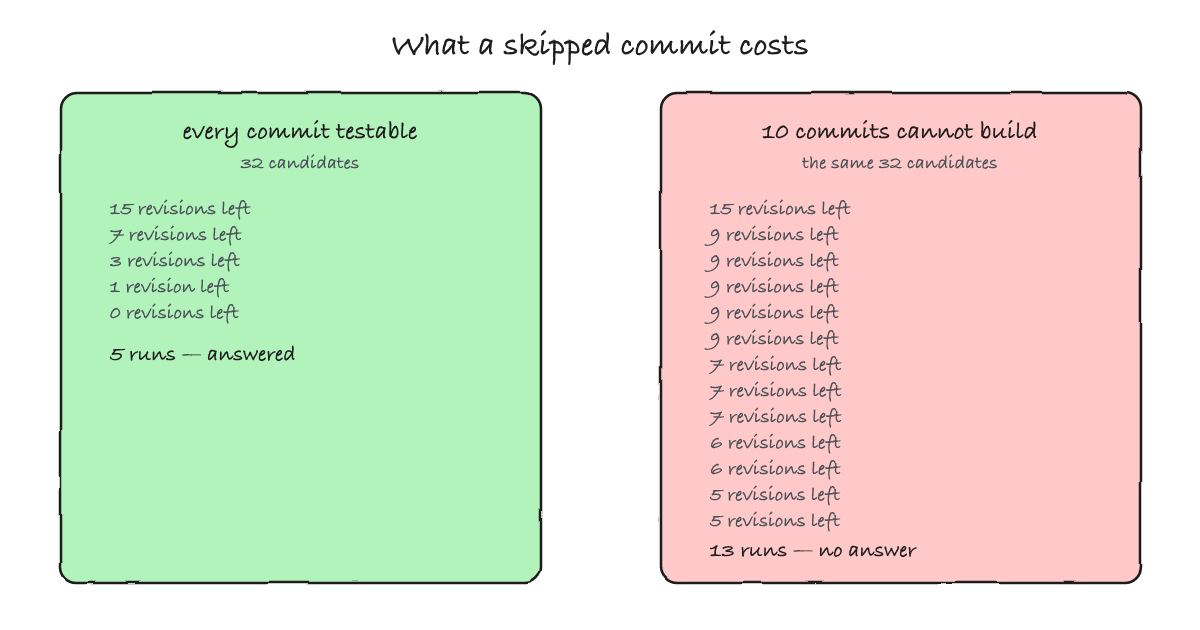
I built a history where the regression is at commit 21 and commits 15–24 cannot be built at all, so the predicate returns 125 for all of them. Watch the "revisions left" counter:
$ git bisect run sh ../check.sh
Bisecting: 15 revisions left to test after this (roughly 4 steps)
[a0f8767] step 12
...
Bisecting: 9 revisions left to test after this (roughly 3 steps)
[55705fe] step 15
Bisecting: 9 revisions left to test after this (roughly 3 steps)
[b5b91fb] step 24
# ... 8 further steps — 13 predicate runs in all — then:
There are only 'skip'ped commits left to test.
The first 'bad' commit could be any of:
2c1c64c
c2e13f4
26c073a
bc073b6
21c8f4a
c5b2c78
018337f
aa941df
55705fe
b5b91fb
1c1b21c
We cannot bisect more!
error: bisect run cannot continue any more
Two things to take from that. First, a skip does not shrink the interval the way a real answer does: the counter displayed 9 revisions left for five consecutive steps while the loop worked through commits it could not test. This run executed the predicate thirteen times where the healthy version of the same 32-commit history needed five — and it still could not finish. Second, the ending is honest: git does not invent a culprit, it prints the set of commits that remain possible and exits non-zero (2). If your tooling treats "bisect run finished" as "we have the culprit", this is the run that teaches you otherwise.
The manual names the reason: "if you skip a commit adjacent to the one you are looking for, Git will be unable to tell exactly which of those commits was the first bad one." A skip next to the boundary converts a definite answer into a set.
That is also the honest way to read the merge case, which is where skipping is most likely. I built a branch that contains a commit which does not even parse, followed by the commit that introduces the regression, merged into main. Three predicates, three different qualities of answer:
| What the predicate does | Answer bisect gives | Quality of that answer |
|---|---|---|
Treats "does not parse" as bad — exit 1 | b165daa — the draft that does not parse | A confident false positive: that commit did not cause the regression, it merely does not build. |
Treats "cannot run" as untestable — exit 125 | There are only 'skip'ped commits left to test. Two candidates: b165daa, be0cf8a | Honest uncertainty. The false positive is gone, and git says out loud that it cannot narrow further. |
Untestable exit 125, plus --first-parent | af08174 — the merge commit | Confident and actionable: the change entered main here, and the branch internals are never visited. |
The first answer is a false positive with no warning attached: the draft commit did not introduce the regression, it merely does not build, and calling it "bad" was the predicate's decision. Marking untestable commits as 125 removes the false positive and replaces it with an honest set of two — bisect telling you it does not know which of the two is the boundary. And --first-parent sidesteps the ambiguity entirely by staying on the mainline, which is exactly what its documentation promises: "the merge commit will be identified as introduction of the bug and its ancestors will be ignored... particularly useful in avoiding false positives when a merged branch contained broken or non-buildable commits, but the merge itself was OK."
The parts you need later
Rename the terms when good and bad are the wrong words. Bisect is not only for regressions; it finds the commit that introduced any property. --term-old fast --term-new slow turns the same loop into a performance investigation, and --term-new fixed --term-old broken finds the commit that repaired something. You cannot mix the two vocabularies in one session, so decide at start.
Narrow the range before you begin. git bisect start -- src/pricing restricts the search to a pathspec, and you can supply several good anchors at once, which cuts the interval before the first test. Both are free accuracy if you already know where the problem can and cannot be.
Recover from a wrong mark without starting over. git bisect log gives you the script; edit out the bad line, then git bisect reset and git bisect replay edited.txt. Within a session, git bisect visualize shows the remaining suspects (it falls back to git log --bisect without a GUI).
Test without a working tree at all. git bisect start --no-checkout keeps a ref called BISECT_HEAD instead of checking anything out, and a bare repository implies it. That makes bisect usable when the predicate reads the object database rather than a directory — I ran a full 32-commit bisect inside a bare clone, with the predicate reading git show BISECT_HEAD:calc.sh, and it landed on the same commit as the checkout-based run.
Bisect state is per working tree. git rev-parse --git-path refs/bisect resolves to .git/refs/bisect in the main tree and to .git/worktrees/<name>/refs/bisect in a linked one, so a bisect in one working tree does not disturb the other. If you already keep several trees around — the subject of the worktree post — you can run a long bisect in one of them and keep editing in another.
Let the run clean up after itself. A bisect session is not closed by finishing — not even by finding the culprit, which leaves HEAD detached at that commit with the session state still on disk. Git 2.56 added --reset-when-found, which closes the session as soon as the culprit is found; --reset-when-found=found leaves HEAD on that commit, and the plain flag returns you to where you started. It is accepted by both start and run, and it cannot be combined with --no-checkout.
Mark only the commit you were asked about. Bisect records the revision it expected you to test; if you test a different one and mark that instead, git drops the fast path it was using and you lose the ancestors optimisation for the rest of the session. When a suggested commit is genuinely untestable, the supported move is git bisect skip — or checking out a nearby commit deliberately and accepting the cost — not silently answering for a commit you did not test.
When bisect is the wrong tool
Bisect rests on an assumption you never type: the range is monotone — every commit before the culprit is good, every commit after it is bad. When that assumption holds, it is close to magic. When it does not, the loop still runs and still answers, which is the problem.
- The failure is intermittent. Flaky predicates give different, confident answers on different runs, as the two flaky runs above show. Fix the determinism first — seeds, fixed clocks, quarantined tests — then bisect. If you "fix" it with retries, you have replaced a flaky predicate with a less flaky one, and bisect does not measure how flaky.
- More than one breakage shares the interval. The broad-predicate experiment is this case: bisect finds the earliest breakage the predicate reacts to, which may be older than the one you care about and may already be fixed.
- The change is not a commit. The regression may be in configuration, in data, in a dependency that moved, or in the environment the test runs in. Bisect will happily attribute it to the nearest commit, and that attribution will be wrong.
- The history was squashed. If a hundred commits arrive as one, the boundary bisect finds is a pull request, not a change. That is still useful — but the answer is "this merge", and
--first-parentis the flag that says so out loud. - You cannot build the commits. The cost table above assumes each step is one test. If a step means a full build, the arithmetic changes: 8 steps of a ten-minute build is eighty minutes, and the skips make it longer. This is where running bisect as a pipeline job stops being a Git question at all — you need any historical commit to be reproducibly buildable and testable, and that is an infrastructure property, not a flag.
Before reaching for bisect, two cheaper tools sometimes answer directly. git log -S '<string>' finds commits that added or removed an exact string, and git log -G '<regex>' finds commits whose diffs match a pattern. Neither runs anything: they read the history. On the 32-commit repository I used throughout this post, the change that bisect needed five test runs to find is one command away:
$ git log -S'print $1 * 3' --oneline
d42e46b step 21
That is step 21 — the same commit, in the time it takes to type it, with no build and no test. git blame answers the narrower "who last touched this line". None of them replaces bisect when the question is behavioural, because "which commit made the checkout fail" is not a string you can search for; but when the change left a textual fingerprint, spending fifteen minutes bisecting instead is a cost you chose.
Summary
Bisect halves an interval and asks you one question per step; the halving is not where the difficulty lives. Write a predicate that answers the question you actually have — not "does anything fail" but "does the thing that is failing today fail here" — and make it deterministic, because bisect will not detect a flaky answer, it will build a conclusion on top of it. Return 0, 1, or 125 deliberately, and know that 126 and 127 are treated as a broken script rather than a bad commit, whatever the manual's wording suggests. Keep the script deterministic and run it at both anchors before you start; if the anchors do not behave as promised, the answer you are about to get is decorative. And when a range contains commits you cannot build, expect either an honest set of candidates or a run that ends inconclusive — not a culprit.