Parallel Agents on Git Worktrees: Isolation Is Not a Checkout

Give one coding agent a repository and it works. Give it a second one and the two start overwriting each other's files: one is halfway through a refactor while the other is fixing a test in a file that refactor is renaming. Even when nothing collides, the thing you get at the end is not two changes — it is one diff that mixes both tasks, and reviewing it is a puzzle you assembled by accident.
The fix is old and unglamorous: a git worktree per task. One object store, several working directories, each with its own HEAD and index. Recent coding agents have productised exactly this — in Claude Code it is claude --worktree feature-auth, and each session gets its own checkout on its own branch, which is the honest answer to "how do I run two of these at once".
But a separate checkout is not a separate machine, and that is where this post lives. If you already know what a worktree is — shared object store, per-tree HEAD, one branch in one tree — that is the other post, and I am not going to repeat it. This one is about what a worktree does not isolate when the worker is an agent: the parts of your setup that still cross the line, the enforcement a tool has to add because an agent will not infer a convention, and the lifecycle you inherit when the worker never gets tired. I use Claude Code as the case study because its documentation is unusually explicit about its own limits — including one hole it states plainly — but the pattern outlives the product.
The layout that follows from the idea
The mechanics are ordinary Git with an unusual placement. A session started with --worktree gets a working directory under .claude/worktrees/<name>/ at the repository root, on a new branch called worktree-<name>. Naming is optional; left out, the tool invents something like bright-running-fox. There is one prerequisite that catches people: the base commit has to exist, so in a repository with no commits the command fails outright rather than guessing.
Putting the worktree inside the repository is the interesting choice, and it has a consequence you can see in one command. I created a repository, then created a worktree the way the agent layout does:
$ git worktree add .claude/worktrees/probe -b worktree-probe
Preparing worktree (new branch 'worktree-probe')
HEAD is now at 848a6bd init

$ git status --short        # in the MAIN checkout
?? .claude/
The nested worktree shows up as untracked content in the checkout you are standing in. Nothing is broken — the tree is simply inside the parent repository's working directory — but every tool that treats "untracked files" as "something changed" now sees a whole checkout. That is why the documented setup asks for one line:
$ cat .gitignore
node_modules/
.env
$ echo '.claude/worktrees/' >> .gitignore
$ git status --short
 M .gitignore
With the layout ignored, the parent repository is quiet again. Small thing, but it belongs in the same category as the rest of this post: the worktree solves the collision problem in your files, and immediately creates a new question about everything that reads your filesystem.
The second choice worth making deliberately is where a new worktree starts from. By default a worktree branches from the remote's default branch, so it starts clean — good for a task that should be based on what everyone else has. Switching the base to the local HEAD instead carries your unpushed commits and current feature branch into the new tree, which is what you want when the agent works on something in progress. Those are genuinely different tasks, and conflating them is how you get an agent confidently editing last week's code.
Isolation has to be enforced, not documented
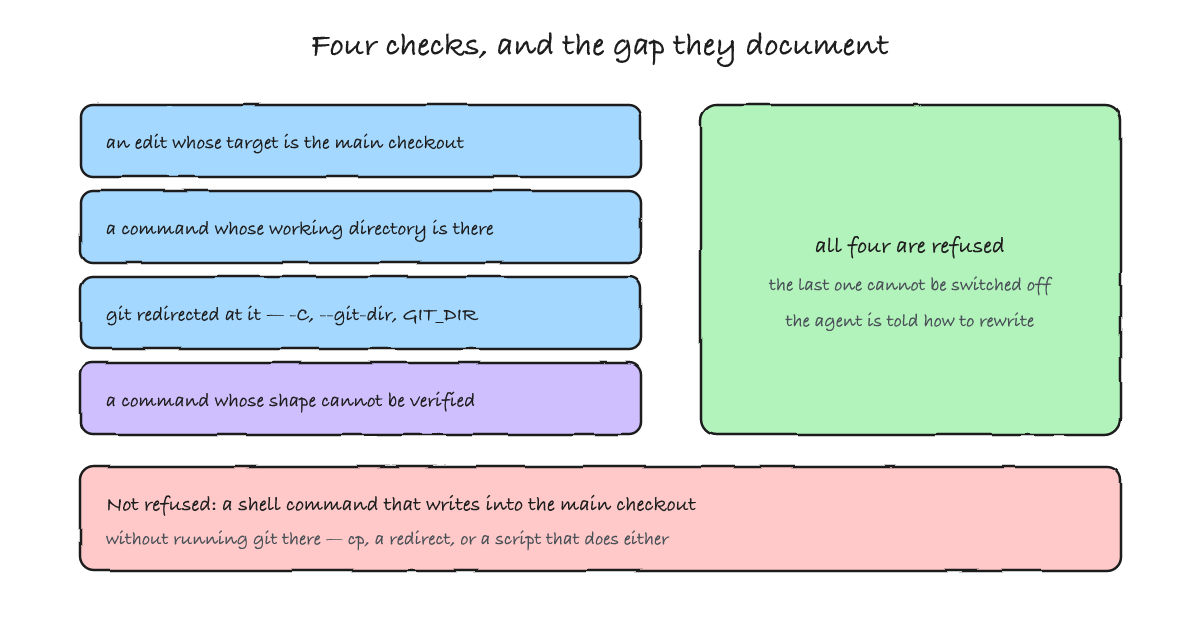
In a human team, "don't edit the main checkout from here" is a sentence in a contributing guide, and it mostly works because a person feels the awkwardness of the situation. An agent has no such feeling: it will run cd wherever the command takes it, and a rule written in prose is not a rule. So isolation in an agent session is enforced at the tool boundary, and the checks are worth reading closely because they define exactly what "isolated" means.
| Check | What it refuses |
|---|---|
| File edits | An Edit, Write or notebook edit whose target path is in the main checkout. |
| Command working directory | A shell command whose working directory resolves into the main checkout — or one the tool cannot verify stays outside it. |
| Git redirects | A command that points Git at the main checkout through git -C, --git-dir, GIT_DIR, GIT_WORK_TREE, or a cd into it before running Git. |
| Command shape | A command whose text does not let the tool prove that any Git it runs stays in the worktree — a computed command name, unparseable syntax, an expansion such as ${!name}. This one cannot be switched off. |
That last row is the interesting one to sit with, because it is an admission about the limits of static reasoning. The tool is not reading your intent; it is reading a string. When the string does not spell out what will run, the command is refused, and the agent is told how to rewrite it as plain, separate commands. You cannot turn it off, and the reason is sound: a check that can be switched off is a check that gets switched off.
Now the part I would put on the wall. The documentation states, in the same section, what these four checks do not see: they read the path an edit targets, the directory a command runs in, and the text of the command — and none of them tracks which files a shell command writes. A command that copies or redirects into the main checkout without invoking Git there is not refused. It is handled like any other shell command, by your permission rules and sandboxing.
Which means the isolation has the shape of Git, not the shape of a filesystem boundary. It stops the agent from editing the main checkout and from redirecting Git at it, and it does not stop cp. Calling a worktree a sandbox invites a security argument it cannot win; the boundary that holds is the one around the process — permissions and sandboxing — and the worktree is what keeps two agents from tripping over each other. If you want the capability-scoping version of that argument, it is the guardrails post.
What still crosses the boundary
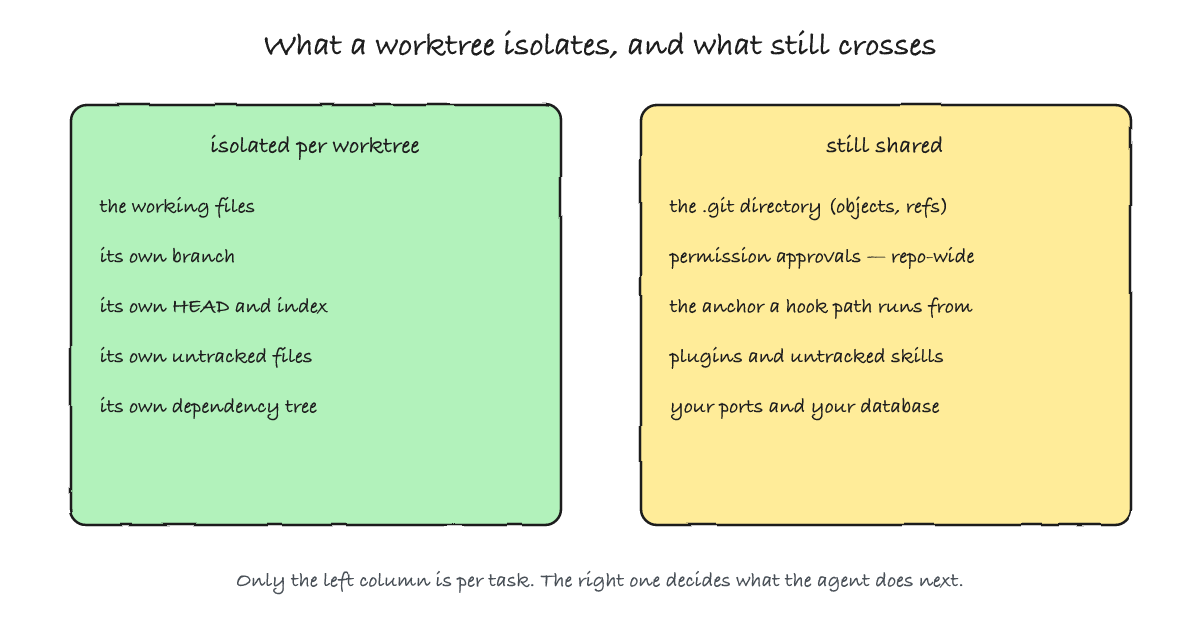
A worktree gives you a separate tree. It shares more than the object store, and the shared list is where an agent session differs from a human one — because the things that leak are exactly the things that shape an agent's behaviour: permissions, instructions, and hooks.
| What crosses | Why it matters for an agent |
|---|---|
| Permission approvals | Answering "yes, and don't ask again" for a command in a worktree session saves the rule to the main checkout's local settings, so it applies there and in every other worktree of the repository — and it survives the worktree's removal. One isolated session can permanently widen what every future session may do without asking. (Per-worktree approvals existed before v2.1.211.) |
| Hook path anchors | The project-directory variable your hooks use stays where the session started, in the main checkout; only the working directory passed to a hook follows the agent into the worktree. A hook script written as ${PROJECT_DIR}/.claude/hooks/check.sh keeps running the main checkout's copy — the same shared-hooks property that surprises people in plain Git, now with an agent to blame. |
| Plugins and untracked instructions | Project-scoped plugins load in worktrees without reinstalling. And when a worktree has no .claude/skills directory of its own — typically because it is gitignored — the session reads the main checkout's. The branch cannot pin its own instructions if those instructions are not in the branch. |
The .git directory | Shared by construction, which is why commits work from inside a worktree with sandboxing on. The ordinary consequence, and the one where the two posts meet. |
The first row is the one I would raise in any design review. Isolation that isolates your files but not your approvals is isolation with a hole in the shape of the thing you least want widened. It is also a deliberate trade — a rule you approve once should not have to be re-approved per checkout — and the honest reading is that the worktree is not the unit of trust: the repository is.
The environment is the other half, and it is the part people forget until a build fails. A worktree is a fresh checkout of tracked files, so everything you keep out of Git is missing: secrets, dependency trees, build caches. I created a worktree in a repository with an ignored .env and an ignored node_modules/:
$ ls -A ../probe2
.git
.gitignore
app.txt
package-lock.json

$ cat ../probe2/.env
cat: ../probe2/.env: No such file or directory
Neither is an accident — ignoring them is correct — which is why the agent setup ships a file for exactly this, .worktreeinclude, that copies matching and gitignored paths into each new worktree. The rule has a sharp edge worth knowing, and it is one git command away from being checkable. .worktreeinclude uses .gitignore syntax and copies only paths that both match a pattern and are ignored, so a tracked file is never duplicated:
$ git check-ignore -v .env node_modules/dep/index.js app.txt
.gitignore:2:.env	.env
.gitignore:1:node_modules/	node_modules/dep/index.js
Two paths printed, one silently absent: app.txt is tracked, so it is not a candidate. That single missing line is the rule — the include file cannot smuggle a tracked file into a checkout, which is what keeps it from being a second, divergent copy of your repository.
Safety choices worth stealing
This part is why the documentation is worth reading even if you never run the product. When an agent can write to a repository, the repository's own configuration stops being trusted input — and two decisions follow from taking that seriously.
A worktree's identity is verified before it is used. The tool checks the directory's Git identity and refuses it when the metadata resolves back into the main checkout — a .git file pointing at the main repository's own directory, or a core.worktree redirect. The stated reason is precise: from such a directory, an ordinary git reset --hard would act on the main checkout rather than the worktree. It also refuses symlinked worktree paths, and the version note says earlier releases followed a committed symlink and could create files outside the repository. That is a refusal written by someone who has thought about what the failure looks like at 3am, and it generalises: verify the invariant you are about to rely on, do not assume it from the path you were handed.
The repository's own filter drivers are not run. A filter driver is a shell command that Git will execute during checkout, defined in the repository's config — which means anything able to write to the repository, including the agent, could have put one there. So when creating a worktree, the tool neutralises the repository-local filters instead of running them. The consequence is visible and documented: with Git LFS configured locally rather than globally, a new worktree contains LFS pointer files rather than the real ones, and the fix is to pull inside the worktree. In rare configurations it refuses to create a worktree at all, and says why.
Both decisions share a shape: the thing that can write to the repository is not allowed to define what runs. If you are building anything that hands a checkout to a non-human writer, that sentence is the design rule, and it is cheaper to copy than to rediscover.
Lifecycle at machine speed
Human worktrees accumulate at human speed. Agent worktrees accumulate at machine speed — a subagent can want one per task — so the interesting question is not how to create one but who removes it, and what stops a removal from deleting work. The mechanism is Git's own lock, used the way the manual intends:
$ git worktree lock .claude/worktrees/probe --reason "agent running"
$ git worktree remove .claude/worktrees/probe
fatal: cannot remove a locked working tree, lock reason: agent running
use 'remove -f -f' to override or unlock first

$ git worktree unlock .claude/worktrees/probe
$ git worktree remove .claude/worktrees/probe
(removed)
While an agent runs, a lock like that one keeps a concurrent cleanup from removing the tree underneath it, and the lock is released when the agent finishes. The lock reason travels with it, which is why the refusal above reads like a status report rather than a mystery.
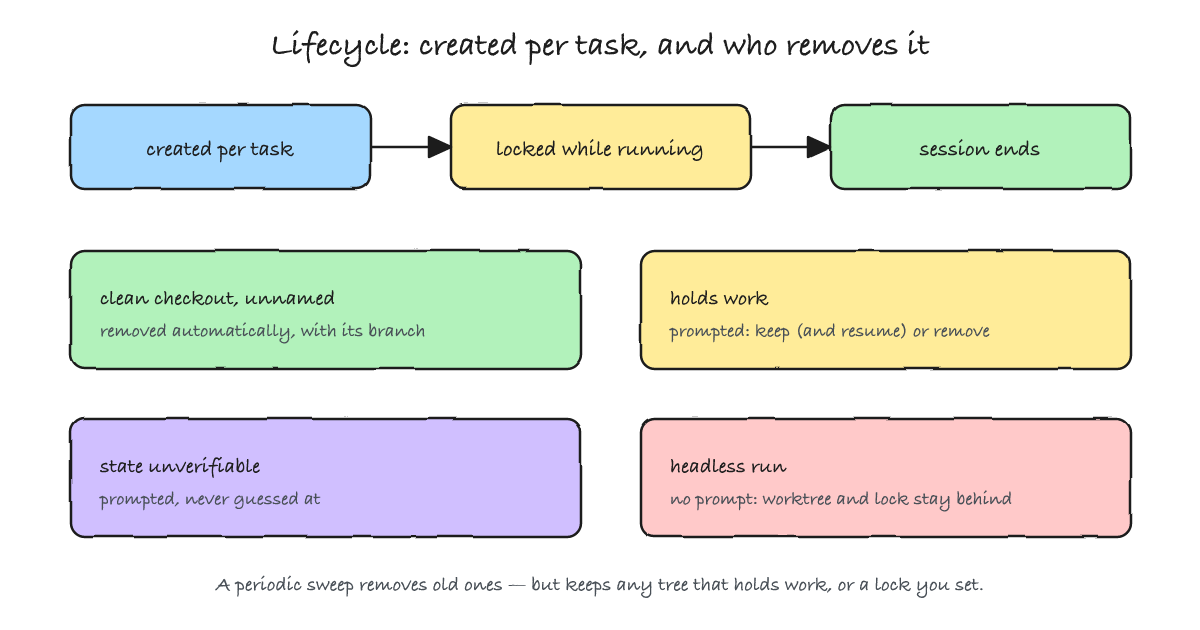
On the way out, the outcome depends on what the tree holds, and the cases are worth knowing because they decide whether you lose work:
| State when the session ends | What happens |
|---|---|
| Clean, unnamed session | The worktree and its branch are removed automatically. |
| Clean, named session | You are prompted, so the tree can be kept for later. |
| Holds work | You are prompted to keep or remove; keeping preserves the directory and branch, and the exit message prints the command that resumes it. |
| State cannot be verified | You are prompted rather than guessed at — the tool declines to remove a tree it could not inspect, and names what it could not check. |
| Non-interactive run | No exit prompt exists, so nothing is cleaned up, and the lock taken at creation stays until a later sweep releases it. |
The last row is the one that will bite a pipeline. A headless session is exactly the case where nobody is at the terminal to answer a prompt, so the prompt does not appear and the cleanup does not happen: you get directories and locks that outlive the work. There is a periodic sweep for worktrees that agents and background sessions leave behind, keyed to a retention setting, and it deliberately keeps a tree that still holds changed or untracked files, unpushed commits, or an uninspectable submodule. It also releases locks left by sessions whose process died — but never a lock you set yourself. Which is the right way round: a machine tidying up after itself should not tidy up after you.
If you take one operational lesson from this, take the one my own experiment nearly taught me the hard way: an agent farm's disk fills with checkouts, not with repositories — and each checkout can carry its own dependency tree. The cleaning is ordinary Git, and the reason to know the rules in advance is that discovering them while a sweep is running is how work disappears.
When not to isolate this way
- The tasks are actually one change. Splitting an edit into two worktrees does not remove the merge, it defers it to you, by hand, with no tooling watching. If two agents must touch the same file, serialise them instead.
- You are treating the worktree as a security boundary. It is not one. It stops edits and Git redirects; it does not stop a shell command from writing where it likes, and it does not scope what a session is allowed to do. That is the process boundary's job.
- The environment is expensive to build twice. A worktree is a fresh checkout, so dependencies and caches come with it — once per tree, which is a real bill on a heavy project.
- The work needs shared runtime state. Two worktrees still share your ports, your database, and your running services — and this is the most common reason two parallel agent runs fail at once. Two agents starting integration tests will both try to bind the same port, or both migrate and seed the same local database, and what they report is a connection error with nothing to do with either change. Give each tree its own port and its own database instance, or serialise the tests that need them. Isolation of files is not isolation of a machine, and a schema migration in one tree does not care about the other.
- Submodules are in play. There the worktree story gets sharp, for the reasons the worktree post lays out: a submodule is per tree, a tree holding an initialised submodule cannot be moved, and each tree keeps its own copy of the submodule's object store.
And one thing worth saying plainly, because it is easy to lose in the mechanics: none of this makes an agent's output correct. Isolation is what stops two workers from corrupting each other, and it is a precondition for reviewing anything. Deciding whether the change is right is still a review — of one branch at a time, which is the whole point.
Summary
A worktree per task is the right primitive for running coding agents in parallel, and it is now one flag away. Treat it as a Git-shaped isolation, not a sandbox: it keeps trees and branches apart, and it still shares the object store, the permission approvals (which apply repository-wide, not per tree), the anchor your hooks run from, and the untracked instructions a session reads. Enforce the boundary at the tool layer, expect the enforcement to be textual — and therefore to have a gap for anything the text does not spell out — and pair it with the process-level controls that actually scope what a session may do. Then budget for the lifecycle: checkouts that multiply per task, locks that hold a tree in place while an agent works, and headless runs that never clean up after themselves. The pattern is no longer tied to one product — but the honest account of where its isolation stops is worth more than the feature list that ships with it.