Understanding Queues: RabbitMQ with Java 25 and Spring Boot 4.2

Most RabbitMQ tutorials stop at "hello world": one producer, one queue, one consumer, and a message that arrives. Then the first production incident teaches the rest. It might be a message that was confirmed and still went nowhere, a consumer that hoards work while its neighbour sits idle, a retry loop that never ends, or one that ends quietly by deleting the message.
This is a tutorial in a different format. It starts from zero: what a queue is for, and every word you will meet in the documentation, explained on a drawing. It then builds a small Spring Boot application, goes through the problems that show up in real systems, and ends with a puzzle. You should be able to answer the puzzle by then, but most people answer it wrong the first time.
Every claim about how the broker or Spring behaves is a test against a real broker. The exceptions are behaviours a single-node test cannot stage, such as replication, alarms spreading across a cluster, at-least-once dead-lettering and a node crashing before it writes to disk. Those come from RabbitMQ's documentation, and the text says so where they appear. The companion repository is michalwolinski/rabbitmq-queues-tutorial-java: 38 tests on Testcontainers, each one named after the claim it proves. Every code snippet in this article is an excerpt of a real file in that repository, and its path is on the first line. The stack is Java 25, Spring Boot 4.2.0-RC1 with Spring AMQP 4.2.0-RC1, and RabbitMQ 4.4.0. Everything runs in Docker, with images pinned by digest.
Why a queue at all
Start with the problem, not the tool. A shop's checkout has to trigger an invoice. The obvious design is a direct call: checkout sends POST /invoices and waits. That works as long as invoicing is up and fast. When it is down, slow or deploying, checkout fails too, and the customer who was ready to pay sees an error page because of a PDF.
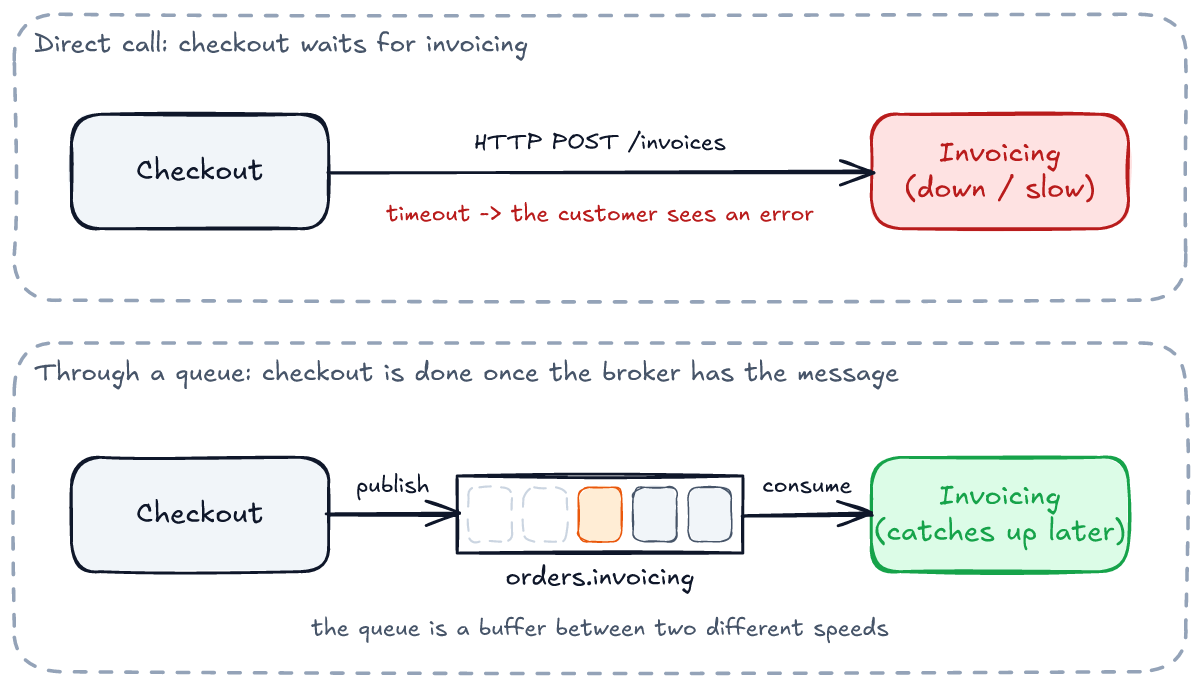
With a queue in between, checkout is done as soon as the broker has the message (or, with the outbox described later, as soon as its own database transaction commits). Invoicing picks it up when it can: in a millisecond, or after its deploy finishes. This gives you three things:
- Decoupling in time. The two sides do not need to be up at the same moment.
- Load levelling. A burst of 10,000 orders becomes a queue of 10,000 messages, not 10,000 concurrent requests to invoicing.
- Fan-out. The same "order placed" fact can reach invoicing, analytics and shipping without checkout knowing any of them exist.
It also costs three things, and most of this article is about them: the work happens later (so the caller cannot get the result), it can happen more than once (so the consumer has to tolerate duplicates), and it can fail where nobody is watching. The tools that deal with those costs are acknowledgements, publisher confirms, dead-letter queues and idempotent consumers.
The vocabulary, in one picture
RabbitMQ speaks AMQP 0-9-1, and the protocol's model has a twist that trips everyone up at first: a producer never sends to a queue. It sends to an exchange. The exchange looks at the message and at its list of bindings, and puts a copy into every queue whose binding matches. The exchange routes and keeps nothing. The queue stores messages and delivers them to consumers.
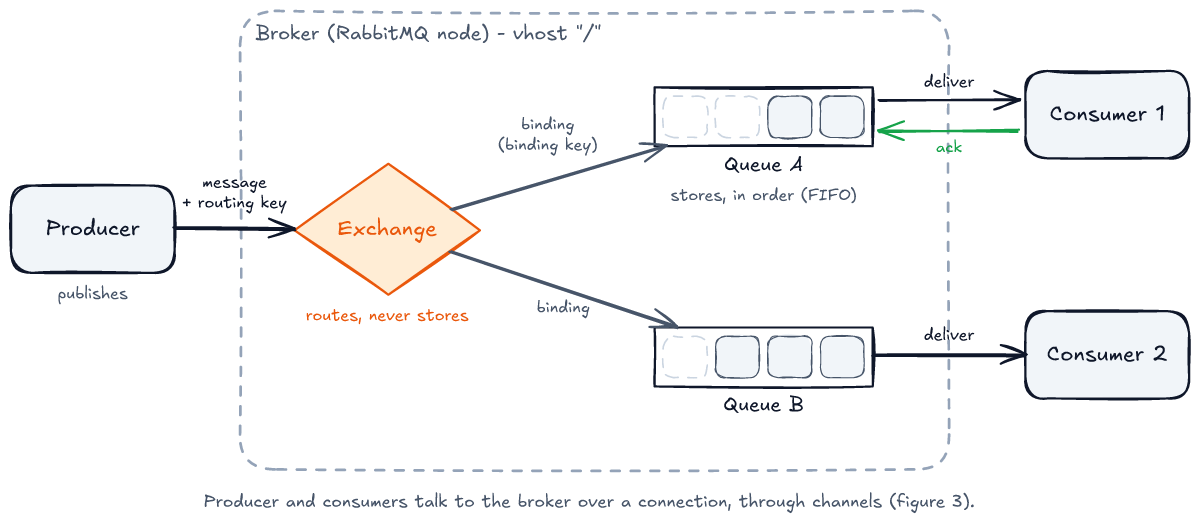
Here is the whole vocabulary, grouped by the part of the picture it belongs to. You do not need to memorise it now. Come back to it when a later section uses a word.
The players
| term | what it is |
|---|---|
| broker | The server: RabbitMQ. It accepts messages, routes them, stores them and delivers them. |
| node / cluster | One running RabbitMQ process is a node. Several nodes form a cluster and share exchanges, queues and users. |
| vhost | A virtual host: a namespace inside the broker with its own exchanges, queues and permissions. The default one is /. Think of it as a database schema. |
| producer / publisher | Code that sends messages. In Spring, usually a RabbitTemplate. |
| consumer | Code that receives messages from a queue. In Spring, a method annotated with @RabbitListener. |
The wiring
| term | what it is |
|---|---|
| connection | A TCP connection from your application to the broker. Expensive to open: handshake, authentication, heartbeats. An application that both publishes and consumes should have two (see connections and channels). |
| channel | A lightweight session multiplexed inside a connection. Every publish and every consumer works through a channel. |
| exchange | The router. Receives every published message and decides which queues get a copy. Has a type: direct, fanout, topic or headers. |
| queue | An ordered buffer of messages waiting for a consumer. The only place a message is stored. |
| binding | A rule "exchange X sends to queue Q when ...". The "when" depends on the exchange type. |
| routing key | A string the producer attaches to a message, e.g. order.placed.pl. |
| binding key | The string or pattern on a binding that the routing key is compared with, e.g. order.placed.*. |
| default exchange | The exchange with the empty name "". Every queue is bound to it under its own name, so publishing to "" with routing key orders.audit lands in the queue orders.audit. |
The message
| term | what it is |
|---|---|
| body | Bytes. RabbitMQ never looks inside. In this tutorial it is JSON. |
| properties | Standard metadata fields: content_type, delivery_mode, message_id, correlation_id, expiration and more. |
| headers | Your own key-value pairs, plus ones the broker adds: x-death, x-delivery-count. Spring adds __TypeId__ for the JSON converter. |
| delivery mode | persistent (2) or transient (1): whether the message should be written to disk. Spring's default is persistent. |
| delivery tag | A number the broker gives each delivery on a channel. An ack refers to a delivery by its tag. |
| redelivered | A flag on a delivery: "this message was delivered before and not acknowledged". |
Delivery and safety
| term | what it is |
|---|---|
| ack | The consumer telling the broker "done, delete it". |
| reject / nack | The consumer telling the broker "not done". With requeue=true the message goes back to the queue. With requeue=false it is dead-lettered, or dropped if the queue has no dead-letter exchange. nack is RabbitMQ's extension that can cover several deliveries at once. |
| ready / unacked | The two states of a message in a queue: waiting for a consumer, or delivered and not yet acknowledged. |
| prefetch (QoS) | How many unacked messages the broker may push to one consumer at a time. |
| durable | A property of a queue or exchange: it survives a broker restart. |
| persistent | A property of a message: it is written to disk. Durable and persistent are two different things; on a classic queue you need both, while a quorum queue writes every message to disk anyway. |
| publisher confirm | The broker telling the producer "I have taken responsibility for this message" (basic.ack), or "I could not" (basic.nack). |
| mandatory / return | A publish flag. If a mandatory message matches no queue, the broker sends it back to the producer (basic.return) instead of dropping it. |
| dead-letter exchange (DLX) | An exchange a queue sends its rejected, expired or overflowing messages to, with an x-death header saying why. |
| TTL | Time to live: how long a message may wait in a queue before it expires. |
| max-length / overflow | A queue's size limit, and what happens when it is reached: drop the oldest (drop-head, the default) or refuse new ones (reject-publish). |
Queue types
| type | what it is | use it for |
|---|---|---|
| classic | The original queue, stored on one node, not replicated. | Exclusive and temporary queues (per-connection reply queues), and data you can afford to lose or rebuild. |
| quorum | A replicated queue built on the Raft consensus algorithm. Always durable. Writes every message to disk. Replication needs a cluster: per the documentation, a three-node quorum queue keeps working after losing one node. On a single node, as in the tests here, you get durability but no high availability. | Anything you cannot afford to lose. The default choice in RabbitMQ 4. |
| stream | An append-only log that consumers read by offset and can re-read, closer to Kafka. | Replay, large fan-out, event history. Not covered here. |
Connections and channels
Before any routing happens, your application has to reach the broker. It does that over a connection, which is a real TCP connection with a handshake, authentication and heartbeats. Inside a connection you open as many channels as you need. A channel is just a number on the frames, so it costs almost nothing. The question is how many connections, and the answer for most services is two.
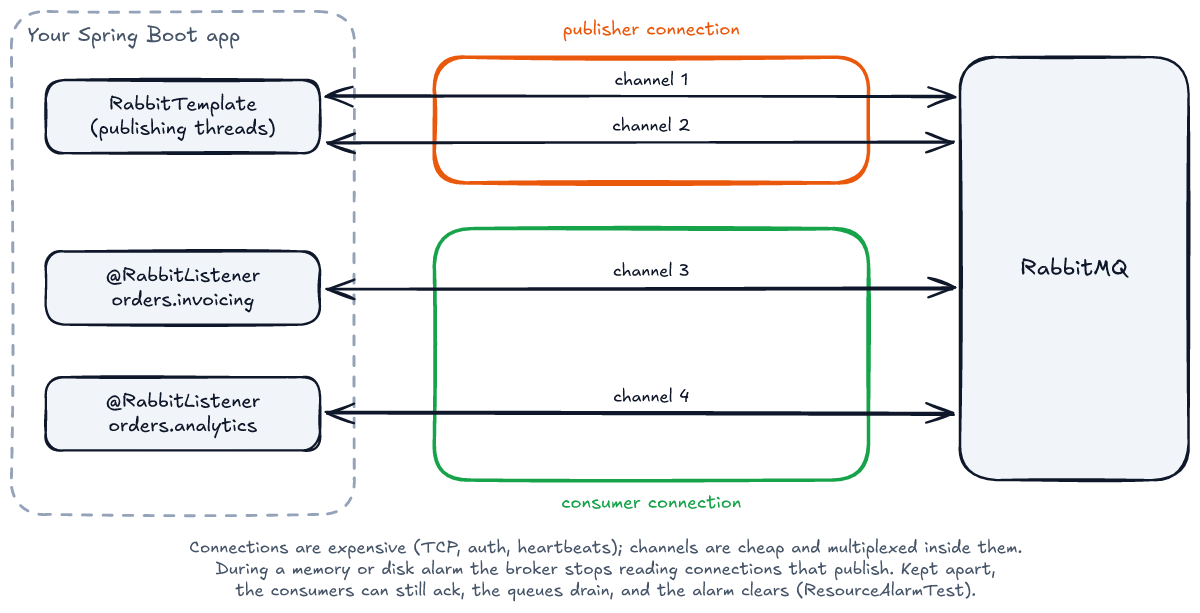
The classic beginner mistake is opening a connection per message. It works in a demo and melts the broker under load. Spring Boot gives you a CachingConnectionFactory that opens one connection and caches channels on it, so that mistake is hard to make with Spring.
The opposite mistake is the Spring Boot default, and it is subtler. When a broker node runs low on memory or disk it raises a resource alarm, and, as RabbitMQ's documentation puts it, "all connections in the cluster that attempt to publish a message will be blocked until all alarms across the cluster clear". "Stops reading" means everything on that connection, acks included. If your listeners share the connection with your RabbitTemplate, the moment the service publishes during an alarm its consumers can no longer acknowledge, the queues cannot drain, and the memory that would end the alarm is never freed. Spring AMQP's reference documentation warns that with a single connection factory, "as it is by default with Spring Boot auto-configuration", this can deadlock.
ResourceAlarmTest reproduces it with a typical pipeline stage that consumes a message and publishes another. Five messages are waiting and a memory alarm is raised. On one shared connection, the listener receives the first message, publishes, and from then on nothing is acknowledged: all five are still in the queue five seconds later. With the publisher on its own connection, the consumer keeps acking and the queue is empty. The demo application turns that on for its template:
// src/main/java/com/wolinski/rabbitmq/orders/RabbitConnections.java
@Bean
RabbitTemplateCustomizer publishOnASeparateConnection() {
    return template -> template.setUsePublisherConnection(true);
}
OrderFlowTest.theApplicationPublishesOnAConnectionOfItsOwn checks the broker's side: one connection for the listeners, one for the template. You will meet the channel cache again in the section on ordering, because it has a side effect too.
Exchanges: four ways to route
The exchange type decides how the routing key is compared with the binding keys. There are four types, plus the default exchange you already met. All of them are exercised in ExchangeTypesTest.
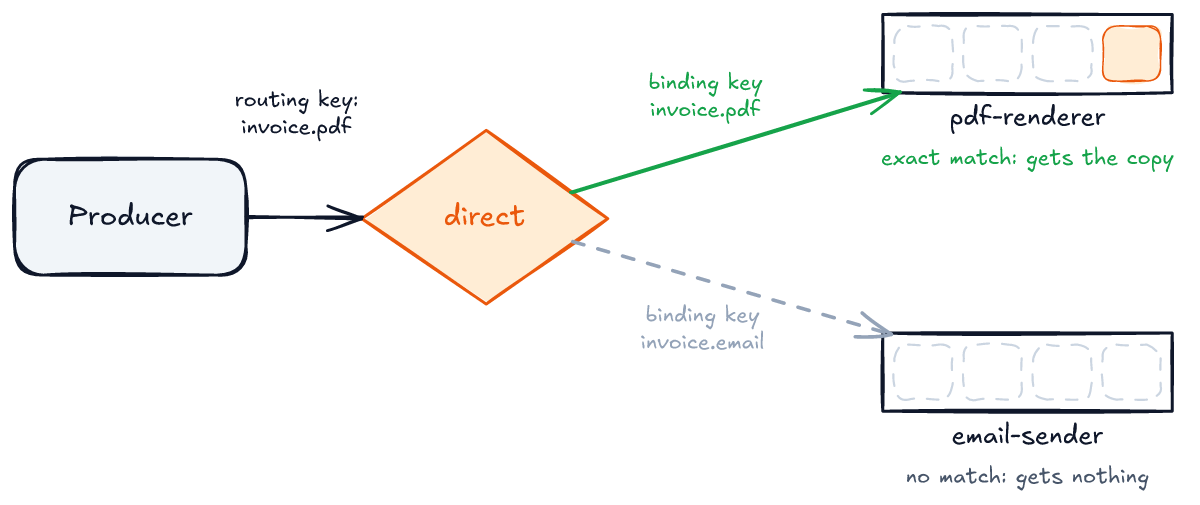
Direct: exact match
A direct exchange delivers a message to every queue whose binding key is exactly equal to the routing key. It is the simplest one: a lookup table.
Fanout: everyone gets a copy
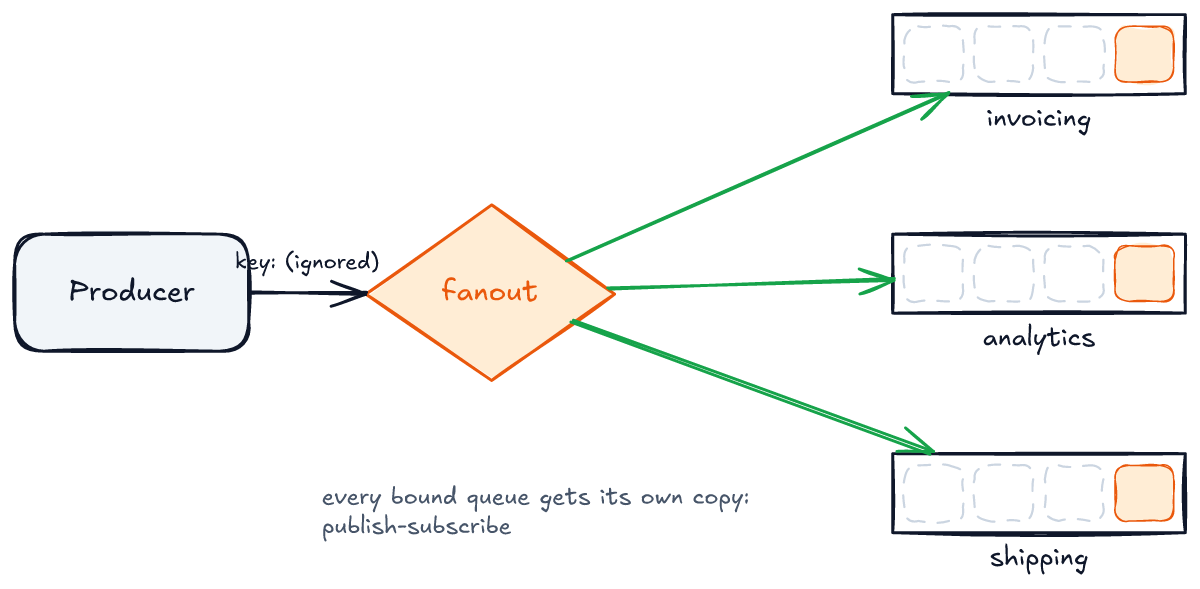
A fanout exchange ignores the routing key and copies the message to every bound queue. It is publish-subscribe in its purest form: each subscriber has its own queue, and each queue gets its own copy.
Topic: patterns over dotted words
A topic exchange treats the routing key as words separated by dots, and binding keys as patterns over those words. * matches exactly one word and # matches zero or more. This is the type most event-driven systems end up with, because one exchange can serve consumers interested in very different slices of the traffic.
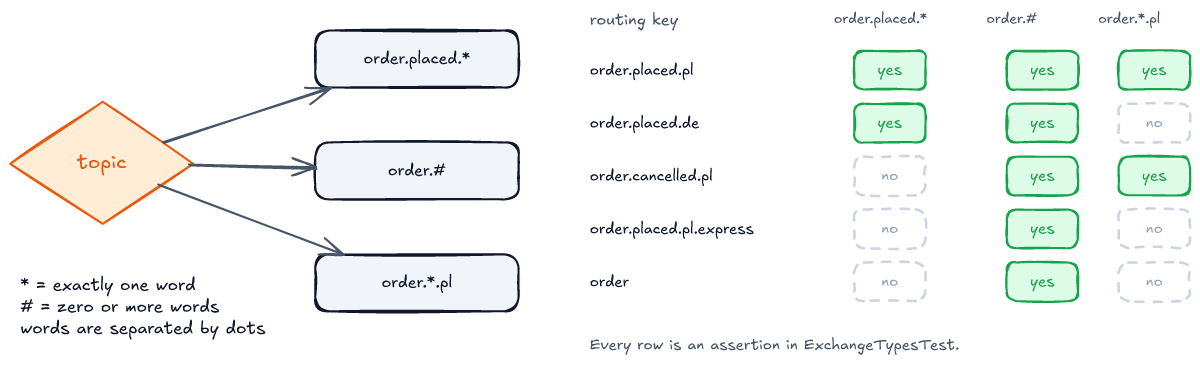
The two rows people get wrong are the last two. order.placed.pl.express has four words, so order.placed.* (exactly three) does not match it. order alone matches order.#, because # can match zero words. Here is the test that checks the whole table:
// src/test/java/com/wolinski/rabbitmq/ExchangeTypesTest.java
@Test
void topicExchangeMatchesWordsWithStarForOneAndHashForAnyNumber() {
    TopicExchange exchange = declare(new TopicExchange(unique("demo.topic")));
    Queue anyPlacedOrder = bind(exchange, "order.placed.*");
    Queue everythingAboutOrders = bind(exchange, "order.#");
    Queue polishOnly = bind(exchange, "order.*.pl");

    rabbit.convertAndSend(exchange.getName(), "order.placed.pl", "1");
    rabbit.convertAndSend(exchange.getName(), "order.placed.de", "2");
    rabbit.convertAndSend(exchange.getName(), "order.cancelled.pl", "3");
    rabbit.convertAndSend(exchange.getName(), "order.placed.pl.express", "4");
    rabbit.convertAndSend(exchange.getName(), "order", "5");

    // Which messages, not in what order: see OrderingTest for why the order can differ here.
    assertThat(drain(anyPlacedOrder)).containsExactlyInAnyOrder("1", "2");
    assertThat(drain(everythingAboutOrders)).containsExactlyInAnyOrder("1", "2", "3", "4", "5");
    assertThat(drain(polishOnly)).containsExactlyInAnyOrder("1", "3");
}
Note the comment about order. The first version of this test asserted the exact order and failed: the queue received 1, 3, 2, 5, 4. That was not the exchange's doing, and the section on ordering explains where it came from.
Headers, and the default exchange
A headers exchange ignores the routing key and matches on message headers instead. The binding says x-match: all (every listed header must match) or any (one is enough). It is rarely needed, but useful when the routing criteria do not fit in a dotted string.
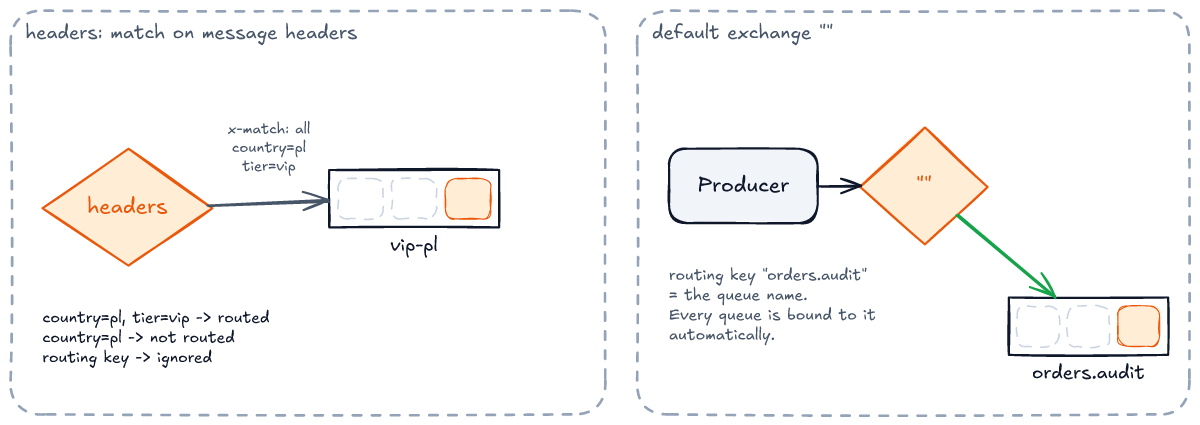
The default exchange is the one with the empty name. Every queue is bound to it automatically, with its own name as the binding key, so convertAndSend("", "orders.audit", ...) puts a message straight into orders.audit. It is convenient for tests and for point-to-point work, and most of the tests in the repository use it to keep each one focused on a single idea.
The Spring Boot 4.2 project
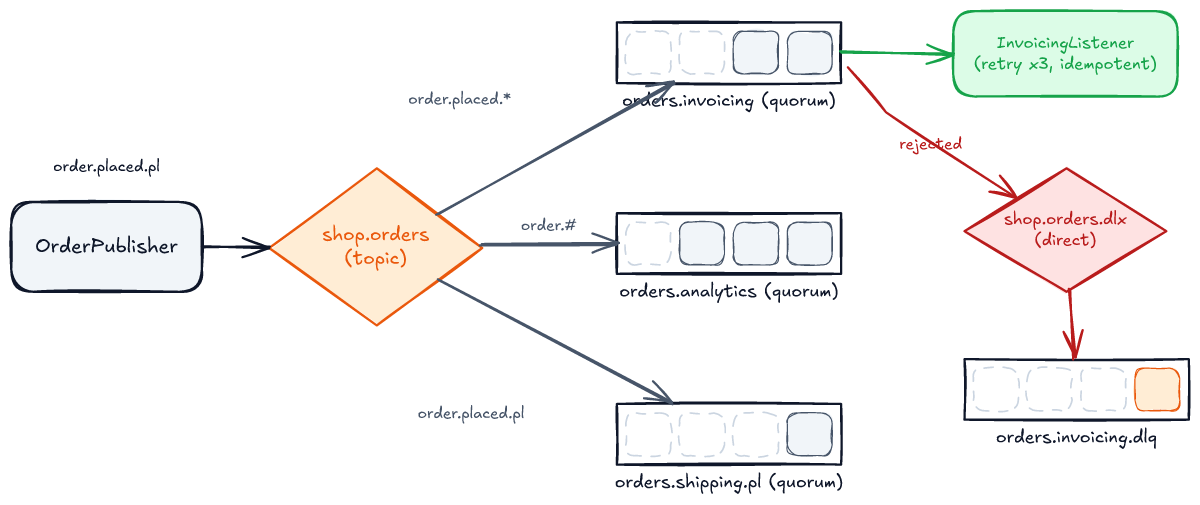
Time to build something. The demo application is a slice of a shop: checkout publishes an OrderPlaced event, and three queues receive it. Invoicing issues an invoice, analytics counts it, and Polish shipping only cares about orders from Poland.
The starter: pick the right one of three
The first trap shows up before any code. Spring Boot 4.2 has three AMQP starters, and the obvious name is the wrong one for this tutorial:
spring-boot-starter-amqp: a generic AMQP 1.0 client (it pulls in Apache Qpid'sprotonj2-client). With it, theorg.springframework.amqp.rabbitpackages did not exist, so nothing compiled.spring-boot-starter-amqp-rabbitmq: Spring AMQP's client for RabbitMQ over AMQP 1.0 (spring-rabbitmq-client). Everything compiled, and then the context failed to start withNo qualifying bean of type 'org.springframework.amqp.rabbit.connection.ConnectionFactory'.spring-boot-starter-rabbitmq: the one that auto-configures the classic AMQP 0-9-1 stack, meaningConnectionFactory,RabbitTemplate,RabbitAdminand@RabbitListener.
<!-- pom.xml -->
<dependency>
    <groupId>org.springframework.boot</groupId>
    <artifactId>spring-boot-starter-rabbitmq</artifactId>
</dependency>
<dependency>
    <groupId>org.springframework.boot</groupId>
    <artifactId>spring-boot-starter-jackson</artifactId>
</dependency>
The Jackson starter is there for the message converter. Spring Boot 4 moved to Jackson 3, and Spring AMQP 4 followed: the converter is now JacksonJsonMessageConverter. The Jackson 2 based Jackson2JsonMessageConverter you will find in older guides is deprecated for removal.
The message: a record
// src/main/java/com/wolinski/rabbitmq/orders/OrderPlaced.java
/** The event the shop publishes after checkout. A record is all a JSON message needs. */
public record OrderPlaced(String orderId, String country, long amountCents) {

    /** {@code order.placed.pl}, {@code order.placed.de}: the topic exchange routes on these words. */
    public String routingKey() {
        return "order.placed." + country.toLowerCase();
    }
}
The topology as beans
Exchanges, queues and bindings are declared as Spring beans. On the first connection, Spring's RabbitAdmin declares all of them on the broker. Declaring is idempotent: if a queue already exists with the same arguments, nothing happens. If it exists with different arguments, the broker refuses, and that is a classic deployment-day error.
// src/main/java/com/wolinski/rabbitmq/orders/OrderTopology.java
@Bean
TopicExchange ordersExchange() {
    return ExchangeBuilder.topicExchange(ORDERS_EXCHANGE).durable(true).build();
}

@Bean
DirectExchange deadLetterExchange() {
    return ExchangeBuilder.directExchange(DEAD_LETTER_EXCHANGE).durable(true).build();
}

@Bean
Queue invoicingQueue() {
    return QueueBuilder.durable(INVOICING_QUEUE)
            .quorum()
            .deadLetterExchange(DEAD_LETTER_EXCHANGE)
            .deadLetterRoutingKey(INVOICING_DEAD_LETTER_QUEUE)
            .build();
}
Two things to notice. Every queue is a quorum queue. That is the right default in RabbitMQ 4 for anything you care about, and the puzzle at the end turns on it. The invoicing queue also names a dead-letter exchange, so a message it rejects goes somewhere a person can look at, instead of disappearing. The bindings come next, and then the converter:
// src/main/java/com/wolinski/rabbitmq/orders/OrderTopology.java
@Bean
Declarables orderBindings(TopicExchange ordersExchange, DirectExchange deadLetterExchange,
        Queue invoicingQueue, Queue invoicingDeadLetterQueue, Queue analyticsQueue, Queue plShippingQueue) {
    return new Declarables(
            BindingBuilder.bind(invoicingQueue).to(ordersExchange).with("order.placed.*"),
            BindingBuilder.bind(analyticsQueue).to(ordersExchange).with("order.#"),
            BindingBuilder.bind(plShippingQueue).to(ordersExchange).with("order.placed.pl"),
            bindDeadLetters(invoicingDeadLetterQueue, deadLetterExchange));
}

/** One converter bean: Boot hands it to both the RabbitTemplate and the @RabbitListener containers. */
@Bean
JacksonJsonMessageConverter messageConverter() {
    return new JacksonJsonMessageConverter();
}
The configuration
# src/main/resources/application.yaml
spring:
  rabbitmq:
    # Publisher side: ask the broker for a confirm per message, and to hand back what it could not route.
    publisher-confirm-type: correlated
    publisher-returns: true
    template:
      mandatory: true
    # Consumer side.
    listener:
      simple:
        prefetch: 10
        retry:
          enabled: true
          max-retries: 3
          initial-interval: 200ms
          multiplier: 2.0
          max-interval: 2s
Each of these lines gets its own section below, and each is there because the default does something you probably do not want. A note for people coming from Spring Boot 3: the retry property is now max-retries, where older guides show max-attempts. It counts retries, not calls, so 3 means four calls in total, and OrderFlowTest counts them.
Publishing and consuming
The publisher sends the event and then waits for the broker's verdict. It asks two separate questions: did the broker take the message (the confirm), and did any queue want it (the return)?
// src/main/java/com/wolinski/rabbitmq/orders/OrderPublisher.java
public void publish(OrderPlaced order) {
    CorrelationData correlation = new CorrelationData(order.orderId());
    rabbit.convertAndSend(OrderTopology.ORDERS_EXCHANGE, order.routingKey(), order, correlation);

    CorrelationData.Confirm confirm = awaitConfirm(correlation);
    if (false == confirm.ack()) {
        throw new OrderNotPublished(order, "broker nack: " + confirm.reason());
    }
    ReturnedMessage returned = correlation.getReturned();
    if (null != returned) {
        throw new OrderNotPublished(order, "returned " + returned.getReplyText()
                + " for routing key " + returned.getRoutingKey());
    }
}
Three things this publisher deliberately does not solve, and you have to:
- The dual write. Checkout writes the order to its database and publishes the event. Those are two systems and there is no transaction spanning both. Publish before the commit and a rollback leaves an event about an order that does not exist; publish after it and a crash between the two loses the event for good. Confirms cannot help, because the publish never happened. The standard answer is the transactional outbox: write the event to a table in the same transaction as the order, and let a relay publish it with confirms. The follow-up article covers the relay's retries and monitoring.
- The unknown outcome. When
awaitConfirmtimes out, the message may or may not be in the queue: the broker may have taken it and the confirm got lost with the connection. The only safe reaction is to publish again, which means the consumer can see the event twice. Publisher-side retries are one more reason the consumer has to be idempotent. - Throughput. Waiting for each confirm costs one network round trip per message. That is fine for a checkout. For bulk publishing, send a batch and wait once (
invokewithwaitForConfirmsOrDie, shown in ordering), or handle theCorrelationDatafutures asynchronously.
The consumer is a method with @RabbitListener. Spring converts the JSON body back into the record, calls the method, and acknowledges the message when the method returns. The idempotency check is explained in typical problems.
// src/main/java/com/wolinski/rabbitmq/orders/InvoicingListener.java
@RabbitListener(queues = OrderTopology.INVOICING_QUEUE)
void onOrderPlaced(OrderPlaced order) {
    if (processed.contains(order.orderId())) {
        return;
    }
    issuer.issue(order);
    // Marked only after the side effect succeeded: a failure must leave the order eligible for a retry.
    processed.mark(order.orderId());
}
OrderFlowTest.oneOrderReachesEveryQueueWhoseBindingMatchesItsRoutingKey publishes a Polish and a German order. Invoicing issues both invoices, analytics receives both, and Polish shipping receives only the Polish one.
The life of a message
Before going further, it helps to see every state a message can be in, because most bugs are a message in a state its author did not expect.
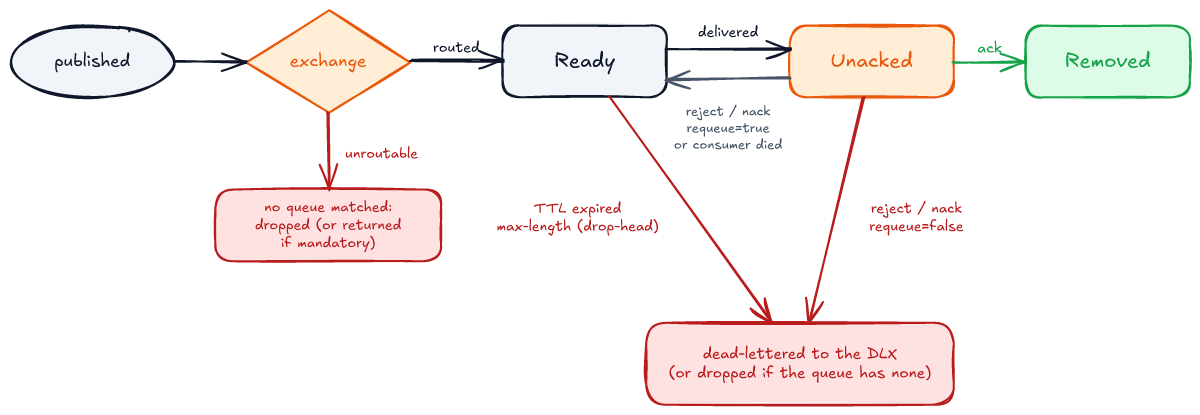
The two states inside a queue are the ones to understand well. A ready message is waiting for a consumer. An unacked message has been delivered and is waiting for its verdict. The unacked message has not left the broker, which still holds it. It is just invisible to other consumers. If the consumer's channel closes without an ack, it goes back to ready. AcknowledgementTest.anUnackedMessageWaitsInvisiblyAndReturnsWhenTheConsumerGoesAway shows that: while the consumer holds the message, the queue's ready count is 0, and after the consumer stops it is 1 again.
Acknowledgements: who says "done"
The acknowledgement decides when the broker deletes a message, so it decides what happens when your code fails halfway. Spring AMQP has three modes, and the names are the most common source of confusion in this whole topic.
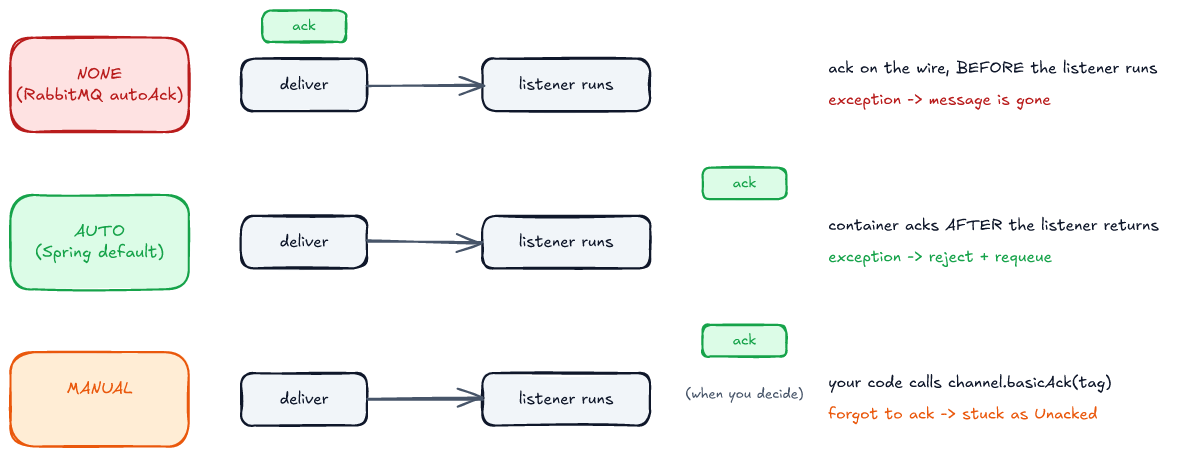
Spring's AUTO is not RabbitMQ's "auto ack". In RabbitMQ terms, auto-ack (autoAck=true in basicConsume) means the broker considers the message delivered the moment it sends it. Spring calls that mode NONE. Spring's AUTO, which is the default, means the container acks after your listener returns normally, and rejects if it throws. The Javadoc of AcknowledgeMode spells it out: "Do not confuse with RabbitMQ autoAck which is represented by NONE here".
The difference matters as soon as a listener throws:
// src/test/java/com/wolinski/rabbitmq/AcknowledgementTest.java
@Test
void noneMeansTheBrokerForgetsTheMessageOnDeliverySoAFailureLosesIt() {
    Queue queue = declare(QueueBuilder.durable(unique("ack.none")).build());
    AtomicInteger attempts = new AtomicInteger();
    consume(queue, message -> {
        attempts.incrementAndGet();
        throw new IllegalStateException("crashed mid-way");
    }, container -> container.setAcknowledgeMode(AcknowledgeMode.NONE));

    rabbit.convertAndSend("", queue.getName(), "A-1");

    await().during(Duration.ofSeconds(1)).atMost(Duration.ofSeconds(5)).until(() -> 1 == attempts.get());
    stopConsumers();
    assertThat(ready(queue)).as("gone: acknowledged on the wire before the listener ran").isZero();
}
With NONE the message was tried once and is gone. With AUTO, the companion test sees the same message delivered a second time, with redelivered=true, and the second attempt succeeds. Use AUTO unless you have a specific reason not to. Use MANUAL when the work finishes on another thread and you need to ack from there. Use NONE only for messages you can afford to lose.
Prefetch and competing consumers
Put two consumers on one queue and they compete: each message goes to exactly one of them. That is how you scale processing horizontally. How the work is split depends on one number: the prefetch, which is how many unacked messages the broker may push to a consumer before it hears back.
PrefetchTest sets up the worst case. One consumer is stuck on its first message and never finishes, and the other is fast. Ten messages are published. How many does the fast consumer get to process?
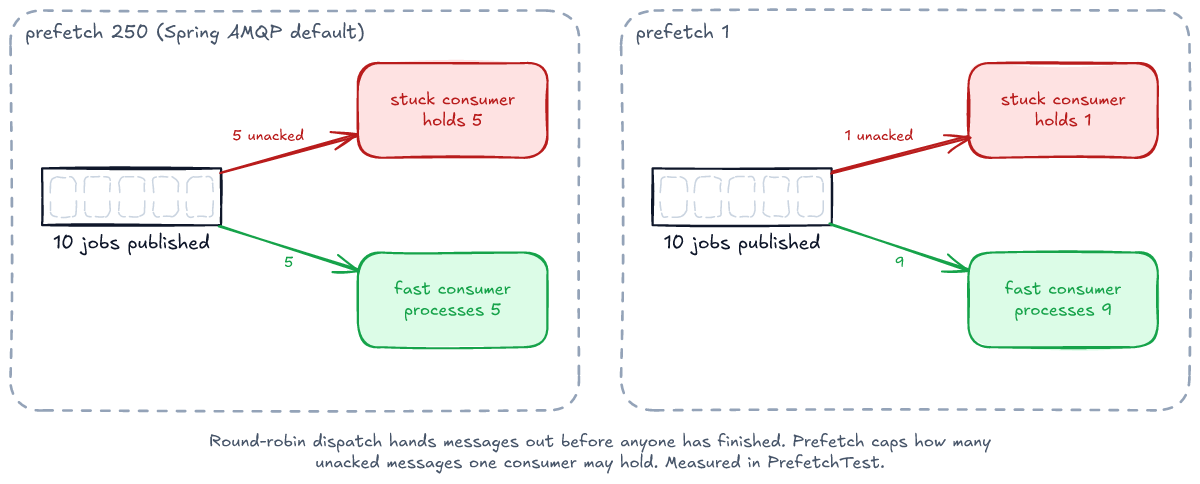
With Spring AMQP's default prefetch of 250 (AbstractMessageListenerContainer.DEFAULT_PREFETCH_COUNT), the broker hands the ten messages out round-robin as they arrive, five each, before either consumer has finished anything. Four of the stuck consumer's five then wait behind a message that never completes, while the fast consumer has nothing left to do. With prefetch 1, the stuck consumer holds one message and the fast one processes the other nine.
So which value? A high prefetch gives throughput when messages are small and processing is uniform, because the consumer never waits for the network. A low prefetch gives fairness when processing time varies or a consumer can stall. The demo application uses 10, a common middle ground. The point is to choose the value on purpose, because the default was picked for throughput, not for fairness.
There is one more constraint, and it is the one that bites in production. The broker's consumer timeout (30 minutes by default) runs from the moment a message is delivered, and prefetched messages are delivered, just waiting in the client's buffer. So the real limit is not "one message must finish in 30 minutes", it is roughly prefetch × processing time. At the default prefetch of 250 and 10 seconds per message, the last message in the buffer waits about 42 minutes, so it times out and is redelivered, possibly to another instance, while it is still queued behind the others. PrefetchTest.messagesWaitingInThePrefetchBufferRunDownTheConsumerTimeoutToo shrinks the numbers: a 3-second timeout, messages that take 2 seconds each, prefetch 4. No single message is slow, and the broker still redelivers.
Publisher confirms and returns
The consumer side has acks. The producer side has publisher confirms: the broker tells the producer whether it took responsibility for each message. Without confirms, convertAndSend returning normally only means the bytes left your process.
Confirms answer a narrower question than most people assume, though. Here is the first surprise from the test suite:
// src/test/java/com/wolinski/rabbitmq/PublisherConfirmsTest.java
@Test
void anUnroutableMessageIsConfirmedAndSilentlyDroppedWithoutMandatory() throws Exception {
    TopicExchange exchange = new TopicExchange(unique("confirms.no-bindings"));
    admin.declareExchange(exchange);
    RabbitTemplate fireAndHope = new RabbitTemplate(connectionFactory);
    fireAndHope.setMandatory(false);

    CorrelationData correlation = new CorrelationData("A-1");
    fireAndHope.convertAndSend(exchange.getName(), "order.placed.pl", "A-1", correlation);

    assertThat(correlation.getFuture().get(5, TimeUnit.SECONDS).ack()).isTrue();
    assertThat(correlation.getReturned()).as("nobody tells you it went nowhere").isNull();
}
The exchange has no bindings, so the message matched no queue. The broker confirmed it anyway (ack=true) and dropped it. A confirm means "I processed your publish". It does not mean "a queue has it". To learn that, you need one of two things. The mandatory flag makes the broker send an unroutable message back to the publisher, which is right when the publisher can do something about it. An alternate exchange, set as an argument on the exchange, catches every message no binding matched and routes it to a queue of your choice, which is right when nobody upstream can and a person should look. PublisherConfirmsTest.anAlternateExchangeCatchesWhatNoBindingMatched shows that the message then counts as routed: no return, an ack, and the message waiting in the catch-all queue.
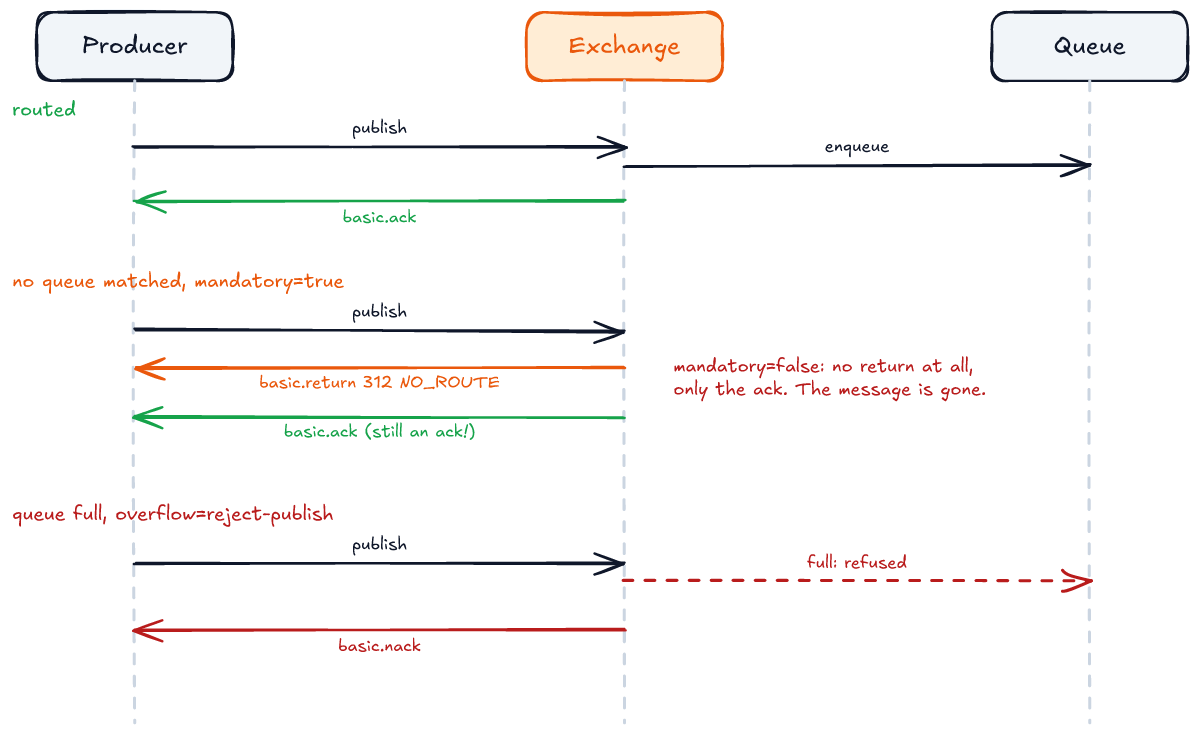
When the message is routed, the confirm carries more weight than it seems. According to RabbitMQ's documentation, the ack for a persistent message routed to a durable queue is sent only after the message has been written to disk, and a quorum queue confirms only once a majority of its replicas have written it. So a confirm is the earliest moment at which a publisher may forget a message, and the reason the outbox relay marks its row as published only after one. It also has a price: the broker writes to disk in batches every few hundred milliseconds, so under load a single confirm can take that long, which is why the documentation strongly advises handling confirms asynchronously or per batch.
With mandatory: true, the same publish produces a return with reply code 312 and text NO_ROUTE, and then the ack. Spring AMQP guarantees the return is attached to the CorrelationData before the confirm future completes, so the publisher above can check both in order. A nack is rare and always worth an alert: the broker sends one when a queue refuses the message, as a full queue with overflow: reject-publish does, or, in the documentation's words, "in exceptional cases when the broker is unable to handle messages successfully". Spring AMQP also completes outstanding confirms as nacks itself, with a reason, when the channel closes before the broker answered. PublisherConfirmsTest.aFullQueueWithRejectPublishAnswersWithANack shows the first case on a classic queue. On a quorum queue the same test is unreliable, and RabbitMQ's documentation explains why: quorum queues enforce reject-publish loosely and "may overshoot their limit by some small number of messages".
Durable, persistent, and what survives a restart
"Durable" and "persistent" sound like synonyms, and mixing them up loses messages. Durable is a property of the queue: the queue's definition survives a restart. Persistent is a property of each message: the message is written to disk. On a classic queue you need both. DurabilityTest publishes one persistent and one transient message to a durable classic queue and a quorum queue, waits for the confirms, restarts RabbitMQ on the node (rabbitmqctl stop_app and start_app), and reads back what is left:
| queue | persistent message | transient message |
|---|---|---|
| durable classic | survived | lost |
| quorum | survived | survived: a quorum queue writes every message to disk |
That is a clean restart. A crash is worse, and RabbitMQ's documentation describes it: a persistent message the node had not yet written to disk is lost too, and the only signal the publisher gets is that its confirm never arrived. Persistence without confirms is a hope.
The third case, a non-durable shared queue, could not be tested the way older tutorials suggest, because RabbitMQ 4.4 no longer accepts it. Declaring a non-durable, non-exclusive queue does not just fail. The broker closes the whole connection:
// src/test/java/com/wolinski/rabbitmq/DurabilityTest.java
@Test
void rabbitMq4RefusesANonDurableSharedQueueAndClosesTheWholeConnection() {
    Queue nonDurable = QueueBuilder.nonDurable("durability.non-durable").build();

    assertThatThrownBy(() -> admin.declareQueue(nonDurable))
            .isInstanceOf(AmqpIOException.class)
            .rootCause().hasMessageContaining("reply-code=541")
            .hasMessageContaining("Feature `transient_nonexcl_queues` is deprecated");
}
If you upgrade from RabbitMQ 3 and one service still declares durable=false queues, every other channel on that service's connection dies with it. Exclusive queues, the per-connection temporary kind, are still fine (DurabilityTest.anExclusiveTemporaryQueueIsStillAllowed).
Retries and dead-letter queues
Messages fail. A downstream API times out, a payload is invalid, a bug throws. What you need is a policy: retry what might succeed later, and set aside what will never succeed, somewhere a person can find it. The demo uses two layers, drawn in panel A below.
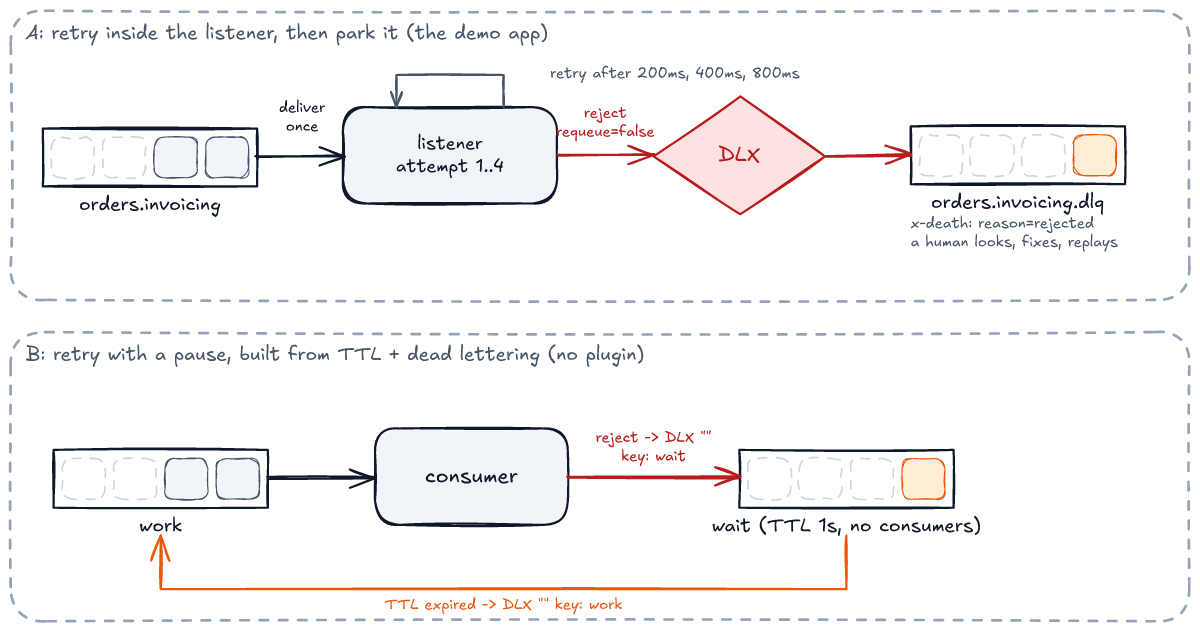
Layer one: retry in the listener. spring.rabbitmq.listener.simple.retry wraps the listener in a retry interceptor. The broker delivers the message once, and Spring calls your method up to four times with exponential backoff (200 ms, 400 ms, 800 ms). Layer two: dead-lettering. When retries run out, Spring's default recoverer rejects the message with requeue=false, and the queue's dead-letter exchange routes it to orders.invoicing.dlq:
// src/test/java/com/wolinski/rabbitmq/OrderFlowTest.java
@Test
void aFailingOrderIsRetriedInProcessThenParkedInTheDeadLetterQueue() {
    OrderPlaced broken = order("PL", -1);

    publisher.publish(broken);

    Message parked = await().atMost(Duration.ofSeconds(10))
            .until(() -> rabbit.receive(OrderTopology.INVOICING_DEAD_LETTER_QUEUE, 200), Objects::nonNull);
    Map<String, ?> death = parked.getMessageProperties().getXDeathHeader().getFirst();
    assertThat(death.get("reason")).isEqualTo("rejected");
    assertThat(death.get("queue")).isEqualTo(OrderTopology.INVOICING_QUEUE);
    assertThat(death.get("count")).as("dead-lettered once, after the in-process retries").isEqualTo(1L);
    assertThat(issuer.attempts(broken.orderId())).as("1 call + max-retries: 3").isEqualTo(4);
    assertThat(issuer.issued()).doesNotContain(broken.orderId());
}
The x-death header is the broker's record of why the message died, where it died and how many times. A dead-letter queue without monitoring is still a place where messages disappear, only more slowly, so alert on its depth.
One caveat the demo accepts and you might not. According to the quorum queue documentation, by default a quorum queue dead-letters at most once: the message is removed from the source queue and handed to the DLX without a confirm, so if the target is unavailable at that moment it is lost. RabbitMQ also offers dead-letter-strategy: at-least-once, which keeps the message in the source queue until the dead-letter target confirms it. It requires overflow: reject-publish, costs memory and CPU, and can produce duplicates in the DLQ. Turn it on when the dead letters are records you must keep, not diagnostics.
In-process retry has a limit: while Spring sleeps between attempts, that consumer thread processes nothing else, and the message stays unacked, so the pauses count against the consumer timeout for it and for every prefetched message waiting behind it. For pauses of seconds or minutes, use panel B: a wait queue with a TTL and no consumers, whose dead-letter target is the work queue. The consumer rejects, the message sits in the wait queue until its TTL expires, and then it is dead-lettered back to work. It uses only built-in features, no plugin:
// src/test/java/com/wolinski/rabbitmq/DelayedRetryTest.java
Queue workQueue = declare(QueueBuilder.durable(work).quorum()
        .deadLetterExchange("").deadLetterRoutingKey(wait).build());
declare(QueueBuilder.durable(wait).quorum()
        .ttl(1000).deadLetterExchange("").deadLetterRoutingKey(work).build());
The TTL is set on the queue, not on each message, and that matters. A queue only expires messages at its head, so with per-message TTLs of different lengths a long one at the head holds back a short one behind it. QueueLimitsTest.aLongPerMessageTtlAtTheHeadHoldsBackAnExpiredMessageBehindIt publishes a 3-second message and then a 100-millisecond one: the short one is dead-lettered only after the long one, more than 2.5 seconds late. One wait queue per delay keeps every message in it on the same clock.
The test measures the gap between the first and second delivery and asserts it is between one and three seconds. For several retry levels, chain several wait queues with growing TTLs (say 1 s, 10 s and 60 s), and use the x-death count to pick the next one or give up.
Ordering
A queue is FIFO. People take that to mean "my messages are processed in the order I sent them", and that is true only if nothing on either side reorders them. Both sides can.
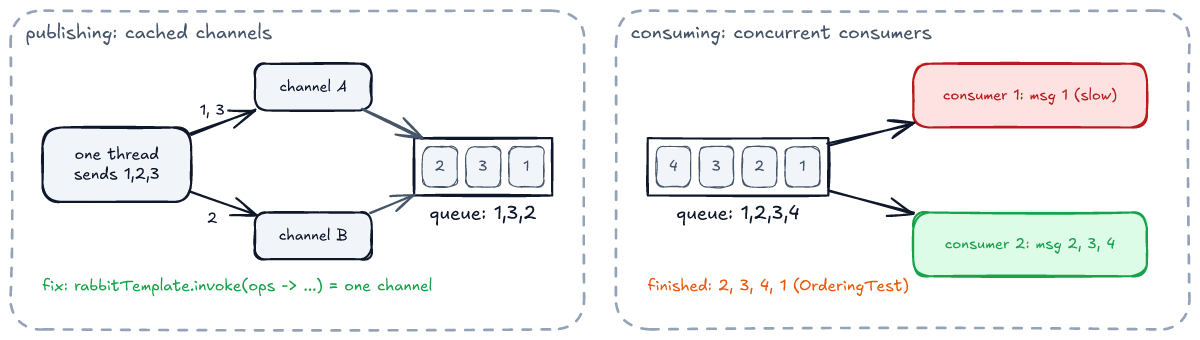
On the way in. RabbitTemplate checks a channel out of the CachingConnectionFactory's cache for each operation and returns it afterwards, and Spring AMQP's documentation says plainly that the next operation is not guaranteed to get the same channel. Messages on different channels have no ordering guarantee relative to each other. With publisher confirms on, this happened to us from a single thread: the topic test above sent 1, 2, 3, 4, 5 and the queue received 1, 3, 2, 5, 4. It does not happen every run, which makes it worse. When order matters, publish the batch through invoke, which pins every operation in the callback to one channel:
// src/test/java/com/wolinski/rabbitmq/OrderingTest.java
rabbit.invoke(operations -> {
    sent.forEach(id -> operations.convertAndSend("", queue.getName(), id));
    operations.waitForConfirmsOrDie(5_000);
    return null;
});
Two hundred messages published this way arrive in exactly the order sent. For publishing from several threads in a guaranteed order, Spring AMQP's reference documentation describes a channel cache of size 1 on a dedicated publisher connection.
On the way out. With more than one consumer, or one container with concurrentConsumers > 1, messages are taken in order but finish in whatever order the work takes. In OrderingTest, two consumers process 1, 2, 3 and 4. Message 1 is slow, so they finish 2, 3, 4, 1. If order matters per entity, for example "paid" must not overtake "placed" for the same order, use a queue with single active consumer (x-single-active-consumer: true): several instances subscribe for failover, and the broker delivers to only one at a time. In OrderingTest.aSingleActiveConsumerGetsEverythingAndTheNextOneTakesOverWhenItLeaves, the first consumer gets messages 1 to 4 while the second gets nothing; when the first stops, message 5 goes to the second. To scale beyond one consumer, partition: route each entity to one of N queues by a hash of its id (RabbitMQ's documentation suggests the x-modulus-hash exchange for this), each with a single active consumer. Remember that a requeue or a retry also reorders: the message that failed is processed after the ones behind it, unless processing for that entity stops until it succeeds.
Delivery guarantees, end to end
Every section so far tuned one link. The guarantee the business cares about, "every placed order is invoiced exactly once", is a property of the whole chain, and the chain is only as strong as its weakest link.
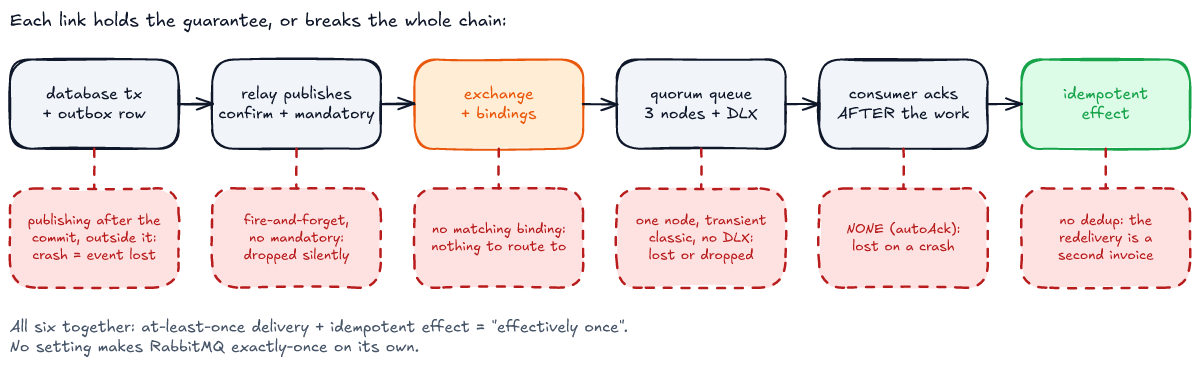
| you get | when | what it costs |
|---|---|---|
| at most once | No confirms, or ack mode NONE, or a rejected message on a queue with no DLX | Lost messages, usually without an error |
| at least once | Outbox or equivalent, confirms and mandatory, durable replicated queues, ack after the work, a DLX everywhere | Duplicates: from publisher retries, consumer crashes and consumer timeouts |
| effectively once | At least once, plus an idempotent consumer | A deduplication record, and thought about each external side effect |
"Exactly once" is not on the list on purpose. A broker cannot know whether your consumer charged the card before it crashed, so delivery can only be made at-least-once; "once" is something the consumer achieves on top of that.
What to watch in production
Most of the problems below are silent until something is measured. RabbitMQ exposes Prometheus metrics through its built-in rabbitmq_prometheus plugin. The handful worth an alert:
- Ready messages per queue, and their trend. A queue that only grows means the consumers cannot keep up or are gone.
- Consumers per queue. Zero consumers on a queue that receives traffic is an outage that has not been noticed yet.
- Unacked messages per queue. Steadily high means slow or stuck consumers, and a prefetch that hides it.
- Redelivery rate. A poison message looks like a high redelivery rate long before it looks like anything else.
- Dead-letter queue depth. Any non-zero value is work for a person.
- Publisher nacks, returns and confirm latency, measured in the application. A return means a routing bug; a nack means a full or failing queue.
- Memory and disk alarms, and blocked connections on the client side (Spring publishes a
ConnectionBlockedEvent). When an alarm fires on any node, every publishing connection in the cluster is blocked until all alarms clear.
Typical problems
This is the section to come back to when something is wrong. Each row is a symptom, its usual cause and the fix. Where a test in the repository shows the behaviour, it is named.
| symptom | cause | fix |
|---|---|---|
| Publish "succeeded", no consumer ever saw it | No binding matched. The broker confirmed it and dropped it. | mandatory: true plus a returns check, or an alternate exchange with a catch-all queue; confirms alone are not enough (PublisherConfirmsTest) |
| Listener threw, message gone | Acknowledge mode NONE: acked before the listener ran | Use AUTO (the default) or MANUAL (AcknowledgementTest) |
| Same message processed twice: two invoices, two e-mails | At-least-once delivery. A consumer that dies after the side effect and before the ack causes a redelivery. | Idempotent consumer: record the message id and skip what you have already done (OrderFlowTest.theSameOrderDeliveredTwiceIsInvoicedOnce) |
| One consumer overloaded, others idle | Default prefetch of 250 with uneven processing time | Lower the prefetch (PrefetchTest) |
| Messages stuck as "Unacked", then suddenly redelivered to another consumer, often processed twice | MANUAL mode and a code path that never acks, or work that takes longer than the broker's consumer_timeout (30 minutes by default in 4.4). When it fires, the broker cancels the consumer or closes its channel and requeues the message, while the first consumer may still be working on it. | Ack or nack on every path, including exceptions. Keep prefetch × processing time, not just one message, well under the timeout, and move long jobs out of the listener (AcknowledgementTest, PrefetchTest) |
| Event about an order that was rolled back, or an order whose event never left | The dual write: database commit and publish are not atomic | Transactional outbox |
| Another service cannot deserialize the message, or breaks after a package rename | Spring's JSON converter writes the producer's fully qualified Java class name in __TypeId__, and the consumer relies on it | Treat the JSON as the contract: let consumers map it to their own type, and version events additively |
| Same message redelivered in a tight loop, logs exploding | Listener throws, AUTO requeues, nothing stops it | Retry with a limit and a DLX, or throw AmqpRejectAndDontRequeueException. See also the puzzle. |
| Queue depth growing for hours, then broker memory or disk alarm and blocked publishers | Consumers slower than producers, or dead | Alert on queue depth and on consumer count. Set max-length or TTL where old messages are worthless (QueueLimitsTest). |
| Messages processed out of order | Several channels on the way in, concurrency on the way out | invoke for publishing; one consumer or partitioned queues for consuming (OrderingTest) |
| Messages lost on broker restart | Transient messages in a classic queue | Persistent messages (Spring's default), or quorum queues (DurabilityTest) |
Whole connection closed with 541 ... transient_nonexcl_queues | Declaring a non-durable shared queue on RabbitMQ 4 | Durable, quorum, or exclusive (DurabilityTest) |
Startup fails with PRECONDITION_FAILED - inequivalent arg | A queue redeclared with different arguments than it already has | Queue arguments cannot be changed by redeclaring. Use a policy, or a new queue and a migration (QueueLimitsTest). |
Context fails: no ConnectionFactory bean | Wrong Spring Boot 4.2 starter | spring-boot-starter-rabbitmq |
| Hundreds of connections from one service | A connection opened per message or per request | Long-lived connections, one for publishing and one for consuming. Let CachingConnectionFactory manage channels. |
| During a memory or disk alarm, consumers stop acking too and the service never recovers on its own | Publisher and listeners share one connection, the Spring Boot default. The broker stops reading the whole connection. | setUsePublisherConnection(true) on the template (ResourceAlarmTest) |
| Publishes of large payloads fail, or every queue slows down | Messages of many megabytes. The 4.4.0 node reports a default max_message_size of 16 MiB, and big messages hurt replication and memory well before that. | Claim check: store the payload in object storage or a database and send a reference |
The idempotency row deserves more than a table cell, because it is the one people try to engineer away. RabbitMQ delivers at least once, and no setting changes that: a consumer that crashes between "did the work" and "sent the ack" will see the message again, and so will one that outlives the consumer timeout. The demo's in-memory check is deliberately minimal. It also has two flaws you must not copy. It is check-then-act, so two instances receiving the same message at the same moment can both pass the check. And it lives in one process's memory. In production the shape depends on where the side effect lives:
- The effect is a write to your own database. Insert the message id into a table with a unique key in the same transaction as the write. The second delivery fails on the key, and you ack it as done.
- The effect is outside your database, such as a payment, an e-mail or another service's API. No local transaction covers it. Pass a stable idempotency key (the event or order id, never a delivery tag) to the external system, which must deduplicate on it. Where it cannot, record the intent first and accept that a crash in the window can still cause a duplicate, then decide whether to detect it afterwards.
The puzzle
You now have everything you need for this one. Take a listener that throws on every message, a poison message that can never be processed:
// src/test/java/com/wolinski/rabbitmq/PoisonMessageTest.java
private static MessageListener alwaysFailing(List<Message> deliveries) {
    return message -> {
        deliveries.add(message);
        throw new IllegalStateException("cannot process " + new String(message.getBody()));
    };
}
The container has Spring AMQP's defaults: acknowledge mode AUTO, defaultRequeueRejected=true and no retry interceptor. Spring Boot's reference documentation describes this setup: "if retries are disabled and the listener throws an exception, the delivery is retried indefinitely".
We publish one poison message to a classic queue, and one to a quorum queue. Neither queue has a dead-letter exchange. Same listener, same container, same broker.
What happens to each message? Make a guess before you scroll.
The classic queue behaves as documented. In a few seconds the listener sees the message more than a hundred times, each redelivery marked redelivered. It never stops on its own. When the consumer is stopped, the message is still in the queue.
The quorum queue delivers the message 21 times. Then the queue is empty. Apart from the listener's own 21 exceptions in the application log, nothing reported it: no error reached the application from the broker, no dead-letter queue received anything, and the message is gone.
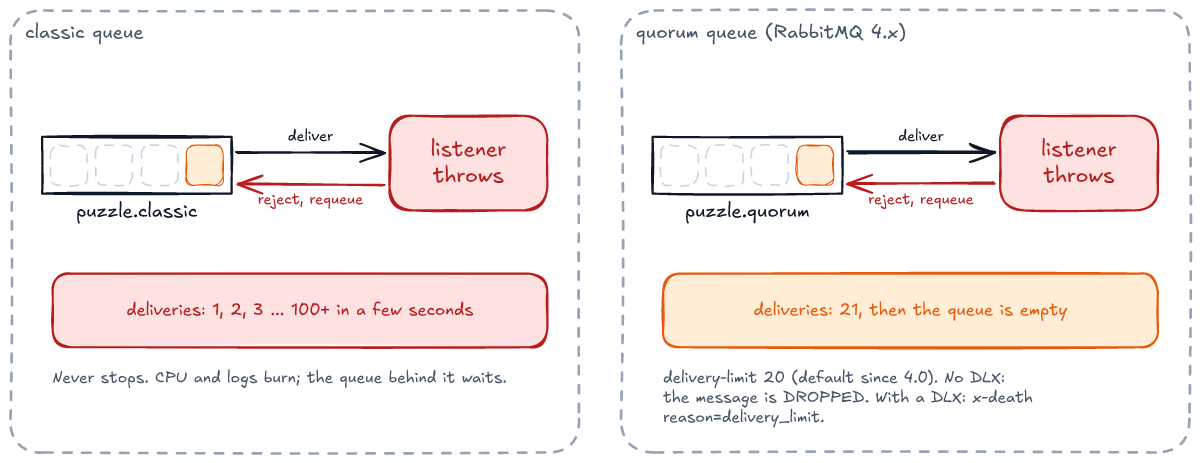
Here is the test, with the exact numbers:
// src/test/java/com/wolinski/rabbitmq/PoisonMessageTest.java
@Test
void quorumQueueDropsThePoisonMessageAfterTwentyRedeliveries() {
    Queue queue = declare(QueueBuilder.durable(unique("puzzle.quorum")).quorum().build());
    List<Message> deliveries = new CopyOnWriteArrayList<>();
    consume(queue, alwaysFailing(deliveries));

    rabbit.convertAndSend("", queue.getName(), "poison");

    await().atMost(Duration.ofSeconds(30)).until(() -> 0 == ready(queue) && deliveries.size() > 1);
    await().during(Duration.ofSeconds(2)).atMost(Duration.ofSeconds(5)).until(() -> 21 == deliveries.size());
    assertThat(ready(queue)).isZero();
    assertThat(deliveryCount(deliveries.getFirst())).isNull();
    assertThat(deliveryCount(deliveries.getLast())).isEqualTo(20L);
}
Why
Spring's documentation is describing Spring's behaviour, and it is accurate: the container rejects with requeue=true every time, forever. The broker gets the last word, though. Since RabbitMQ 4.0, quorum queues have a default delivery limit of 20. A quorum queue counts failed deliveries in the x-delivery-count header. Our last delivery carried 20, the first carried none. Once the count exceeds the limit, the queue removes the message: it dead-letters it if a DLX is configured, and otherwise drops it. RabbitMQ 3.13 had no limit, so an upgrade from 3.x to 4.x quietly turns "retried forever" into "deleted after 21 attempts" for every quorum queue without a DLX.
There is a second layer. Since RabbitMQ 4.3, the counter only goes up for genuine failures: a basic.reject, or a channel that died with the message unacked. A basic.nack with requeue does not count, by design, so that applications can return messages for routing reasons without using up the limit. Spring's container, failing on a single message in AUTO mode, sends basicReject, so every one of our failures counted. A consumer that answers failures with basicNack loops on a quorum queue just as it does on a classic one: PoisonMessageTest.aNackDoesNotCountTowardsTheDeliveryLimitSoItLoopsOnAQuorumQueueToo sees more than a hundred deliveries, and the message is still there when the consumer stops.
Is the limit a bug or a feature? A feature: a poison message looping forever is an outage of its own, burning CPU, flooding logs and, with a low prefetch, blocking the messages behind it. The trap is the combination of a limit you did not know about with a queue that has nowhere to put the message. The fix is to give every quorum queue a DLX, as RabbitMQ's own documentation recommends:
// src/test/java/com/wolinski/rabbitmq/PoisonMessageTest.java
Queue parked = declare(QueueBuilder.durable(unique("puzzle.parked")).quorum().build());
Queue queue = declare(QueueBuilder.durable(unique("puzzle.quorum-dlx")).quorum()
        .deadLetterExchange("")
        .deadLetterRoutingKey(parked.getName())
        .build());
With that, the same 21 deliveries end with the message parked, carrying x-death with reason=delivery_limit. Better still, add Spring's retry interceptor as in the demo application, so that a failing message is retried a few times in-process and dead-lettered with reason=rejected long before the broker's safety net is needed. If you really need a different limit, set x-delivery-limit on the queue, or a delivery-limit policy, deliberately and in writing.
What this does not cover
The tutorial is about the AMQP 0-9-1 model and the failure modes of a single service. It deliberately leaves out streams and super streams, request/reply over queues, AMQP 1.0 (which RabbitMQ 4 supports natively, and which Spring Boot 4.2's other two starters are for), TLS and authentication, cluster operations (sizing, upgrades, partitions), and moving messages between brokers with shovels and federation. Each changes some details above; none changes the chain in figure 16.
Cheat sheet
- Producers publish to exchanges; queues store messages. Routing is the exchange type plus the bindings.
- Topic patterns:
*is one word,#is zero or more. - Two long-lived connections per application, one for publishing and one for consuming; channels for everything else. A shared connection deadlocks during a resource alarm. In Spring Boot 4.2 the starter is
spring-boot-starter-rabbitmq. - Confirms say "the broker has it", returns say "no queue wanted it". Turn on both:
publisher-confirm-type: correlated,publisher-returns: true,template.mandatory: true. - Spring
AUTO≠ RabbitMQ auto-ack. RabbitMQ's auto-ack is Spring'sNONE, and it loses messages on failure. - Choose the prefetch on purpose. The default of 250 favours throughput over fairness.
- Durable is the queue, persistent is the message. Quorum queues persist everything, and RabbitMQ 4 refuses non-durable shared queues.
- Every quorum queue gets a DLX. Without one, the default delivery limit of 20 deletes poison messages silently.
- Retry with a limit, then dead-letter. Use in-process retry for short pauses, and a TTL wait queue for long ones.
- Delivery is at least once, end to end only if every link is. Use an outbox for the dual write, and make every consumer idempotent.
- Keep prefetch × processing time well within the consumer timeout (30 minutes by default), or the broker hands buffered messages to someone else.
- FIFO holds inside a queue only. Publish on one channel and consume with a single active consumer (or partition) when order matters.
- Measure ready, unacked, consumers, redeliveries and DLQ depth. Every silent failure in this article shows up in one of them.
Run it yourself
The repository needs only Docker and bash. ./run.sh runs the whole suite inside a pinned Maven and JDK 25 image, and Testcontainers starts RabbitMQ 4.4.0 next to it. It takes about a minute. To run one class, use ./run.sh -Dtest=PoisonMessageTest. Break things on purpose: change the prefetch, remove mandatory, delete a DLX, and watch which test fails. That is the fastest way to make the behaviour stick.