git archive — what a tarball leaves behind

A tarball is the artifact a repository produces for everyone who will never clone it. A release asset, a vendored dependency, a source drop for a packager, the thing CI attaches to a build. The command is one word — git archive — and what comes out looks like the repository: same file names, same directory shape, same README. It is not the repository, and the distance between the two is where the incidents live. A submodule arrives as an empty directory. A build fails on a machine that has the source and not the ignored file the source needs. A checksum changes on every run, so nothing downstream can be verified. A tarball has no line to the commit it claims to represent, and the person who has to prove otherwise is you.
This is a post about that distance. The git behaviour below is version-pinned to 2.56.0, and every command and number is output I ran rather than behaviour I remembered. One correction to the usual framing, though: the interesting variables are not all in git. Some live in your configuration, and one is the compressor on whichever machine does the archiving — so where a result depends on the machine, I say which machine produced it.
The scope is the export path: what leaves a repository when you ship it, and what the resulting artifact can prove about itself. The working copy is a different post, running a historical commit another, and automating that in a pipeline a third. This is about the archive you hand out, not the tree you build in. Examples are shell throughout.
What git archive actually exports
The first thing to internalise is that git archive reads the object store, not your working directory. It walks a tree and streams the blobs it finds. Files that are not in the tree — untracked files, ignored files, anything you have not committed — do not exist as far as the command is concerned. The .git directory is never part of the output; there is no history, no refs, no configuration, no hooks.
I built a small repository to make the boundary visible. Tracked: README.md, src/app.sh, docs/notes.md, version.txt, and a .gitignore that ignores build/ and .env. Present in the working directory but never committed: an untracked wip.txt, plus the ignored .env and build/out.txt. There is deliberately no .gitattributes yet — it arrives two sections down, and the order matters.
Eleven paths exist in the working directory. Five of them are tracked. The archive lists seven entries, because the two directories that contain tracked files appear as entries of their own:
$ git archive --format=tar HEAD | tar -tf -
.gitignore
README.md
docs/
docs/notes.md
src/
src/app.sh
version.txt
Mapped back to the working directory, the omissions sort themselves into exactly three reasons, and none of them is "git decided to skip it":
| Path in the working directory | Tracked | In the archive |
|---|---|---|
README.md, src/app.sh, docs/notes.md, version.txt | yes | yes |
.gitignore (tracked, and a surprise to some) | yes | yes |
wip.txt | no — never committed | no |
.env, build/, build/out.txt | no — ignored | no |
.git/ | — | no |
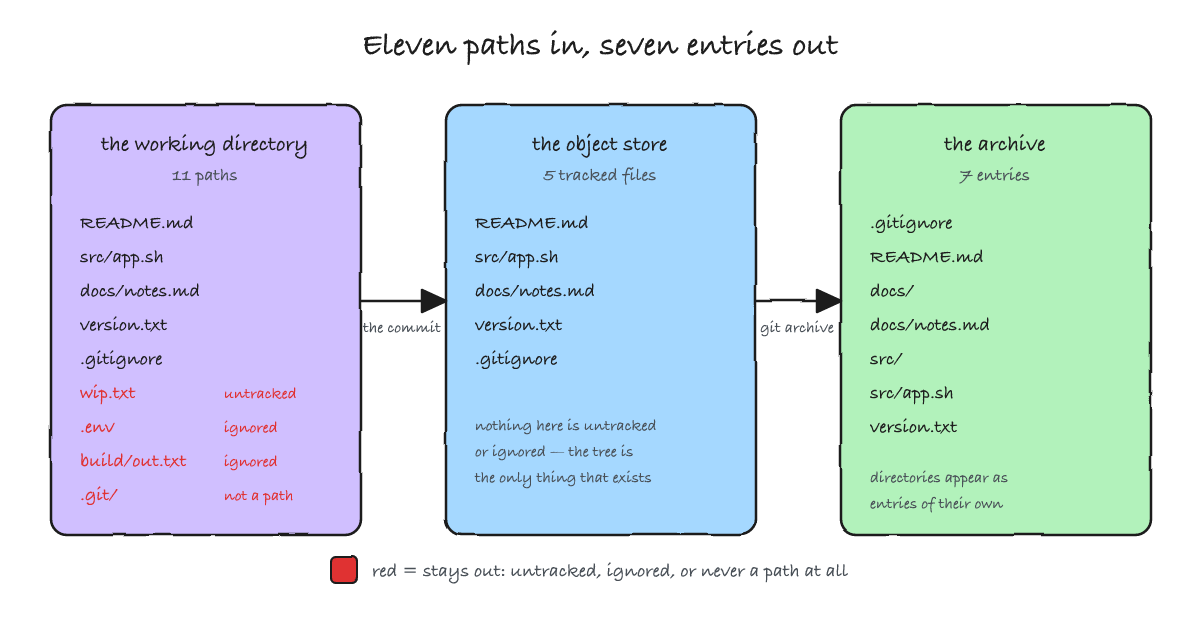
.git internals that were never candidates.Two entries in that table deserve a second look. The first is that the ignored files are absent for the ordinary reason — they were never added — and not because git archive consulted .gitignore at all. It does not read .gitignore, and it does not need to: an ignored file is simply not in the tree. The second is the opposite surprise: the file whose whole job is to keep things out is itself tracked, so it ships. The archive documents the rules that shaped it.
The output format is tar unless you say otherwise, and zip, tar.gz and tgz are built in. If you pass -o with a recognised extension, the format is inferred from the filename; --prefix prepends a directory name, which is what you want for a source drop that should not explode into the current directory.
$ git archive --format=zip HEAD > src.zip
$ git archive --format=tar.gz --prefix=proj-1.0/ HEAD > proj-1.0.tar.gz
$ git archive -o inferred.zip HEAD && file inferred.zip
inferred.zip: Zip archive data, at least v1.0 to extract, compression method=store
$ git archive -o inferred.tar.gz HEAD && file inferred.tar.gz
inferred.tar.gz: gzip compressed data, from Unix, original size modulo 2^32 10240
One useful property falls out of the design: because the command reads trees and not a working directory, it runs happily in a bare repository. A server can hand out a tarball for a commit it has never checked out, which is the basis of the --remote form and of git upload-archive. That does not make the remote form unrestricted, though, and the restrictions are worth knowing before you build a pipeline on it. The manual's SECURITY section is explicit:
- a client may request a commit or tree pointed to directly by a ref —
git archive --remote=origin v1.0; - a client may request a sub-tree with the
ref:pathsyntax —v1.0:Documentation; - a client may not use other SHA expressions, "even if the end result is reachable" — so
master^and a literalabcd1234are both refused.
Those rules protect objects that were removed from history but not yet pruned, and they can be relaxed with uploadArchive.allowUnreachable, which defaults to false. The consequence for this article is not trivia: in remote mode the ref is the only thing you are allowed to name, which is precisely the mutable thing the later sections argue against pinning to. Hold that thought until the section on branches. There is one more asymmetry worth stating here — GitHub does not implement upload-archive at all. The tarball behind "Source code (tar.gz)" is served by a separate HTTP endpoint, which means its stability is a GitHub policy question rather than a protocol one. That turns out to matter a great deal.
A commit and a tree are not the same artifact
Here is the sentence from the git archive manual that decides everything downstream, quoted from the version this post was written against:
When a tree ID is provided, the current time is used as the modification time of each file in the archive. On the other hand, when a commit ID or tag ID is provided, the commit time as recorded in the referenced commit object is used instead.
Read that twice, because the difference is not cosmetic. HEAD is a commit. HEAD^{tree} is a tree, and so is v1.4.0^{tree}. Archiving the commit is deterministic; archiving the tree is not, because every run stamps the current wall-clock time into the archive. The same commit, archived twice, produces identical bytes. The same tree, archived twice, does not:
$ git archive --format=tar HEAD > c1.tar
$ git archive --format=tar HEAD > c2.tar
$ sha256sum c1.tar c2.tar
2b0580995d10ab82170185d9f936204494ed1f456436d6ea0ad51983c707b441  c1.tar
2b0580995d10ab82170185d9f936204494ed1f456436d6ea0ad51983c707b441  c2.tar

$ git archive --format=tar 'HEAD^{tree}' > t1.tar
$ sleep 2
$ git archive --format=tar 'HEAD^{tree}' > t2.tar
$ sha256sum t1.tar t2.tar
7e6d8a7ec2dd25d1ad20bc9e6aa73e35e75329f47fc3f70eb0f67dd803f22580  t1.tar
091b5e3e59ebb74b48b0121311bde082830b55217d9c63b7bcf7e25953940fc1  t2.tar
Two seconds of wall clock is the only difference between those last two files, and it is enough to break every checksum, cache key and signature that expected a stable artifact.
Losing determinism is the smaller half of the problem. The larger half is provenance, and the manual is as explicit about it as it is about time: the commit ID is stored in a global extended pax header in the tar format, and in the ZIP format it is stored as the archive comment. When you archive a tree, there is no commit ID to store, and the header is simply absent. git ships a command to read it back — git get-tar-commit-id — and the contrast between the two forms is a single command:
$ git get-tar-commit-id < c1.tar
32ac0bd792b6350d9b7da5f1ab0fd886c440cc0f

$ git get-tar-commit-id < t1.tar
$ echo $?
1
The first prints the commit the archive was cut from. The second prints nothing and exits non-zero, because a tree archive carries no such claim. The commit ID is in the file even where a listing will not show it — the tar header is a pax global entry, which tar -tf hides and which you have to go looking for in the bytes:
$ strings c1.tar | grep 'comment='
52 comment=32ac0bd792b6350d9b7da5f1ab0fd886c440cc0f
The zip form is friendlier about it: the same hash comes back as the archive comment, which unzip -z prints on its own, and which unzip -l shows as a stray forty-character line above the file table rather than in it:
$ git archive --format=zip HEAD > z.zip
$ unzip -z z.zip
Archive:  z.zip
32ac0bd792b6350d9b7da5f1ab0fd886c440cc0f
There is a third consequence of the same choice, and it is the one that reaches furthest downstream: a tree archive also turns off export-subst, the attribute that substitutes placeholders in a file as it is added. It needs the export rules to demonstrate, so it is shown in the next section — where the lab finally commits a .gitattributes.
Put the timestamps and the provenance together and the rule writes itself: archive the commit or the tag, never the tree. The trap is not exotic. The git manual's own examples show v1.4.0^{tree} used specifically to produce an archive "without a global extended pax header" — which is exactly the provenance you spent the release process creating. --mtime will pin the timestamp of a tree archive and give you determinism back, but it cannot put the commit ID back, because a tree does not have one.
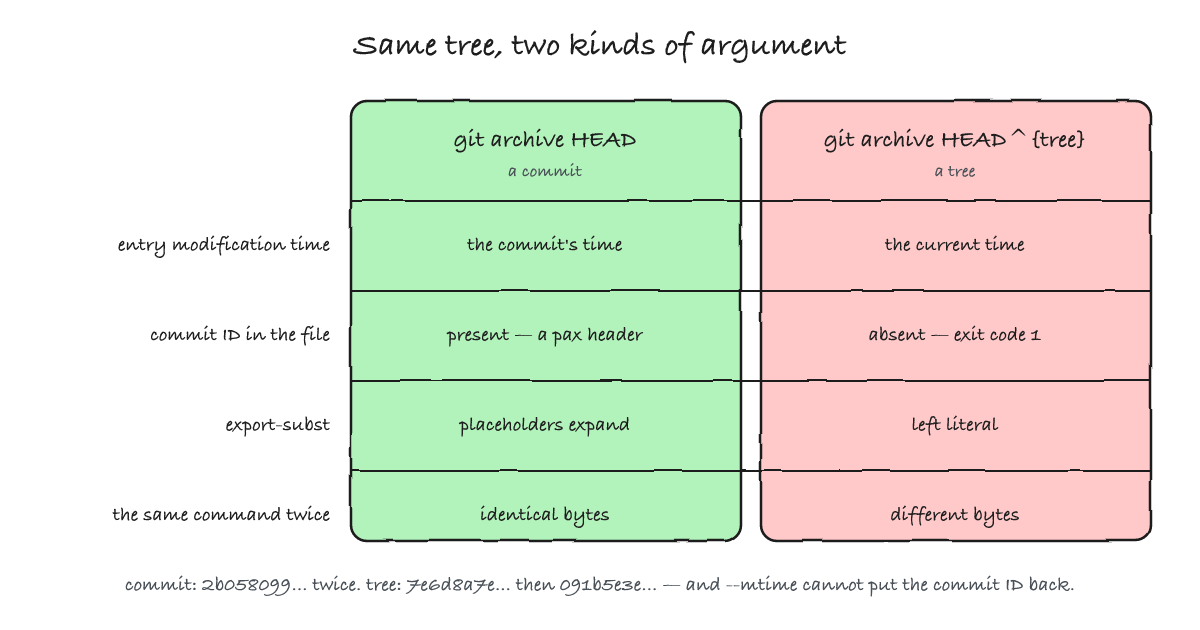
HEAD gives all four; HEAD^{tree} gives none of them.A detail of the timestamps is worth stating here because it is counter-intuitive and because it sets up the reproducibility section later. Every entry in the archive gets the same modification time — the commit's — regardless of when each file last changed. A file untouched for four years and a file edited in the last commit carry the same stamp, because the value comes from the commit being archived and not from each path's history. Archive an older commit and all the stamps move back together. The consequence is a build hazard rather than a curiosity. Unpack that archive over an existing tree that still holds build outputs and the sources arrive older than the artefacts they ought to invalidate, so make — or anything else that compares mtimes — concludes that everything is up to date and keeps the stale output. Extract into a clean directory, or touch what you unpacked.
The export rules live in the tree you archive
What goes into the archive is shaped by two attributes, and both are read from the tree being archived rather than from your working tree. export-ignore keeps paths out; export-subst expands placeholders in the ones that stay. That is the whole vocabulary, defined in the gitattributes manual, and it is worth knowing precisely because the source of the rules is where people get caught.
Back to the lab: commit the rules and the listing changes. This is the same repository as before, with only .gitattributes added and committed:
$ cat .gitattributes
docs/*.md export-ignore
version.txt export-subst

$ git archive --format=tar HEAD | tar -tf -
.gitattributes
.gitignore
README.md
docs/
src/
src/app.sh
version.txt
Compare that with the seven entries earlier: docs/notes.md has disappeared, and docs/ has stayed. Filtering out the only file in a directory removes the file but leaves the directory entry behind, as an empty folder — zero occurrences of the path, one of its parent:
$ git archive --format=tar HEAD | tar -tf - | grep -c '^docs/notes.md