Small Language Models at the Edge: 1,000 Tickets on a Mac, a Thin Client and n8n

A lot of what workflows send to a cloud model is small: read a support ticket, return four fields as JSON, route it. Small language models with one to three billion parameters now run on a laptop or a thin client, and the promise is that this traffic can stay local: no API bill, no data leaving the building, no network in the path. I wanted to know how much of that promise holds for a real extraction task, so I sent the same 1,000 support tickets to four local models and one cloud model and checked every answer against the right one.
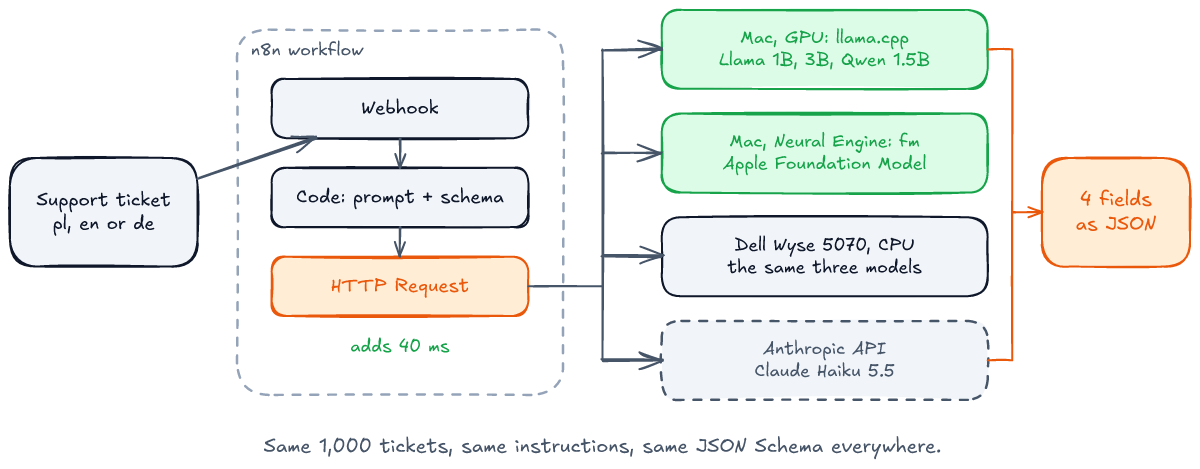
The local side ran on two machines. A MacBook Pro with an M1 Pro ran Llama 3.2 1B, Llama 3.2 3B and Qwen 2.5 1.5B through llama.cpp, and the Apple Foundation Model that ships with macOS through Apple's fm command. A Dell Wyse 5070 thin client, a Pentium Silver J5005 with four cores, 8 GB of memory and no AVX2, ran the three llama.cpp models on its CPU. Claude Haiku 5.5 was the cloud baseline. And because calls like these usually come from a workflow, I also put an n8n workflow in front of the local model to see what it adds.
Five results are worth knowing before you move a workflow step to a small model.
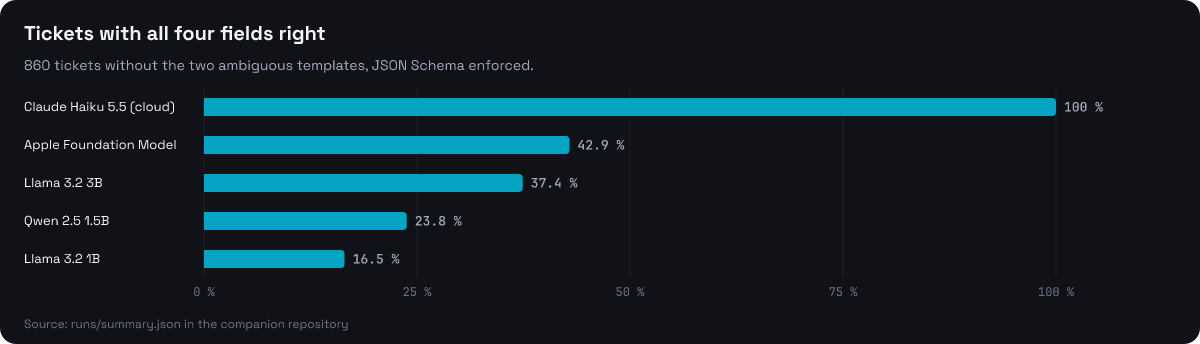
- Constrained decoding fixes the format, not the answer. With the JSON Schema enforced, every llama.cpp model returned valid JSON 1,000 times out of 1,000. Without it, Qwen 2.5 1.5B wrapped all 1,000 answers in a Markdown fence. But valid is not right: the best local model, Llama 3.2 3B, got all four fields right on 37% of the tickets, against 100% for Haiku 5.5.
- The Apple Foundation Model gave an unusable answer 37% of the time with the schema enforced, mostly by putting the string
"null"where the answer wasnull. - The order of the options in the prompt decided the language field. With the languages listed as
"pl", "en" or "de", Llama 3.2 1B called 0 of 60 English tickets English; with English listed first, 49 of 60. - Temperature 0 is not a replay. The same model and file gave a different answer on 23 of 100 tickets when it moved from the Mac's GPU to the Dell's CPU, and llama.cpp's prompt cache changed 2 of 200 answers when the same request was simply sent again.
- n8n is not the bottleneck. The workflow added 40 ms to a 0.36 s call. The thin client is: 15 to 38 seconds per ticket, at ten watts.
Everything is in the companion repository: the ticket generator, the schema, the clients, the n8n workflow, the scripts that ran each measurement and every run file the numbers come from. python3 -m bench.report recomputes the numbers from those files, and bench/check_article.py checks that this article quotes them as computed. Where I rely on documentation instead of a measurement, the text says so.
The task: 1,000 support tickets
Each ticket is a short customer message in Polish, English or German. The model returns four fields: what the customer wants (category), how urgent it is (priority), which order it is about (order_id, or null) and the language of the ticket. This is the kind of step that sits at the start of a support workflow: route the ticket, look up the order, pick the queue.
The tickets come from a generator, not from a model, so the right answer for each one is known. Every ticket is assembled from a template whose category, priority, language and order number the generator chose. A fifth of them carry a trap: a phone number, an amount or an earlier order that looks like an order number but is not the one the ticket is about. Of the 1,000 tickets, 915 have distinct text, 188 carry a trap and 400 name no order at all.
Please refund order A-34644, the item was broken. No rush, whenever you have time. Last month order A-41211 arrived fine. Thanks, AnnaThe right answer to that one is refund, low, A-34644, en. Every model got the same instructions and the same schema, from bench/task.py:
SCHEMA = {
    "type": "object",
    "additionalProperties": False,
    "required": ["category", "priority", "order_id", "language"],
    "properties": {
        "category": {"type": "string", "enum": ["delivery", "refund", "billing", "technical", "other"]},
        "priority": {"type": "string", "enum": ["low", "normal", "high"]},
        "order_id": {"anyOf": [{"type": "string"}, {"type": "null"}]},
        "language": {"type": "string", "enum": ["pl", "en", "de"]},
    },
}
Two things in it are there for Apple's fm serve, which rejected the shorter forms. "type": ["string", "null"] came back as an HTTP 400, so the schema says the same thing with anyOf. A pattern for the order number came back as an error event inside an HTTP 200 stream ("An unsupported generation guide was used"), so the schema has none and the checker tests the format itself. Every engine got this same schema, so no engine got a stricter one than the others.
The checker is strict on purpose, and a little stricter than the schema. An answer counts as valid only if it parses as JSON, has exactly the four keys, every value is in its enum and the order number is null or has the form A-12345; the schema itself only asks for a string or null. A Markdown fence around the JSON makes the answer invalid: a workflow that calls JSON.parse on it fails, so the measurement does too. An invalid answer gets every field wrong.
One weakness of the task showed up in the results, and I report it rather than hide it. Two kinds of ticket, "do you ship to Norway?" and "can I change the e-mail address on my account?", in all three languages (6 of the 45 templates), are labelled other, and the models put them under delivery and technical: of the 140 such tickets, the local models put at most 8 under other, and Haiku 62. Those answers are defensible, so the tables give accuracy on all 1,000 tickets and on the 860 without those two templates.
The setup
| Machine | Engine | Models |
|---|---|---|
| MacBook Pro, M1 Pro, 32 GB, macOS 27.2 | llama.cpp b12074, Metal, every layer on the GPU | Llama 3.2 1B and 3B Instruct, Qwen 2.5 1.5B Instruct, all Q4_K_M GGUF |
| same | fm serve, Chat Completions on port 1976 | the Apple Foundation Model ("model": "system") |
| Dell Wyse 5070, Pentium Silver J5005, 4 cores, 8 GB, Ubuntu 26.04 | llama.cpp b12074, CPU, 4 threads | the same three GGUF files |
| Anthropic API | Python SDK 2.6.0, structured outputs | Claude Haiku 5.5 |
The GGUF files come from bartowski/Llama-3.2-1B-Instruct-GGUF, bartowski/Llama-3.2-3B-Instruct-GGUF and Qwen/Qwen2.5-1.5B-Instruct-GGUF on Hugging Face, and their SHA-256 sums, in the repository, match the ones Hugging Face publishes. The J5005 has SSE4.2 but no AVX, AVX2 or FMA, and llama.cpp's release build picks its SSE4.2 code path at start-up, so the Dell runs the same binary any old x86 box would.
Each local model was served by llama-server with one slot and a 2,048-token context, and called with temperature: 0, max_tokens: 160 and the schema as response_format. The client, bench/client.py, streams the answer and records the time to the first token of content and the total time. Each Mac model answered all 1,000 tickets twice, with the schema enforced and without it. The Dell answered the first 100 tickets per model, because at its speed 1,000 would take about a day per model. Haiku answered all 1,000 with structured outputs, once with thinking off and once with adaptive thinking.
Constrained decoding: valid JSON every time
With a JSON Schema in response_format, llama.cpp turns the schema into a grammar and only lets the model pick tokens the grammar allows. The model cannot write a fence, an extra key or a value outside the enum, because those tokens are never on the menu. Without it, the model writes whatever it writes:
| Model | Invalid, schema enforced | Invalid, not enforced | Why, when not enforced |
|---|---|---|---|
| Llama 3.2 1B | 0% | 91.1% | 655 fences, 248 extra keys, 8 not JSON |
| Qwen 2.5 1.5B | 0% | 100% | 1,000 Markdown fences |
| Llama 3.2 3B | 0% | 0.3% | 2 fences, 1 category outside the enum |
| Apple Foundation Model | 37.2% | 68.3% | 681 fences, 2 stream errors |
| Claude Haiku 5.5 | 0% | not run |
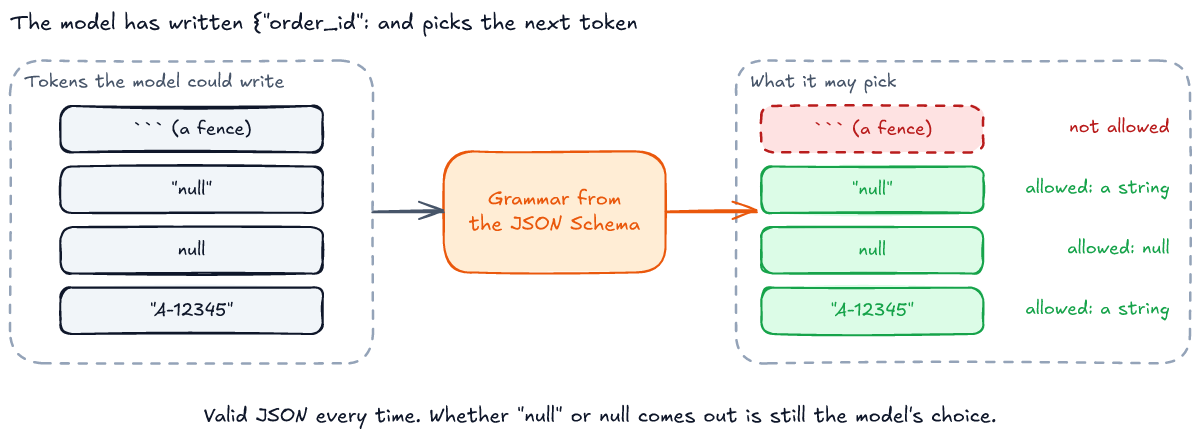
For the two smallest models the schema is the difference between a usable step and a broken one. Qwen 2.5 1.5B never once returned bare JSON on its own, and with the schema it never once returned anything else. Llama 3.2 3B mostly did not need the help, and its answers with and without the schema scored the same, 32.2% with every field right. So for models this small, enforce the schema; on a 3B model it is a seat belt rather than a crutch.
The Apple Foundation Model is the exception, and the reason is the null. Of its 372 invalid answers with the schema enforced, 368 had an order_id that was a string meaning no value: "null" 251 times and "" 117 times. The schema allows a string there, so the grammar let both through, and no consumer expects either. The other 4 were errors fm serve reported inside the stream, and they are worth reading:
- Twice it refused an ordinary refund request in Polish, "Chcę zwrotu pieniędzy za zamówienie A-39212, to nie to, co zamawiałem" (I want my money back for order A-39212, it is not what I ordered), with "The model's safety guardrails were triggered." Both tickets have the same text, and it refused them in the run without the schema too.
- Twice, for "Hi, Do you have a shop in Krakow? Best regards, Tom", it generated for about 85 seconds and stopped with "The session's transcript exceeded the model's context size." The request asked for at most 160 tokens.
Enforcing a type guarantees the type; it says nothing about what goes inside it. If your schema has a nullable field and you use this model, check for the string forms of null yourself.
Two more things about fm serve that a client has to handle. It streams by default, but with a schema the answer arrived all at once: the median time to the first token and the median total time were both 1.37 s. And it reports some failures, like the unsupported pattern, as an error event inside an HTTP 200 stream, so a client that only checks the status code records an empty answer as a success. bench/client.py checks every chunk for an error key.
Valid is not right
A schema-valid answer can still route the ticket to the wrong queue. This is the share of tickets with every field right, and each field on its own, with the schema enforced:
| Model | All fields, 1,000 | All fields, 860 | Category | Priority | Order | Language | Traps |
|---|---|---|---|---|---|---|---|
| Llama 3.2 1B | 14.2% | 16.5% | 63% | 50% | 83% | 59% | 136 / 188 |
| Qwen 2.5 1.5B | 20.5% | 23.8% | 68% | 44% | 96% | 76% | 183 / 188 |
| Llama 3.2 3B | 32.2% | 37.4% | 81% | 61% | 100% | 72% | 188 / 188 |
| Apple Foundation Model | 36.9% | 42.9% | 57% | 45% | 60% | 60% | 114 / 188 |
| Claude Haiku 5.5 | 92.2% | 100% | 92% | 100% | 100% | 100% | 188 / 188 |
"Traps" counts the tickets with a decoy number where the model still picked the right order. The Apple model's low order and field scores are mostly its invalid answers, which score zero on every field.
The order number is the field the 1.5B and 3B models do well. Llama 3.2 3B took the right order on every one of the 188 trap tickets, and Qwen on 183 of them. Pulling an identifier that has a fixed shape out of a sentence is close to what grammar-constrained decoding is built for.
Priority is the field they do badly, and it is the field that needs a judgement call. The instructions say "high" only if the customer says it is urgent, "low" if they say there is no rush, otherwise "normal". The commonest mistake, 308 times in 1,000 for Llama 3.2 3B, was calling a ticket with no word about urgency "high". It did that to all 104 delivery tickets and 103 of the 107 refund tickets that should have been "normal", and to none of the "other" ones: a missing parcel or a refund reads as urgent to the model whether or not the customer said so.
Category alone, on the 860 clear tickets, is closer to the cloud than the all-fields numbers suggest: 94% for Llama 3.2 3B, 79% for Qwen, 73% for Llama 1B and 67% for the Apple model. And Haiku got every field of every clear ticket right, which also means this task cannot tell Haiku apart from a perfect model. Its 7.8% of misses are all the two ambiguous templates. A harder task would be needed to say where Haiku stops; for this one, the cloud model is simply the ceiling.
Language should be the easiest field, and it was not. That one has its own section.
The order of the options decided the language
Llama 3.2 3B labelled 284 of the 335 English tickets as Polish. Llama 1B did the same to 296. The tickets are plainly English ("Hello, The app crashes when I open my orders. This is urgent, I need it by Friday. Thank you"), so I suspected the constrained decoding: the schema lists "pl" first. I tested that on the first 60 English tickets, changing one thing at a time, with the schema enforced (bench/language_probe.py):
| Change | Llama 3.2 3B answers "en" | Llama 3.2 1B answers "en" |
|---|---|---|
none: the prompt says "pl", "en" or "de" | 12 / 60 | 0 / 60 |
the schema's enum in the order en, de, pl | 12 / 60 | 0 / 60 |
the prompt lists "en", "de" or "pl", and the enum too | 47 / 60 | 49 / 60 |
the prompt names them: "pl" for Polish, "en" for English, "de" for German | 34 / 60 | 0 / 60 |
Reordering the schema alone changed nothing, which makes sense once you think about how the grammar works: it narrows the set of allowed tokens and does not rank them. The prompt's order changed almost everything. Both Llama models leaned toward the first code the instructions mentioned, and putting English first moved Llama 1B from 0 to 49 of 60. Naming the languages helped the 3B model half way and did nothing for the 1B one.
I kept the original prompt for the main runs, so every model was measured on the same instructions, and I report this as a finding rather than tune it away. The lesson is not "put English first"; it is that a small model's answer can depend on details a reviewer would never flag, like the order of a list. If you deploy one, test the prompt variants on your own data, and keep the ones that do not move the result.
Speed: Mac, Dell and the cloud
Time per ticket with the schema enforced, as the client saw it: from sending the request to the last token of the answer, and to the first one.
| Where | Model | Median | p95 | First token | Generation |
|---|---|---|---|---|---|
| Mac, GPU | Llama 3.2 1B | 0.36 s | 0.42 s | 0.08 s | 117 tok/s |
| Mac, GPU | Qwen 2.5 1.5B | 0.52 s | 0.59 s | 0.10 s | 86 tok/s |
| Mac, GPU | Llama 3.2 3B | 0.73 s | 0.85 s | 0.13 s | 52 tok/s |
| Mac, Neural Engine | Apple Foundation Model | 1.37 s | 1.49 s | 1.37 s | not reported |
| Anthropic API | Claude Haiku 5.5 | 1.19 s | 1.67 s | 0.91 s | not reported |
| Dell, CPU | Llama 3.2 1B | 15.5 s | 18.7 s | 6.0 s | 3.8 tok/s |
| Dell, CPU | Qwen 2.5 1.5B | 19.9 s | 25.9 s | 8.5 s | 3.2 tok/s |
| Dell, CPU | Llama 3.2 3B | 37.6 s | 48.5 s | 16.1 s | 1.5 tok/s |
On the Mac every llama.cpp model answers faster than the cloud, even Llama 3.2 3B, because there is no network and an answer is only 35 to 42 tokens. The first token arrives in about a tenth of a second. Haiku spends 0.91 s before its first token: the network round trip and the time on Anthropic's side, which I did not separate from here.
The Dell is another world. Its four cores generate 3.8 tokens a second with the 1B model, under one token per second per core, and 1.5 with the 3B model. Each request also re-reads part of the prompt: llama.cpp keeps the shared instructions in its prompt cache, so only the 34 or so tokens after them are evaluated again, but at 6 tokens a second on this CPU even that takes six seconds before the first token. A ticket every 15 to 40 seconds is fine for a queue that a workflow drains in the background, overnight or between other work. It is not fine for anything a person waits on.
And the Dell's answers are not the Mac's answers. Same GGUF file, same request, temperature 0, different arithmetic: the Dell computes on its CPU, the Mac on its GPU, and floating-point results depend on the order of the operations. Of the first 100 tickets, the Dell gave the same answer as the Mac on 95 for Qwen and for Llama 3.2 3B, and on 77 for Llama 1B. The smaller the model, the more often a rounding difference flips a token. A prompt you tuned on your laptop is not guaranteed to behave the same on the box you deploy it to.
A retry is not a replay
The first version of the n8n measurement below turned up something I did not go looking for. The same ticket, sent twice in a row to the same llama-server with temperature 0, came back with different answers: billing the first time and other the second, for ticket t0099.
The cause is llama.cpp's prompt cache. My requests left it at the server's default, and the server's own timings show it in use: after the first request, it evaluated about 34 prompt tokens per ticket, not the full 259. The first call finds the shared instructions in the cache and evaluates the 19 tokens after them. The second call, identical, finds the whole prompt in the cache and evaluates one. Different batch shapes, different rounding, and for a model this small, sometimes a different token. With cache_prompt: false in the request, every answer was the same every time. bench/retry.py sends each of 200 tickets twice in a row, with the cache on and off:
| Model | Answer changed on the retry, cache on | Cache off |
|---|---|---|
| Llama 3.2 1B | 2 / 200 | 0 / 200 |
| Qwen 2.5 1.5B | 0 / 200 | 0 / 200 |
| Llama 3.2 3B | 0 / 200 | 0 / 200 |
| Claude Haiku 5.5 | 3 / 200, all three on the ambiguous templates (the API version the current SDK uses rejects temperature, according to Anthropic's documentation) | |
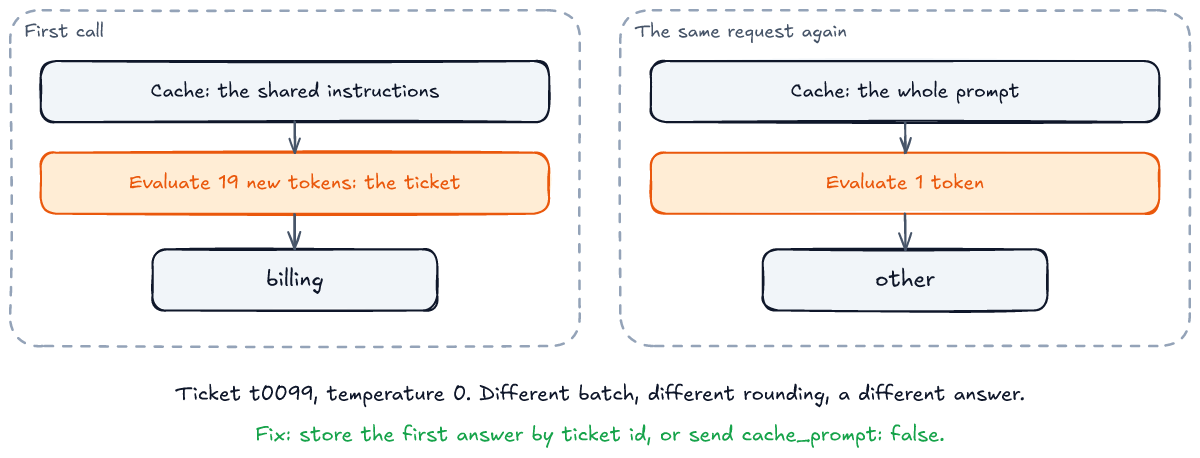
One percent sounds small until you remember what retries are for. A workflow engine retries a step when the first attempt timed out, and a webhook sender delivers twice when it did not see your acknowledgement in time. If the step's answer can change between those attempts, the retry can route the ticket differently from the first attempt. If you need the same answer for the same input, either turn the cache off and pay for the full prompt each time, or store the first answer and return it on a retry, keyed by the ticket. The second is what an idempotency key is for, and it works for the cloud model too, which changed 3 of 200 answers on a retry and offers no setting to stop it. All three were tickets from the two ambiguous templates: Haiku wavered only where the right answer is debatable.
The n8n worker
The workflow is four nodes: a Webhook that receives the ticket, a Code node that builds the Chat Completions request from the same instructions and schema, an HTTP Request to llama-server, and a Respond to Webhook node that returns the model's JSON. It is in the repository as n8n/classify.json, which bench/n8n.py generates from bench/task.py, so it carries the prompt the other runs used. I ran n8n 2.46.7 in Docker on the Mac, with the model server on the host.
# publish:workflow writes to the database and takes effect when n8n starts, so both run before the server does.
docker run --rm "${env[@]}" -v slm-n8n:/home/node/.n8n -v "$PWD/n8n:/import:ro" --entrypoint n8n "$image" \
    import:workflow --input=/import/classify.json
docker run --rm "${env[@]}" -v slm-n8n:/home/node/.n8n --entrypoint n8n "$image" publish:workflow --id=slmClassify00001
docker run -d --name slm-n8n -p 127.0.0.1:5678:5678 "${env[@]}" -v slm-n8n:/home/node/.n8n "$image"
That is the end of docker/n8n.sh, with the image pinned by digest. In n8n 2 a workflow has to be published before its production webhook answers, and the CLI documentation says publish:workflow takes effect only after n8n restarts, hence the order. bench/n8n.py then sends 200 tickets, each one straight to llama-server and then through the webhook, alternating so a slow minute hits both. Before each timed call it sends a different ticket, untimed, so that both calls find the same thing in the prompt cache:
| Median | |
|---|---|
| Straight to llama-server | 0.362 s |
| Through the n8n workflow | 0.401 s |
| What n8n adds | 40 ms median, 72 ms p95 |
Forty milliseconds, with execution history saved to n8n's SQLite database as it is by default, and with Docker Desktop's network between the n8n container and the model server on the host, which a Linux host or a shared container network would shorten. Against a model that takes a third of a second on a GPU, or fifteen seconds on a thin client, the workflow engine is not where the time goes. All 200 calls succeeded and returned the same answer as the direct call.
The first version of this measurement got both numbers wrong in an instructive way. It sent the ticket straight to llama-server and then, right after, the same ticket through n8n. The n8n call found its whole prompt in the cache, evaluated one token instead of about 34, and came out only 12 ms slower than the direct one. Two of its 200 answers also differed from the direct call's, which is how I found the retry effect from the previous section. Sending a different ticket before each timed call put both on the same footing, and the difference went to 40 ms and 0 of 200.
Energy per ticket
I logged power every second on both machines while the runs went: powermetrics on the Mac, for the CPU, GPU and Neural Engine together, and the RAPL package counter on the Dell, for the CPU package with its GPU. Neither counts the memory, the disk, the display or the power supply, so these are chip numbers, not numbers from the wall socket. bench/energy.py matches each run's time window to the samples:
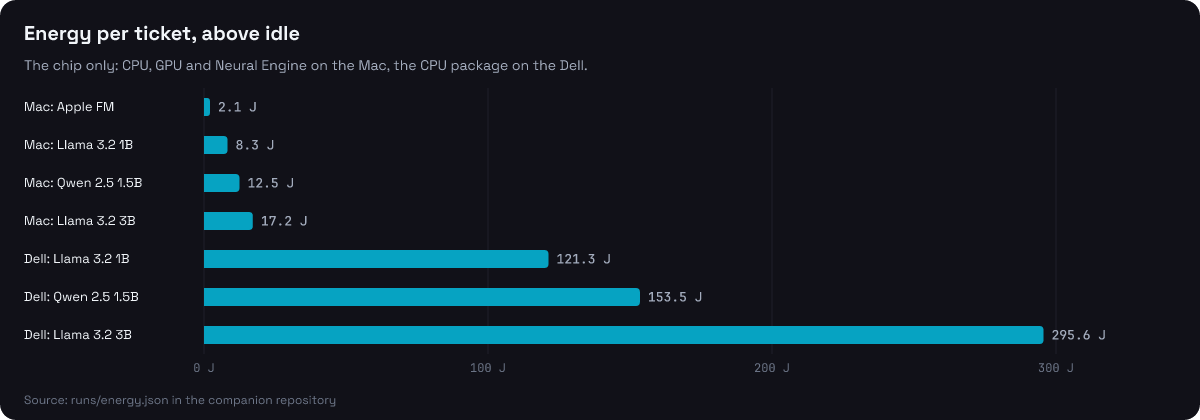
| Where | Model | Mean power | Seconds per ticket | Joules per ticket | Above idle |
|---|---|---|---|---|---|
| Mac | Apple Foundation Model | 6.0 W | 1.54 | 9.3 | 2.1 |
| Mac | Llama 3.2 1B | 27.3 W | 0.36 | 10.0 | 8.3 |
| Mac | Qwen 2.5 1.5B | 29.2 W | 0.51 | 14.9 | 12.5 |
| Mac | Llama 3.2 3B | 27.8 W | 0.74 | 20.7 | 17.2 |
| Dell | Llama 3.2 1B | 9.9 W | 15.7 | 155 | 121 |
| Dell | Qwen 2.5 1.5B | 9.9 W | 19.9 | 197 | 154 |
| Dell | Llama 3.2 3B | 9.9 W | 38.3 | 379 | 296 |
Two things stand out. The Apple model is the slowest on the Mac and the cheapest in energy: it runs on the Neural Engine, at about 6 W against 27 to 29 W for the GPU, and used 2.1 J above idle per ticket against 8 to 17 J. And the low-power box is the expensive one. The Dell drew a flat 9.9 W through every run, close to the J5005's 10 W design power, but it took so long per ticket that each one cost 13 to 18 times the energy the Mac's GPU spent on it. A small, slow processor does not save energy on a job that keeps it busy; it spreads the same work, and more, over a longer time.
For scale: 296 J is about 0.08 Wh. A thousand tickets a day on the Dell with the 3B model is 82 Wh, a few cents of electricity. The energy of local inference matters for a battery, not for the bill. What the Dell costs you is time.
Memory and stability under load
A model that fits is the first condition for running it on a small box. bench/memory.sh starts llama-server with each model, reads its resident memory once it is loaded and again after 50 tickets:
| Model | GGUF file | Mac, loaded | Mac, after 50 | Dell, loaded | Dell, after 50 |
|---|---|---|---|---|---|
| Llama 3.2 1B | 770 MiB | 976 MiB | 976 MiB | 914 MiB | 957 MiB |
| Qwen 2.5 1.5B | 1,066 MiB | 1,256 MiB | 1,266 MiB | 1,189 MiB | 1,220 MiB |
| Llama 3.2 3B | 1,926 MiB | 2,220 MiB | 2,267 MiB | 2,229 MiB | 2,282 MiB |
Each server holds its model file plus 120 to 360 MiB for the 2,048-token context and the working buffers, and it grew by at most 53 MiB over 50 tickets. With the 3B model loaded, the Dell still had about 4 GiB of its 7.6 GiB available, room for n8n beside it. The first Dell run of the 1B model ended at 622 MiB instead of growing, while a 3B server from the main runs was still loaded on the same machine; the number counts the model file's pages that the kernel keeps in memory, and it can drop those under pressure. The table has the rerun with nothing else loaded. The Apple Foundation Model runs inside macOS, so its memory is not something one process shows.
Speed held steady over the long runs. Split each Mac run of 1,000 tickets into ten blocks of 100: the median of the slowest block is within 12% of the fastest one, from 0.721 to 0.761 s for Llama 3.2 3B and from 0.339 to 0.379 s for Llama 1B, with no drift from the first block to the last. The 99th percentile was 0.91 s for the 3B model. The Dell's power stayed at 9.9 W from the first ticket to the last, and 95% of its one-second samples were at or below 9.95 W.
The cloud baseline
Claude Haiku 5.5 got the same instructions and the same schema as structured outputs, in output_config.format, streamed so the first token could be timed like the local runs (bench/cloud.py), from the same Mac in Poland. A request was about 700 input tokens, schema included, and the answer about 31 output tokens.
| Run | All fields, 1,000 | All fields, 860 | Median | p95 | Cost |
|---|---|---|---|---|---|
| Thinking off | 92.2% | 100% | 1.19 s | 1.67 s | $0.085 |
| Adaptive thinking | 92.2% | 100% | 1.19 s | 1.84 s | $0.088 |
8.5 cents for 1,000 tickets. Adaptive thinking changed nothing, because the model decided the task did not need it: the median answer was 33 output tokens with thinking on and 31 with it off, and only the slowest few grew, to at most 242 tokens. All the cloud runs in this article, including the retry test and a five-ticket smoke test, cost $0.21.
So the honest comparison is not "local is free, cloud is expensive". On this task the cloud model costs a hundredth of a cent per ticket and gets every clear ticket right; the best local model is faster on a Mac and gets 37% of them right. What local buys you is the data staying on your machine, no network in the path and no dependency on someone else's uptime. Whether that is worth a 63-point gap in accuracy depends on what happens to a misrouted ticket, and on whether a person checks it anyway.
BitNet: what did not work
BitNet b1.58, Microsoft's 2B model with weights of -1, 0 and 1, was meant to be the fifth local model, on the Mac. Its GGUF does not load in upstream llama.cpp, so it needs Microsoft's bitnet.cpp, which I built in Docker for Linux on arm64, with clang 18, the version its README requires. I could not get a correct answer out of it:
- at the main branch (
0b341e5), the engine read the weights as Q1_0 and printed question marks, at 1.8 tokens a second; - at
1876a3e, the first commit after the GGUF was last changed, it read them as I2_S and ran at 11.5 tokens a second inllama-bench, but printed "!!!!" for every prompt, in the command-line tool and in the server, and a request with a schema timed out or failed with "Unexpected empty grammar stack"; - at
112f853, built with the kernel option set to on, assetup_env.pydoes on arm64, and again with it off, it printed "!!!!" too.
The model file matches the SHA-256 Hugging Face publishes. What I did not try is a native build on macOS, which is the platform the project documents; I kept every build of third-party code inside a container. So the finding is narrow: on Linux arm64 in Docker, at three commits, bitnet.cpp did not produce usable output for this model. It is not evidence that BitNet does not work, and the Dockerfile is in the repository for anyone who wants to pick it up.
What to reach for
- Enforce the schema for any model under 3B. It took Qwen 2.5 1.5B from 100% invalid to 0%.
- Check nullable fields yourself with the Apple Foundation Model: it puts the string
"null"where the answer should benull. - Use a small model for what has a shape: an order number, an ID, a field from a fixed form. Llama 3.2 3B got the order right on 1,000 of 1,000 tickets, traps included.
- Do not use one for judgement calls like priority without measuring it on your own data. All the local models were between 44% and 61% on priority.
- Test the prompt's wording and order, not just its meaning. Moving English to the front of a list took Llama 3.2 1B from 0 to 49 of 60 English tickets right.
- Make retries return the stored answer, keyed by the input, or turn off llama.cpp's prompt cache if you need the same answer from the model itself.
- Re-test on the hardware you deploy to. Mac and Dell disagreed on up to 23 of 100 answers with the same file.
- Put the workflow engine wherever it is convenient. n8n added 40 ms.
- Memory is not the limit. The 3B model's server took 2.2 GiB, on the Mac and on the thin client alike.
- A thin client is for background queues, one ticket every 15 to 40 seconds. For anything interactive, use a GPU, Apple silicon or the cloud.
- If the answer has to be right, the cloud model was cheaper than you think: $0.085 per 1,000 tickets, every clear ticket right.
Scope and how this was checked
This is one task, one prompt and synthetic tickets, measured with the Foundation Model that ships with macOS 27.2 and the model versions named above. The tickets are short and their language is plain; real customer messages are longer and messier, and both local and cloud models may do worse on them. The task turned out too easy to rank Haiku against anything better, and two of its templates are ambiguous, which the tables show separately. The Dell runs cover the first 100 tickets, not all 1,000. Every request ran alone, against a server with one slot; a workflow that sends several at once would queue them, and I did not measure throughput under concurrency. Energy is the chip's, not the wall's. Some of the Mac runs, all of the Apple model's and Llama 1B's and the first 568 tickets of Llama 3.2 3B's, ran on battery; the 3B model generated 52.3 tokens a second on battery and 52.2 on mains power, so I did not rerun them.
Every number in this article comes from a run file in the repository: python3 -m bench.report recomputes them and bench/check_article.py compares them with the text. The runs record each request's answer, timing and, for the cloud, token usage and cost. The model files' checksums are in models/SHA256SUMS; the models themselves are not in the repository. The tickets come from bench/tickets.py with a fixed seed, so python3 -m bench.tickets 1000 regenerates the same 1,000.
If you evaluate a model for a workflow step, the method matters more than these numbers: generate inputs whose right answers you know, enforce the output format, score each field, and look at what the model got wrong before you believe the score. I wrote more about that in how to evaluate AI agents. And if the step sits in a long-running process, durable execution is one place the retries from the section above come from.