How Big an LLM Can a 1 GB Raspberry Pi 4 Run? Measured

A Raspberry Pi 4 with 1 GB of RAM can run a language model at a usable speed, as long as the model file fits in the roughly 650 MiB the system leaves free. Below that line, Qwen2.5 0.5B generated 8.3 tokens per second, roughly 360 words a minute, which is faster than the 238 an average adult reads. Above it, Llama 3.2 1B at the usual Q4_K_M quantization generated 0.09 to 0.15 tokens per second over five runs, 0.13 in the middle: one short sentence every few minutes. The 1B model's file is 1.6 times bigger and it ran about 65 times slower.
The cliff has nothing to do with the processor. It is memory: when the weights no longer fit, the Pi reads them from the SD card again for every token, and the card, not the CPU, sets the speed. This article shows where the line is on a real 1 GB board, what does not move it (switching off the desktop, shrinking the graphics memory pool) and what does (a smaller quantization, at a price in quality).
| Model | File | Prompt | Generation | 16 tokens |
|---|---|---|---|---|
| Qwen2.5 0.5B Instruct, Q4_K_M | 469 MiB | 24.9 tok/s | 8.3 tok/s | 2 s |
| Llama 3.2 1B Instruct, IQ3_M | 627 MiB | 5.5 tok/s | 3.6–3.9 tok/s | 4 s |
| Llama 3.2 1B Instruct, Q4_K_M | 770 MiB | 5.7 tok/s | 0.13 tok/s (0.09–0.15) | 2–3 min |
| Qwen2.5 1.5B Instruct, Q4_K_M | 1,066 MiB | 4.4 tok/s | 0.05 tok/s | 5 min |
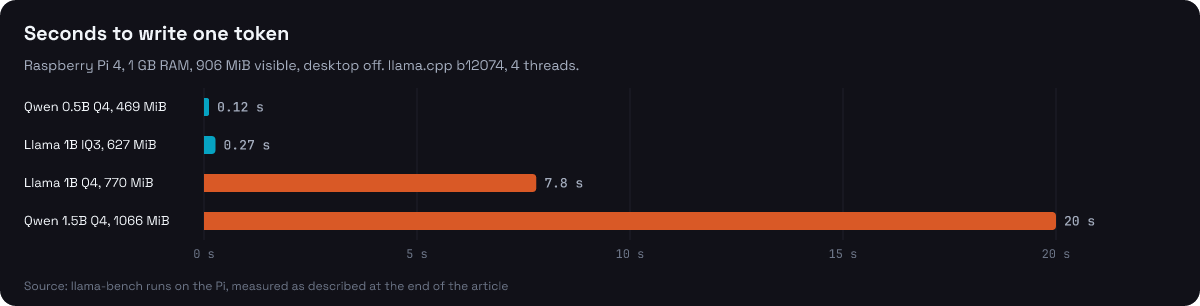
All four on the same board, with the desktop switched off, through llama.cpp's own benchmark tool. The models that fit gave speeds within 8% of each other on every run; the 1B at Q4_K_M did not, and why it varies is part of the story. How it was measured, and what the small print is, comes at the end.
The board
A Raspberry Pi 4 Model B (Rev 1.5) with 1 GB of RAM, a 1.8 GHz quad-core Cortex-A72 and a heatsink with no fan, booting from a 32 GB microSD card. It runs Raspberry Pi OS based on Debian 13 (trixie), 64-bit, as it comes, desktop included. The model runner is llama.cpp build b12074, the prebuilt ubuntu-arm64 release, which runs on Raspberry Pi OS without compiling anything.
"1 GB" is less than it sounds. Linux sees 906 MiB of it; the GPU firmware and the kernel keep the rest. Before any model was loaded, the system used 280 MiB with the desktop running and 230 MiB without it. That leaves roughly 625 to 675 MiB for a model, and the model's file has to fit in there together with its working memory.
Why the cliff is so steep
llama.cpp does not copy the model into memory. It maps the file, so the kernel loads pieces of it on demand and can drop them again when memory is short. That is why a model bigger than the RAM still starts: the 1,066 MiB Qwen 1.5B loaded on a board with 906 MiB and never crashed.
But generating a token reads every weight in the model once. If the weights do not all fit, the kernel drops some to load others, and the next token needs the dropped ones back. For Llama 3.2 1B at Q4_K_M, with the system as it comes, the process never held more than 674 MiB of its 770 MiB file in memory. The missing hundred came from the SD card, over and over.
To see how much, I ran generation alone four more times, each after emptying the page cache, with vmstat logging once a second. While the 1B model wrote its 16 tokens, the card was read at a steady 38 to 39 MiB/s, and the CPU spent 78% of the time waiting for it. What changed from run to run was how much had to be read back per token: 256 to 341 MiB, a third to almost half of the file, depending on which pages the kernel had just dropped. Divide one by the other and you get the speed: 38.5 MiB/s over 298 MiB is 0.13 tokens per second, and the runs measured 0.11 to 0.15.
That is about three times the hundred MiB that did not fit. A program that sweeps through a file bigger than its memory, in the same order every time, is the page cache's worst case: whatever the kernel drops to make room is soon needed again. I did not trace which pages were dropped, but the reads fit that picture.
That turns the cliff into arithmetic. A model that does not fit runs at the storage's read speed divided by what it rereads per token, so faster storage should speed it up roughly in proportion, and a faster CPU would not. I did not test a faster card or a USB SSD; at ten times the read speed, the arithmetic still gives only about one token per second.
The models that fit read their file once, while loading, and at most 2 MiB per token while generating. Once they were in memory, they stayed there, and the CPU was the limit again.
Reading the prompt suffers far less than writing the answer. llama.cpp pushes the whole 128-token prompt through each weight in one pass, so a model that does not fit rereads its file once per prompt instead of once per token. That is why the 1B at Q4_K_M read its prompt at 5.7 tokens per second, no slower than the same model at IQ3_M that fits (5.5), while it generated some 30 times slower.
The same 770 MiB file is not slow everywhere. In my small language models at the edge comparison it generated 3.8 tokens per second on a Dell Wyse 5070 thin client, a four-core Pentium Silver with 8 GB of RAM, measured through llama-server rather than llama-bench, so not exactly the same test. That is about 30 times the Pi's 0.13, from a similarly modest CPU. The difference is the memory.
What did not help
Switching off the desktop (sudo systemctl isolate multi-user.target) freed about 50 MiB. It made no difference to the 0.5B model (8.0 tok/s with the desktop, 8.3 without) and not enough of one for the 1B model, which kept thrashing in both cases.
Shrinking the CMA pool. Raspberry Pi OS reserves 512 MiB as a contiguous memory pool for the graphics driver (the vc4-kms-v3d overlay); /proc/meminfo shows it as CmaTotal: 524288 kB. That looks like half the RAM gone, and a common tip is to cut it down. I set dtoverlay=vc4-kms-v3d,cma-64 in /boot/firmware/config.txt and rebooted. The pool shrank to 64 MiB and the 1B model held 732 MiB instead of 674, but it generated 0.14 tok/s, inside the 0.09 to 0.15 it gave with the pool untouched. The pool is marked reusable, so the kernel can already keep ordinary file pages in it; taking 448 MiB out of it gave the model only 58 MiB more, and no speed-up I could tell apart from the run-to-run noise. I put the original setting back afterwards.
What did help: a smaller quantization
Quantization stores each weight in fewer bits. The same Llama 3.2 1B in IQ3_M, a mostly 3-bit format, is a 627 MiB file instead of 770. That is just under the line, and it was enough: generation jumped from about 0.13 to 3.6–3.9 tok/s, some 30 times faster, from the same model on the same board.
The price is the model's accuracy, and on a 1B model there is not much to spare. I gave both models that fit three small tasks at temperature 0:
| Task | Qwen2.5 0.5B, Q4_K_M | Llama 3.2 1B, IQ3_M |
|---|---|---|
| "Reply with one word, the city only: Please ship the parcel to our office in Gdansk by Friday." | Repeated the whole sentence (3.7 s) | "Milwaukee" (11.3 s) |
| Classify "I was charged twice for my subscription this month." as billing, technical or other | "Billing" (2.4 s) | "Billing" (12.3 s) |
| Summarize in one sentence: a greenhouse sensor read 41 degrees, the vents did not open because a fuse had blown, staff replaced it and the temperature fell to 27 | A correct sentence that kept every fact (10.2 s) | Said the temperature dropped "likely due to the reduced airflow caused by the vents not opening", the opposite of the text (29.6 s) |
Three prompts are an anecdote, not a benchmark. Still, the 1B model squeezed into the smaller file answered with a city that is not in the text and reversed the cause in the summary, while the 0.5B model got two of three right.
Was that the 3-bit file or just Llama 3.2 1B? The Q4_K_M version cannot answer on this Pi in reasonable time, so I asked all three files the same questions on a Mac, on its CPU only. The Q4_K_M model got all three right: "Gdansk", "Billing" and a summary with the cause the right way round. The IQ3_M file said "Milwaukee" again and got the cause wrong again, in different words. So the mistakes came with the quantization, not with the model. The Mac's answers were not word for word the same as the Pi's, even at temperature 0, which is normal across machines; the right and wrong ones stayed right and wrong.
On this board, then, the 0.5B model at Q4 is the better bet for a narrow task (classify, route, pick from a list): more reliable than the 1B at IQ3_M on these prompts, and more than twice as fast. The best of the three, the 1B at Q4_K_M, simply does not fit.
The times in that table also show the other half of the cost. A one-word answer from the 1B model still took 11.3 seconds, and 10.7 of them went on reading the prompt: 59 tokens, chat template included, at 5.5 tokens per second. On a Pi, short answers are dominated by reading the prompt, not by writing the reply.
Heat
A heatsink alone is borderline for four cores at full load. The phases that keep the CPU busy, reading a prompt and generating with a model that fits, heated the chip by almost 20 °C in under a minute. From about 82 °C the firmware started lowering the clock, from 1,800 MHz down to as little as 1,629, and vcgencmd get_throttled returned 0x80008, where bit 3 means the soft temperature limit is active at that moment. The peak was 83.7 °C.
That changes one number in this article. The IQ3_M run started at 63.7 °C and hit the soft limit after 51 seconds, so its 3.6 tok/s was partly measured on a throttled clock; the generation-only run, four seconds long, gave 3.9. The 0.5B measurements took 42 seconds, before the limit, at 1,800 MHz throughout and 79.8 °C at most. The thrashing runs stayed between 63 and 74 °C while generating: a CPU that waits for the SD card has little to heat up with.
What to reach for
- Keep the model file under about 650 MiB on a 1 GB Pi 4. On this board the line fell between the 627 MiB file that ran and the 770 MiB one that did not; leave yourself a margin, because the model's working memory needs room too.
- Prefer a smaller model at Q4 over a bigger one squeezed to 3 bits. On this board the 0.5B at Q4_K_M was faster and, on three tasks, more reliable than the 1B at IQ3_M, whose mistakes the same model at Q4_K_M did not make.
- Do not expect the desktop or the CMA pool to save you. They give back tens of MiB, and a model that is a hundred MiB too big stays too big.
- Watch for the symptom, not just the speed:
vmstat 1with a highwacolumn and a growingbimeans the model is being read from the card. At that point none of the settings I tried made it fast; a smaller file did. - Add a fan if the model will run for long: with a heatsink alone, the soft limit came within a minute of full load.
- Buy more RAM if a 1B model is the goal. A 1B model at Q4 is 770 MiB, which a 2 GB board holds with room to spare. I did not measure one, so I cannot say how fast it would run.
How this was measured
Speeds come from llama-bench with 4 threads, a 128-token prompt and 64 generated tokens, three repetitions, for the 0.5B model. The models that did not fit ran once with 16 generated tokens instead, because a single 64-token run of the 1B model at Q4_K_M had not finished after 12 minutes. The 1B model at Q4_K_M and IQ3_M, and the 0.5B, then also ran generation alone (-p 0 -n 16) after dropping the page cache, with vmstat 1 logging the card's reads; the 1B at Q4_K_M did that four times, which with its first run gives the five behind 0.09 to 0.15. The 1.5B figure is a single run. Peak memory is the process's VmHWM, sampled once a second from /proc, because Raspberry Pi OS does not ship GNU time. A logger recorded temperature, ARM clock and throttling flags every two seconds. The answers in the table came from llama-server at temperature 0, 64 tokens at most, with prompt caching off; the cross-check ran the same script on a MacBook (M1 Pro) with the GPU switched off (-ngl 0).
What I did not test: llama.cpp can also read the model into ordinary memory instead of mapping it (--load-mode none) or pin it there (mlock). Its documentation warns that without mapping, a model larger than the total RAM will not load at all; the 770 MiB file is smaller than the RAM but bigger than what is free, so the overflow would go to swap instead of being reread from the card. The board had 904 MiB of swap, and I did not check whether it was on the card or compressed in RAM (zram), which newer Raspberry Pi OS releases are reported to use. That would decide whether this helps, and I no longer had the board when I wanted to measure it.
The Q4_K_M files are the same ones used in my small language models at the edge comparison, checked by SHA256; IQ3_M and the 0.5B model came from Hugging Face and match their published hashes. Every number in this article is checked against the raw run files by a script, and the script fails if one of them changes.